
 Sign in to Mod The Sims
 Vintage Radio
 Vintage Radio
SCREENSHOTS


VintageRadio1_ByL.jpg - width=900 height=900
VintageRadio1-back_ByL.jpg - width=900 height=900
VintageRadio1-sides_ByL.jpg - width=900 height=900
VintageRadio1-working_ByL.jpg - width=900 height=900
Downloaded 2,466 times
84 Thanks
28 Favourited
5,135 Views
Say Thanks!
Thanked!

Hey all,
Sharing something Vintage this time.
This is a low poly model of a radio, found in Electronics > Audio, costing 99. Model is by arkhive-studio.
This is the mesh and only recolor.
Polycounts: Fc-458, Vc-569
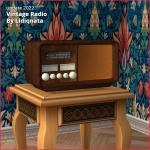
This is base game mesh, if you find any problem with it - just drop a comment.
Sharing something Vintage this time.
This is a low poly model of a radio, found in Electronics > Audio, costing 99. Model is by arkhive-studio.
This is the mesh and only recolor.
Polycounts: Fc-458, Vc-569
This is base game mesh, if you find any problem with it - just drop a comment.

Advertisement:
| Filename | Type | Size |
|---|---|---|
| Vintage_Radio1_ByL.7z | 7z | |
| Mesh_Vintage_Radio_ByL.package | package | 554173 |
|
Vintage_Radio1_ByL.7z
Download
Uploaded: 11th Aug 2022, 442.2 KB.
2,466 downloads.
|
||||||||
| For a detailed look at individual files, see the Information tab. | ||||||||
Install Instructions
Basic Download and Install Instructions:
1. Download: Click the download link to save the .rar or .zip file(s) to your computer.
2. Extract the zip, rar, or 7z file.
3. Place in Downloads Folder: Cut and paste the .package file(s) into your Downloads folder:
1. Download: Click the download link to save the .rar or .zip file(s) to your computer.
2. Extract the zip, rar, or 7z file.
3. Place in Downloads Folder: Cut and paste the .package file(s) into your Downloads folder:
- Origin (Ultimate Collection): Users\(Current User Account)\Documents\EA Games\The Sims™ 2 Ultimate Collection\Downloads\
- Non-Origin, Windows Vista/7/8/10: Users\(Current User Account)\Documents\EA Games\The Sims 2\Downloads\
- Non-Origin, Windows XP: Documents and Settings\(Current User Account)\My Documents\EA Games\The Sims 2\Downloads\
- Mac: Users\(Current User Account)\Documents\EA Games\The Sims 2\Downloads
- Mac x64: /Library/Containers/com.aspyr.sims2.appstore/Data/Library/Application Support/Aspyr/The Sims 2/Downloads
- For a full, complete guide to downloading complete with pictures and more information, see: Game Help: Downloading for Fracking Idiots.
- Custom content not showing up in the game? See: Game Help: Getting Custom Content to Show Up.
- If you don't have a Downloads folder, just make one. See instructions at: Game Help: No Downloads Folder.
Advertisement:
Loading comments, please wait...
Author


Download Details
Packs:
None, this is Sims 2 base game compatible!
Uploaded: 11th Aug 2022 at 11:28 PM
Uploaded: 11th Aug 2022 at 11:28 PM
Style:
– Antique
: Antique or Historical
Room:
– Living
: Living Room
– Study
: Study/Office
Maxis Flags:
– Not Applicable
Tags
Other Download Recommendations:
-
by Dr Pixel updated 9th Feb 2005 at 1:07pm
 34
23.6k
5
34
23.6k
5
-

-
-
-
by spmjcom 31st Jul 2006 at 7:49pm
18
33.8k
21
-
by muaka2 4th Jan 2007 at 11:13am
5
12.1k
4
-
by candyo1965 12th Aug 2008 at 8:20am
4
8.9k
6
-
by Dr Pixel 20th Nov 2008 at 5:54pm
16
23.4k
34
-
-


More downloads by lidiqnata:
See more










About Me
[size=3]*Edit 2022*[/size]
[size=5]Re-upload of everything created by me has started at [color=#fa2742]Lidiqnata sims 2[/color][/size]
[size=5]Visit my [color=#fa2742]Patreon[/color] if you wish to support this process.[/size]
[size=5]Re-upload of everything created by me has started at [color=#fa2742]Lidiqnata sims 2[/color][/size]
[size=5]Visit my [color=#fa2742]Patreon[/color] if you wish to support this process.[/size]