
 Sign in to Mod The Sims
 More "Prenatal Books"
 More "Prenatal Books"


Screenshot 2025-10-23 143256.png - width=909 height=601
Screenshot 2025-10-10 103226.png - width=1392 height=783
Screenshot 2025-10-10 103253.png - width=812 height=679
Screenshot 2025-10-10 103259.png - width=497 height=600
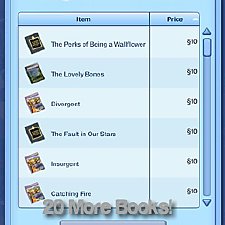
Meaning it's still Prenatal Books, but won't be counted as such by wishes. But you can read them!
The two new books are called:
- Preparing For A New Arrival
- What To Expect When Expecting
Both are 200$ and you can find them in the bookstore under the All or General Categories.
Bonus Points if you got the Authors name reference. I hopefully will one day return to this but I think I did well for my first solo Mod! As usual follow the directions, and the required section. This requires CCLoader which the link is provided.
Special Thanks To:
- MonoChaos
- SweetDevil
- CaptainPuff
- TS3CreatorCove
| Filename | Type | Size |
|---|---|---|
| pleasantspark_morepregnancybooks_mod.zip | zip | |
| pleasantspark_morepregnancybooks_mod.package | package | 6337 |
The following custom content is required for this download to function properly! Please make sure you download it before downloading the files!
- CCLoader by douglasveiga
Note from the Creator:
Reminder, mods can go in further then Sims 4.
So if done correctly then you should probably have this setup (my setup is very different from yours.)
> Documents
>> Electronic Arts
>>> The Sims 3
>>>> Mods
>>>>> CC
>>>>>>> PleasantSpark
>>>>>>>> pleasantspark_morepregnancybooks_mod.package
This is here since people really don't know how to install mods. But hopefully this works and you can see your stuff in game!
|
pleasantspark_morepregnancybooks_mod.zip
Download
Uploaded: 23rd Oct 2025, 5.2 KB.
357 downloads.
|
||||||||
| For a detailed look at individual files, see the Information tab. | ||||||||
Install Instructions
1. Click the file listed on the Files tab to download the file to your computer.
2. Extract the zip, rar, or 7z file. Now you will have either a .package or a .sims3pack file.
For Package files:
1. Cut and paste the file into your Documents\Electronic Arts\The Sims 3\Mods\Packages folder. If you do not already have this folder, you should read the full guide to Package files first: Sims 3:Installing Package Fileswiki, so you can make sure your game is fully patched and you have the correct Resource.cfg file.
2. Run the game, and find your content where the creator said it would be (build mode, buy mode, Create-a-Sim, etc.).
For Sims3Pack files:
1. Cut and paste it into your Documents\Electronic Arts\The Sims 3\Downloads folder. If you do not have this folder yet, it is recommended that you open the game and then close it again so that this folder will be automatically created. Then you can place the .sims3pack into your Downloads folder.
2. Load the game's Launcher, and click on the Downloads tab. Find the item in the list and tick the box beside it. Then press the Install button below the list.
3. Wait for the installer to load, and it will install the content to the game. You will get a message letting you know when it's done.
4. Run the game, and find your content where the creator said it would be (build mode, buy mode, Create-a-Sim, etc.).
Extracting from RAR, ZIP, or 7z: You will need a special program for this. For Windows, we recommend 7-Zip and for Mac OSX, we recommend Keka. Both are free and safe to use.
Need more help?
If you need more info, see:
- For package files: Sims 3:Installing Package Fileswiki
- For Sims3pack files: Game Help:Installing TS3 Packswiki
Loading comments, please wait...

Uploaded: 23rd Oct 2025 at 9:19 PM
-
-
Fincastle - "An island of Americana"
by cutsocks 6th Jun 2010 at 9:23am
 +1 packs
192 245.4k 276
+1 packs
192 245.4k 276 World Adventures
Miscellaneous » Neighborhoods & CAS Screens » Neighbourhoods and Worlds
-
-
-
by Lisen801 8th Sep 2010 at 10:27pm
72
51.9k
25
-
[24/10] Welcome Wagon Mods "None/Less/More" (Compatible with Patch 1.63-1.67)
by anak_ponti updated 15th Jan 2011 at 1:39am
48
55.2k
106
-
by chasmchronicle 16th Jun 2012 at 10:16am
45
62.4k
138
-

by lastolympian 20th Aug 2024 at 12:57pm
8
8.1k
18
-

by lastolympian 16th Sep 2024 at 10:40am
1
3.9k
4
-

by lastolympian 16th Sep 2024 at 12:32pm
6
3.8k
5



About Me
You can also find me on Tumblr, Simblr, SFS, Patreon (Free) and others. See ya!
TOU:
- Do what you want with my work, as long as you link back to me.