
 Sign in to Mod The Sims
 No-Fade Columns
 No-Fade Columns


nofadecolumns_00.jpg - width=820 height=620
nofadecolumns_test-1.jpg - width=820 height=620
nofadecolumns_test-2.jpg - width=820 height=620

Please note that this mod is for the full columns – not the half / quarter / three-quarter ones (that you get when you intersect a column with a wall; those are different objects)! If you want to make a similar mod for the latter, please post in the Create forum, not in the comments.
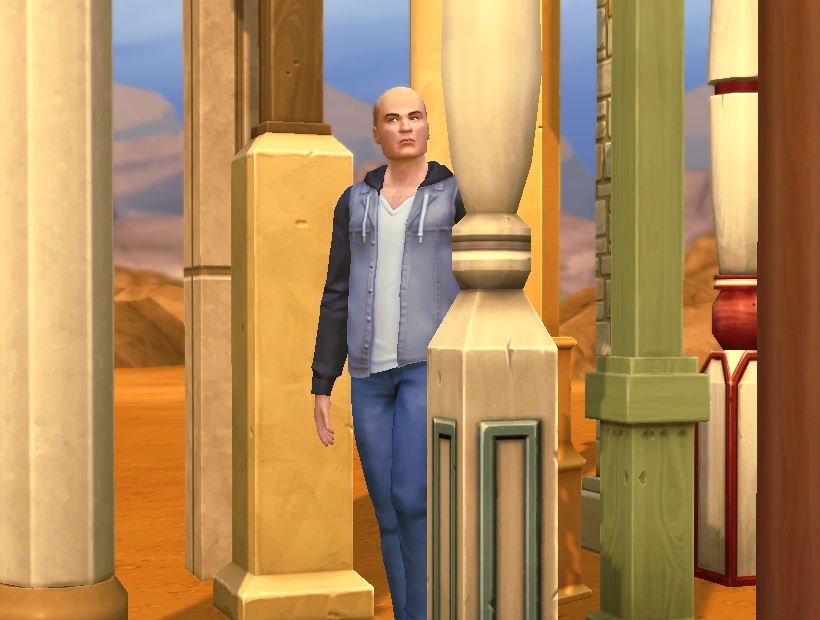
Note that even though it is possible to place a column on top of a sim in Build mode, the actual in-game routing works fine -- sims will not walk through columns or anything (I tested specifically for that since I thought maybe that was the reason they made them fade in the first place).
This is done by setting the "FadeType" and "CustomFadeDistance" in the MODL to 0. Funnily it seems to be sufficient to do this for one MODL each (the first one listed); let me know if any columns still fade for you (I don't have the greatest graphics card under the sun so can't test whether one would maybe have to override all of them to make this work for fancier settings).
This overrides the following resources:
MODL 0x01661233-0x00000000-0xD65E57CEE12B1ECF -- Design Calabria Hexagonal Column
MODL 0x01661233-0x00000000-0x3A98E4181BF21295 -- Greco-Roman Column
MODL 0x01661233-0x00000000-0x717DCD4612D03559 -- Tintoretto Column
MODL 0x01661233-0x00000000-0x4678551069BB9D43 -- Capistrano Round Column
MODL 0x01661233-0x00000000-0x140980897C326FAB -- Mega Column (Deluxe)
MODL 0x01661233-0x00000000-0x96A22C71A7D5F019 -- Mega Column (Budget DeLite)
MODL 0x01661233-0x00000000-0x6933686DAA49A7DD -- Mega Column (Basic)
MODL 0x01661233-0x00000000-0xF86B0E19B2D4A3B1 -- Buenaventura Column
MODL 0x01661233-0x00000000-0xB66FC487A094DBC5 -- Soledad Square Column
MODL 0x01661233-0x00000000-0x32AAED70036D9B5E -- Grosvenor Column
MODL 0x01661233-0x00000000-0x777CBB53FE0837BA -- Annesley Square Column
MODL 0x01661233-0x00000000-0xB2266FF7148E3C72 -- FitzHerbert Column
Compatibility:
2014-12-16: Probably doesn't need updating since all that's changed is a version number and two flags that have been changed in every object I've seen so far, so I guess that is also something like a version number. But let me know if anything suddenly behaves funny.
s4pe 0.2c/d with wrappers by Inge and Snaitf.
|
pbox_columns-basegame_no-fade.zip
Download
Uploaded: 22nd Nov 2014, 33.0 KB.
9,308 downloads.
|
||||||||
| For a detailed look at individual files, see the Information tab. | ||||||||
Install Instructions
1. Download: Click the File tab to see the download link. Click the link to save the .rar or .zip file(s) to your computer.
Read the upload description for installation instructions. If nothing else is specified, do the following:
2. Extract: Use WinRAR (Windows) to extract the .package file(s) (if included, ts4script as well) from the .rar or .zip file(s).
3. Cut and paste the .package file(s) (if included, ts4script as well) into your Mods folder
- Windows XP: Documents and Settings\(Current User Account)\My Documents\Electronic Arts\The Sims 4\Mods\
- Windows Vista/7/8/8.1: Users\(Current User Account)\Documents\Electronic Arts\The Sims 4\Mods\
Need more information?
- Anyone can use both .rar and .zip files easily! On Windows, use WinRAR.
- If you don't have a Mods folder, just make one.
- Mod still not working? Make sure you have script mods enabled

Loading comments, please wait...


Uploaded: 22nd Nov 2014 at 11:12 AM
Updated: 10th Feb 2015 at 1:35 PM
-
-
No-Fade Ceiling Lights (Update for GTW)
by FakeHousesRealAwesome updated 20th Apr 2015 at 12:01am
-
by FakeHousesRealAwesome 3rd Mar 2015 at 7:23am
-
by plasticbox updated 12th Aug 2015 at 8:10am
 7
34k
75
7
34k
75
-
by plasticbox 12th Aug 2015 at 8:13pm
6
36.8k
92
-
Unlocked - Temple Columns - Jungle Adventure
by Bakie 1st Jun 2018 at 2:57pm
+1 packs
5 11.6k 23 Jungle Adventure
-

by MizoreYukii updated 15th Nov 2019 at 9:48pm
48
164.5k
291
-
[REMASTERED] No-Fade Columns on Live and BuildBuy Mode
by TwelfthDoctor1 updated 31st Dec 2025 at 2:14pm
-
-


-
Newbie Road 37 [NL] - Starter House
by plasticbox 21st Dec 2005 at 12:15am
Title: Newbie Road 37 [NL] Category: Lots & Housing > Residential > Starter Homes Cost: 19.996 Lot size: 3x2 more...
 +1 packs
22 12.6k 2
+1 packs
22 12.6k 2 Nightlife
-
Newbie Road 119 -- Tiny Triplex
by plasticbox updated 12th Apr 2008 at 7:24pm
Requires OfB. Custom content, see below. more...
+1 packs
8 13.4k 24 Open for Business
-
Wee Barnoid #04 – Starter house (under 20.000§) – No CC
by plasticbox 6th Aug 2009 at 5:28am
Update/Fix 2009-08-09: I had accidentially used a custom object for the indoor doors, which didn't get packaged so there were more...
 13
26.7k
42
13
26.7k
42
-
Wee Barnoid #22 – Budget starter (under 11.000§) – No CC
by plasticbox 8th Nov 2009 at 10:45pm
A minimalistic house for a single sim or two, with a covered porch on the side. more...
9
21.3k
23
-
Newbie Road 181 -- Base Game Mini Starter (under 13.000§)
by plasticbox 23rd Dec 2008 at 8:18pm
No EPs required. more...
5
20.1k
21
-
Newbie Road 47 [NL] - Starter Home
by plasticbox 4th Mar 2006 at 2:15pm
Title: Newbie Road 47 [NL] - Starter Home Category: Lots & Housing > Residential > Starter Homes Cost: 19.992 more...
+1 packs
9 17.6k 19 Nightlife
-
by plasticbox 3rd Feb 2016 at 12:26pm
These are two simple dining tables ‒ a long and a small one ‒ that match the other Boring stuff more...
12
28.7k
95
-
by plasticbox 4th Sep 2014 at 11:20pm
A traditional two-story house with basement on a 20 x 20 lot, furnished for 4+1 (four adults/kids, one toddler/baby). more...
6
12.2k
59
-
Blue Beach House (under 50.000§) – No CC
by plasticbox 27th Mar 2010 at 3:55am
A small two-story house with wrap-around porch and basement, built on a 14x16 lot. more...
17
47.7k
69
-

by plasticbox updated 28th Jan 2016 at 12:30pm
Custom interactions + script that enable harvesting for children. more...
48
61.7k
258


About Me
– Feel free to recycle, you don’t need to ask.
– For the attribution, please link to the upload you’re using wherever possible (instead of my profile). This is particularly important with edits made for/with different games or game versions.
– If you use my stuff in something you make, please upload the result to a free, accessible, noncommercial site with no more restrictions than these. Code must remain open source; meshes and other material must remain re-usable.
Please do not redistribute any unmodified files – link to the upload post instead.