
 Sign in to Mod The Sims
 "Pressentiment" Eyes Collection
 "Pressentiment" Eyes Collection
SCREENSHOTS

pressentiment01.jpg - width=350 height=276
Downloaded 108 times
35 Thanks
1 Favourited
4,338 Views
Say Thanks!
Thanked!
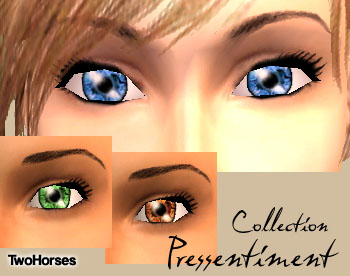
"Pressentiment" is the French word for presentiment, intuition.
This collection of intense eyes in 3 vibrant colors is perfect for your Sims with a strong sixth sense.
This collection of intense eyes in 3 vibrant colors is perfect for your Sims with a strong sixth sense.
I uploaded 2 versions:
2h_eye_pressentiment.rar = includes 3 eyes
2h_eye_pressentiment_contactlenses.rar = includes 3 contact lenses. They appear in the mask section, and do not affect the Sim's genetics.
2h_eye_pressentiment.rar = includes 3 eyes
2h_eye_pressentiment_contactlenses.rar = includes 3 contact lenses. They appear in the mask section, and do not affect the Sim's genetics.
**********
RULES for my textures
YES: using my creations in screenshots/videos/SimArt, etc. (credit not required but appreciated)
YES: uploading my creations with complete sims (credit required)
NO: The Exchange/pay sites/TSR
NO: Uploading my creations elsewhere
NO: changing my textures + alphas, in whole or in part, and claiming it as your own
RULES for my textures
YES: using my creations in screenshots/videos/SimArt, etc. (credit not required but appreciated)
YES: uploading my creations with complete sims (credit required)
NO: The Exchange/pay sites/TSR
NO: Uploading my creations elsewhere
NO: changing my textures + alphas, in whole or in part, and claiming it as your own
Advertisement:
|
2h_eye_pressentiment_contactlenses.rar
Download
Uploaded: 17th Apr 2007, 83.9 KB.
523 downloads.
|
||||||||
|
2h_eye_pressentiment.rar
Download
Uploaded: 17th Apr 2007, 39.4 KB.
684 downloads.
|
||||||||
| For a detailed look at individual files, see the Information tab. | ||||||||
Install Instructions
Basic Download and Install Instructions:
1. Download: Click the download link to save the .rar or .zip file(s) to your computer.
2. Extract the zip, rar, or 7z file.
3. Place in Downloads Folder: Cut and paste the .package file(s) into your Downloads folder:
1. Download: Click the download link to save the .rar or .zip file(s) to your computer.
2. Extract the zip, rar, or 7z file.
3. Place in Downloads Folder: Cut and paste the .package file(s) into your Downloads folder:
- Origin (Ultimate Collection): Users\(Current User Account)\Documents\EA Games\The Sims™ 2 Ultimate Collection\Downloads\
- Non-Origin, Windows Vista/7/8/10: Users\(Current User Account)\Documents\EA Games\The Sims 2\Downloads\
- Non-Origin, Windows XP: Documents and Settings\(Current User Account)\My Documents\EA Games\The Sims 2\Downloads\
- Mac: Users\(Current User Account)\Documents\EA Games\The Sims 2\Downloads
- Mac x64: /Library/Containers/com.aspyr.sims2.appstore/Data/Library/Application Support/Aspyr/The Sims 2/Downloads
- For a full, complete guide to downloading complete with pictures and more information, see: Game Help: Downloading for Fracking Idiots.
- Custom content not showing up in the game? See: Game Help: Getting Custom Content to Show Up.
- If you don't have a Downloads folder, just make one. See instructions at: Game Help: No Downloads Folder.
Advertisement:
Loading comments, please wait...
Author

Download Details
Packs:
None, this is Sims 2 base game compatible!
Uploaded: 17th Apr 2007 at 5:52 AM
Updated: 25th Oct 2008 at 1:32 AM - filters
Uploaded: 17th Apr 2007 at 5:52 AM
Updated: 25th Oct 2008 at 1:32 AM - filters
Eye Type:
– Custom
– Contacts
Eye Style:
– Human
Other Download Recommendations:
-
-
-
-
-
-
-
-
-
by -Shady- updated 14th Mar 2009 at 8:42pm
-
"I'm Crying" - a set of 4 normal and 4 crying eyes
by VacuumMelon 26th Aug 2009 at 9:01pm


More downloads by TwoHorses:
See more
-
-
-

-
-
-
-
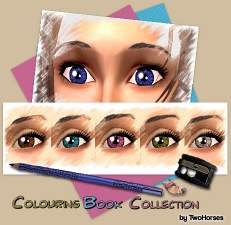
"Colouring Book" Eyes Collections - Now NPC friendly!
by TwoHorses updated 25th Oct 2008 at 1:09am
Colouring Books: One of my favorite chilhood hobbies! more...
-
-
-




About Me
Hi!
I learned so much (and still learning...) from MTS2's tutorials and forum, that I wanted to share with this community my favorites creations. This is my way of saying THANK YOU to all of you!
If you want to contact me: twohorses(a)2hcreations.net
To see more of my creations for Sims 2, see my home page! (all downloads are free)
Have fun!
2H
**RULES for my textures**
YES: using my creations in screenshots/videos/SimArt, etc. (credit not required but appreciated)
YES: uploading my creations with complete sims (credit required)
NO: The Exchange/pay sites/TSR
NO: Uploading my creations elsewhere
NO: changing my textures + alphas, in whole or in part, and claiming it as your own
I learned so much (and still learning...) from MTS2's tutorials and forum, that I wanted to share with this community my favorites creations. This is my way of saying THANK YOU to all of you!
If you want to contact me: twohorses(a)2hcreations.net
To see more of my creations for Sims 2, see my home page! (all downloads are free)
Have fun!
2H
**RULES for my textures**
YES: using my creations in screenshots/videos/SimArt, etc. (credit not required but appreciated)
YES: uploading my creations with complete sims (credit required)
NO: The Exchange/pay sites/TSR
NO: Uploading my creations elsewhere
NO: changing my textures + alphas, in whole or in part, and claiming it as your own