
 Sign in to Mod The Sims
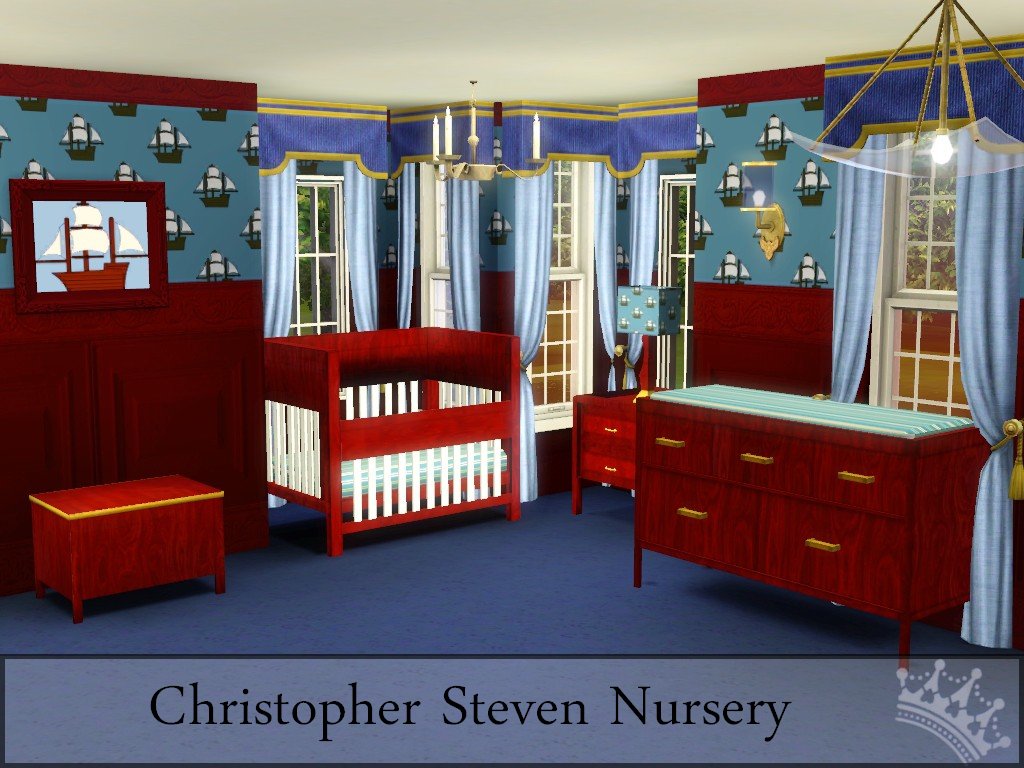
 Christopher Steven Nursery
 Christopher Steven Nursery


Screenshot-181.jpg - width=1024 height=768
csdv2.jpg - width=1024 height=674
toyboxdv.jpg - width=570 height=570
cribdv.jpg - width=570 height=570
changerdv.jpg - width=570 height=570
chrisstevedvrecolorablepalletess.jpg - width=1000 height=833


Crib has been cloned from: Crib expensive
Toybox has been cloned from: toybox contemporary
Changer has been cloned from: Dresser medium country
Polygon Counts:
Crib:
Vertices -1685
Faces-1116
Changer:
Vertices -906
Faces-696
Toybox:
Vertices -248
Faces-200
Additional Credits:
TSR workshop
The Gimp
Wings 3D
Milkshape
This is a new mesh, and means that it's a brand new self contained object that usually does not require a specific Pack (although this is possible depending on the type). It may have Recolours hosted on MTS - check below for more information.
|
christophersteventoyboxdv.zip
Download
Uploaded: 17th Aug 2010, 96.3 KB.
26,342 downloads.
|
||||||||
|
christopherstevennurserydvchanger.zip
Download
Uploaded: 17th Aug 2010, 118.2 KB.
28,694 downloads.
|
||||||||
|
christopherstevencribdv.zip
Download
Uploaded: 17th Aug 2010, 108.6 KB.
31,325 downloads.
|
||||||||
| For a detailed look at individual files, see the Information tab. | ||||||||
Install Instructions
1. Click the download button, or the filename, to download the file to your computer.
2. Extract the zip, rar, or 7z file. Now you will have either a .package or a .sims3pack file.
For Package files:
1. Cut and paste the file into your Documents\Electronic Arts\The Sims 3\Mods\Packages folder. If you do not already have this folder, you should read the full guide to Package files first: Sims 3:Installing Package Fileswiki, so you can make sure your game is fully patched and you have the correct Resource.cfg file.
2. Run the game, and find your content where the creator said it would be (build mode, buy mode, Create-a-Sim, etc.).
For Sims3Pack files:
1. Cut and paste it into your Documents\Electronic Arts\The Sims 3\Downloads folder. If you do not have this folder yet, it is recommended that you open the game and then close it again so that this folder will be automatically created. Then you can place the .sims3pack into your Downloads folder.
2. Load the game's Launcher, and click on the Downloads tab. Find the item in the list and tick the box beside it. Then press the Install button below the list.
3. Wait for the installer to load, and it will install the content to the game. You will get a message letting you know when it's done.
4. Run the game, and find your content where the creator said it would be (build mode, buy mode, Create-a-Sim, etc.).
Extracting from RAR, ZIP, or 7z: You will need a special program for this. For Windows, we recommend 7-Zip and for Mac OSX, we recommend Keka. Both are free and safe to use.
Need more help?
If you need more info, see:
- For package files: Sims 3:Installing Package Fileswiki
- For Sims3pack files: Game Help:Installing TS3 Packswiki
Loading comments, please wait...



Uploaded: 17th Aug 2010 at 8:50 AM
Updated: 22nd Oct 2011 at 4:49 PM
-
-
“Little Sister” crib – Update 2014-08-27, Pets version available
by plasticbox updated 2nd Sep 2014 at 5:15pm
 45
104.6k
212
45
104.6k
212
-
by HugeLunatic 14th Feb 2010 at 1:16am
94
162.1k
401
-
-
by Lisen801 21st Jan 2011 at 6:02pm
27
58.7k
129
-
-
by Morphead 23rd Jul 2012 at 3:30pm
39
106.9k
341
-
-
by TheSweetSimmer 28th Jul 2018 at 6:37pm
3
28.8k
10
-
by PolarBearSims 19th Apr 2020 at 7:08pm
+18 packs
4.7k 6 World Adventures
 High-End Loft Stuff
 Ambitions
 Fast Lane Stuff
 Late Night
 Outdoor Living Stuff
 Generations
 Town Life Stuff
 Master Suite Stuff
 Pets
Pets
 Showtime
 Supernatural
 70s, 80s and 90s Stuff
 Seasons
 Movie Stuff
 University Life
 Island Paradise
 Into the Future


-
by Christine11778 10th Jan 2011 at 12:15am
This is a base game starter home that is under $16,500. more...
6
20.2k
30
-
by Christine11778 12th Oct 2007 at 9:25am
Autumn is a beautiful time of year and now your Sims can have it all year round with Autumn more...
 20
42.1k
73
20
42.1k
73
-
Victorian Retreat by Christine DV
by Christine11778 30th Nov 2007 at 10:35am
The inspiration for this home came from a picture I saw online, this is a road that I rarely travel more...
+3 packs
20 23.1k 31 University
 Nightlife
 Open for Business
-
1 Laurel Lane - Pink Victorian
by Christine11778 25th Aug 2008 at 9:31pm
This is the first Victorian that I created for this game. more...
+1 packs
22 33.5k 23 University
-
by Christine11778 20th Oct 2015 at 8:31am
A haunted little starter home for your Sims more...
 +6 packs
3 7.7k 13
+6 packs
3 7.7k 13 Get to Work
 Outdoor Retreat
 Luxury Stuff
 Perfect Patio Stuff
 Cool Kitchen Stuff
 Horse Ranch
-
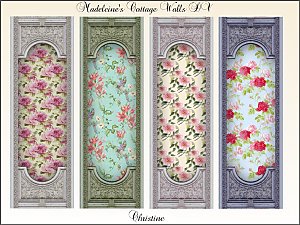
Madeleine's Cottage Walls & Carpets
by Christine11778 20th Feb 2016 at 6:24pm
A lovely set of wall-coverings and Carpets. more...
18
23.5k
97
-
961 Velsta - Starter home with indoor swimming pool
by Christine11778 29th Jan 2007 at 3:38am
I created this starter home by request for one of my friends. more...
+1 packs
12 22k 5 Pets
Pets
-
Andarton Manor – No Expansions Required
by Christine11778 9th Apr 2007 at 9:20am
This lavish Victorian castle is perfect for the "Motherlode" Sims who have more simoleons than they know what to do more...
37
65k
70
-
Olmstead Estate - Holiday Mansion
by Christine11778 26th Dec 2015 at 5:29am
A beautiful home decorated for Christmas more...
+7 packs
6 17k 31 Get to Work
Outdoor Retreat
 Get Together
Luxury Stuff
Perfect Patio Stuff
Cool Kitchen Stuff
Horse Ranch
Get Together
Luxury Stuff
Perfect Patio Stuff
Cool Kitchen Stuff
Horse Ranch
-
"Buggin" Wall Treatments By Christine DV
by Christine11778 5th Aug 2009 at 1:30pm
This is a wall set that is perfect for your Sim toddler or child. more...
3
9.1k


About Me
Please go to this link, it explains my policy concerning my custom content: http://cc4sims.com/faqdv.htm
**Note:** Please do not PM me with requests, and this includes asking me to make a lot using less EPs.
Thanks! :)
If you have a problem with one of my downloads here at MTS2, please reply to the thread instead of sending a PM. Thanks!
**If you have questions about how to download or install custom content, please refer to this page: http://www.modthesims2.com/wiki.php..._Custom_Content **