
 Sign in to Mod The Sims
 AutoSave for sims4
 AutoSave for sims4


Screenshot-st0.jpg - width=800 height=547
Screenshot-00.jpg - width=800 height=547
Screenshot-st1.jpg - width=800 height=547
Screenshot-02.jpg - width=800 height=547
Screenshot-01.jpg - width=800 height=547
Screenshot-sr1.jpg - width=800 height=547
Screenshot-sr0.jpg - width=800 height=547
Screenshot-bn1.jpg - width=800 height=547
Screenshot-bn0.jpg - width=800 height=547
This mod allows periodic saving of your game without interrupting it.
Actual Release
Initial
2015/08/20: Chinese translation (Tiger3018)
2015/08/26: Brasilian translation (Jor)
Features
Menu driven configuration:
Selection of the periodicity of your backup from every 15mn to once a day in SIM TIME
Backup name could be changed on the fly.
Number of backup cycle could be changed on the fly.
All changes are confirmed by messages on the wall messages.

USAGE
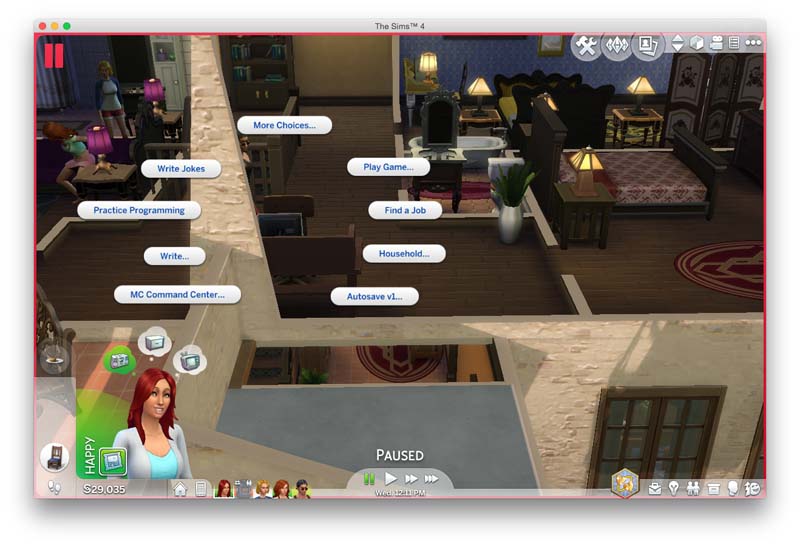
Select any base game computer on any household and select AutoSave option in the menu.
Picks any of the submenu to customize your settings.Default value
- Backup name: define the new name of the backup session starting at the next iteration.
- Status: display the actual status.
- Periodicity: select your backup frequency in sim time.
- Rotation: Define how many backup will be kept by the system.
name: autosave, periodicity: hourly, rentention:5
Conflict
None detected
Additional credit
Tempest for his daily-save mod (defunct)
All the seniors modders for the help they provided.
|
AutoSave_v1b.package.zip
| portugeses added
Download
Uploaded: 26th Aug 2015, 5.4 KB.
16,125 downloads.
|
||||||||
|
AutoSave_v1a.zip
| Chinese added
Download
Uploaded: 20th Aug 2015, 21.9 KB.
3,979 downloads.
|
||||||||
|
Autosave_v1.zip
Download
Uploaded: 20th Aug 2015, 13.9 KB.
48,367 downloads.
|
||||||||
| For a detailed look at individual files, see the Information tab. | ||||||||
Install Instructions
1. Download: Click the File tab to see the download link. Click the link to save the .rar or .zip file(s) to your computer.
Read the upload description for installation instructions. If nothing else is specified, do the following:
2. Extract: Use WinRAR (Windows) to extract the .package file(s) (if included, ts4script as well) from the .rar or .zip file(s).
3. Cut and paste the .package file(s) (if included, ts4script as well) into your Mods folder
- Windows XP: Documents and Settings\(Current User Account)\My Documents\Electronic Arts\The Sims 4\Mods\
- Windows Vista/7/8/8.1: Users\(Current User Account)\Documents\Electronic Arts\The Sims 4\Mods\
Need more information?
- Anyone can use both .rar and .zip files easily! On Windows, use WinRAR.
- If you don't have a Mods folder, just make one.
- Mod still not working? Make sure you have script mods enabled

Loading comments, please wait...
Uploaded: 20th Aug 2015 at 2:03 AM
Updated: 26th Aug 2015 at 3:17 PM - updating languages and adding source files
-
by temptest 1st Oct 2014 at 3:46am
 59
211.9k
267
59
211.9k
267
-

by plasticbox updated 22nd Dec 2014 at 4:21pm
192
295.2k
801
-
-

by nickyclem1 updated 9th Nov 2024 at 11:42pm
10
41k
42
-
by TURBODRIVER updated 12th Oct 2025 at 5:53am
19
63.8k
141
-

by nickyclem1 updated 9th Nov 2024 at 11:40pm
6
16.4k
30
-

by o19 30th Jan 2024 at 11:34am
14
10.4k
7
-
by Reve 27th Apr 2024 at 1:35pm
7
11.7k
13
-
by nickyclem1 updated 9th Nov 2024 at 11:39pm
2
5k
11
-

by ParametricPolymorphism updated 6th Jul 2025 at 11:24pm
6
6.1k
9



-
by sachamagne updated 3rd Aug 2015 at 5:44am
Accident can happens during a deep sleep, even for a sim. Time to get some plastic sheet and thick underwear... more...
45
63.9k
34
