Sign in to Mod The Sims
 Winter Wall Art
 Winter Wall Art


itb-xmastree.jpg - width=1050 height=745
In the Beginning
itb-snowytrees.jpg - width=1050 height=745
In the Beginning
ladyon-xmastree.jpg - width=1050 height=745
The Lady On Red
ladyon-snowman.jpg - width=1050 height=745
The Lady On Red
lone-snowytrees.jpg - width=1050 height=745
The Lone Daisy
lone-xmastree.jpg - width=1050 height=745
The Lone Daisy
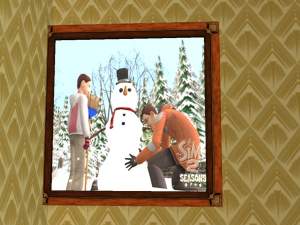
lone-snowman.jpg - width=1050 height=745
The Lone Daisy
thumb.jpg - width=300 height=225
set thumbnail
This is a set of snowy, winter recolours of three base game paintings...
The Lady On Red (Deco / Wall / §180)
The Lone Daisy (Deco / Wall / §285)
In the Beginning (Deco / Wall / §600)
Snowman, Snowy Trees, and Christmas Tree, there are 7 recolours in all (made from screen shots I took in-game), and all files have been Compressorized.
Hope you enjoy these, and have a Merry Christmas, Happy Hanukkah, Merry Solstice, Happy Kwanzaa, Blessed Yule, Happy Festivus, and more. All the best to you and yours this winter!
Additional Credits:
So many thanks to Delphy, Numenor, Quaxi, RGiles, and everyone who brought us CEP, SimPE, and Mod The Sims!
This custom content if it is not clothing, may require a seperate download to work properly. This is available at Colour Enable Package (CEP) by Numenor.
|
liz_pics_winter2017.rar
| snowy scenes on three base game paintings
Download
Uploaded: 20th Dec 2017, 401.8 KB.
687 downloads.
|
||||||||
| For a detailed look at individual files, see the Information tab. | ||||||||
Install Instructions
1. Download: Click the download link to save the .rar or .zip file(s) to your computer.
2. Extract the zip, rar, or 7z file
3. Place in Downloads Folder: Cut and paste the .package file(s) into your Downloads folder:
- Origin (Ultimate Collection): Users\(Current User Account)\Documents\EA Games\The Sims™ 2 Ultimate Collection\Downloads\
- Non-Origin, Windows Vista/7/8/10: Users\(Current User Account)\Documents\EA Games\The Sims 2\Downloads\
- Non-Origin, Windows XP: Documents and Settings\(Current User Account)\My Documents\EA Games\The Sims 2\Downloads\
- Mac: Users\(Current User Account)\Documents\EA Games\The Sims 2\Downloads
- Mac x64:
/Library/Containers/com.aspyr.sims2.appstore/Data/Library/Application Support/Aspyr/The Sims 2/Downloads
Need more information?
- For a full, complete guide to downloading complete with pictures and more information, see: Game Help: Downloading for Fracking Idiots.
- Custom content not showing up in the game? See: Game Help: Getting Custom Content to Show Up.
- If you don't have a Downloads folder, just make one. See instructions at: Game Help: No Downloads Folder.
Loading comments, please wait...

Uploaded: 20th Dec 2017 at 9:35 AM
Updated: 20th Dec 2017 at 11:43 PM
-

-

by maree464 19th Feb 2006 at 1:45pm
 4
3.6k
1
4
3.6k
1
-
-
-
by kim-simpearls 20th Oct 2007 at 9:47pm
+1 packs
5 6.1k 7 Nightlife
-
by iESmedia 20th Dec 2007 at 2:32am
2
5.2k
1
-
-
-
GL Untitled by Len Painting Recolors
by PenelopeT 12th Dec 2021 at 4:50pm
+1 packs
2 1.6k 5 Glamour Life
-




-
-
Claybee Bath (Maxis Recolours in clay and honey gold)
by Liz updated 2nd Feb 2017 at 11:44am
Bathroom recolours (EA and Maxis items) in grey, gold, green, orange, putty, and creme. Base and EP pieces to match my other Claybee rooms. more...
-

-
-
-
Flamingo Kitchen (Maxis Recolours)
by Liz 6th Jul 2017 at 12:12am
Bright, retro kitchen and dining room in light wood, aqua, green, and flamingo pink. more...
-

-

-
-
by Liz 19th Jun 2019 at 11:55am
Cozy cottage layout in softly warm colours in starter, established, and upgraded versions more...
+17 packs
4 4.3k 8 Happy Holiday
 Family Fun
 University
Glamour Life
Nightlife
University
Glamour Life
Nightlife
 Celebration
 Open for Business
 Pets
Pets
 H&M Fashion
 Teen Style
 Seasons
 Kitchen & Bath
 Bon Voyage
 Free Time
 Ikea Home
 Apartment Life
 Mansion and Garden