
 Sign in to Mod The Sims
 Enhancing facades
 Enhancing facades


Ohhh do you really live there.jpg - width=710 height=600
texture a.jpg - width=800 height=600
texture b.jpg - width=533 height=680
Indoor sample.jpg - width=672 height=600
linkable.jpg - width=734 height=600
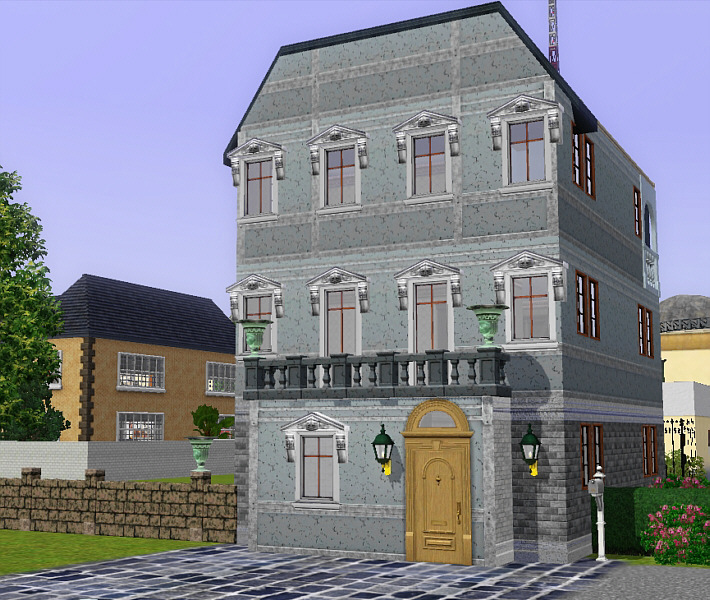
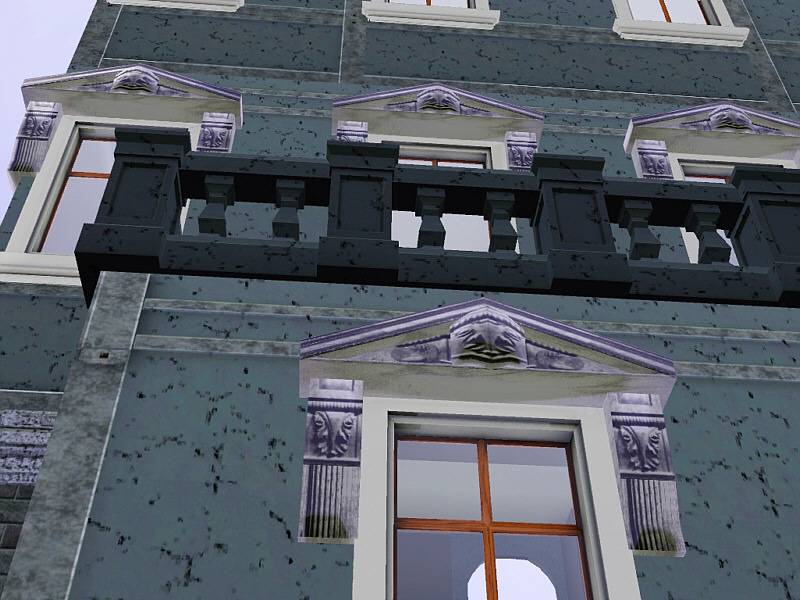
Each missed thing in Sims3 become a new must-to-do for me. As long as we can see overstuffed windows in rabbitholes our poor sims homes look so naked...
Hope you like and enjoy this simple lintel to transform a humble abode in a decent urban traditional house. Not only for outdoor sights! you can use it as a cornice over curtains or over mantles, as you can see in the pic below.
Two recolorable channels and two carved texture layers to play with, simulating plaster, marble or wood.
Price and catalog description
You'll find it under curtains in Buy Mode Decoration Catalog. Cloned from the curtain Loft of Base Game, instead I have installed and fully patched up to World Adventures, but I think it should work for BGame only players. My apologies if it is not useable by someone. Priece: 155 simoleons.
Polygon Counts:
Unbelievable:
259 vertex
236 faces
Additional Credits:
Thanks to the toolmakers and developpers for Sims3 that help people like me, who nothing understand of bits, numbers, codecs and so but want to make a contribution with imagination and artistic feelings.
This is a new mesh, and means that it's a brand new self contained object that usually does not require a specific Pack (although this is possible depending on the type). It may have Recolours hosted on MTS - check below for more information.
|
nanidintel18.rar
Download
Uploaded: 1st Feb 2010, 216.9 KB.
6,837 downloads.
|
||||||||
| For a detailed look at individual files, see the Information tab. | ||||||||
Install Instructions
1. Click the download button, or the filename, to download the file to your computer.
2. Extract the zip, rar, or 7z file. Now you will have either a .package or a .sims3pack file.
For Package files:
1. Cut and paste the file into your Documents\Electronic Arts\The Sims 3\Mods\Packages folder. If you do not already have this folder, you should read the full guide to Package files first: Sims 3:Installing Package Fileswiki, so you can make sure your game is fully patched and you have the correct Resource.cfg file.
2. Run the game, and find your content where the creator said it would be (build mode, buy mode, Create-a-Sim, etc.).
For Sims3Pack files:
1. Cut and paste it into your Documents\Electronic Arts\The Sims 3\Downloads folder. If you do not have this folder yet, it is recommended that you open the game and then close it again so that this folder will be automatically created. Then you can place the .sims3pack into your Downloads folder.
2. Load the game's Launcher, and click on the Downloads tab. Find the item in the list and tick the box beside it. Then press the Install button below the list.
3. Wait for the installer to load, and it will install the content to the game. You will get a message letting you know when it's done.
4. Run the game, and find your content where the creator said it would be (build mode, buy mode, Create-a-Sim, etc.).
Extracting from RAR, ZIP, or 7z: You will need a special program for this. For Windows, we recommend 7-Zip and for Mac OSX, we recommend Keka. Both are free and safe to use.
Need more help?
If you need more info, see:
- For package files: Sims 3:Installing Package Fileswiki
- For Sims3pack files: Game Help:Installing TS3 Packswiki
Loading comments, please wait...

Uploaded: 1st Feb 2010 at 6:56 PM
#pediment, #lintel, #window decoration, #antique, #classical
-
by MelissaMel 4th Nov 2009 at 10:13pm
 18
49.5k
77
18
49.5k
77
-
by nanisim 10th Jan 2010 at 8:05pm
26
52.2k
103
-
-
by granthes 2nd Dec 2010 at 5:39pm
58
127k
387
-
New Meshes: Shiftable Kitchen Tiers Curtains w/ valance: PETS compatible
by lhawk07 updated 6th Dec 2011 at 3:21pm
25
24.6k
72
-
-
-
by TheJim07 2nd May 2016 at 7:27pm
12
26.1k
101
-
by TheJim07 30th Jul 2016 at 8:03pm
10
18.8k
86
-

Automatically Closing Curtains (Custom "Easy Breezy" Curtains)
by Shadowsun252 6th Apr 2026 at 2:49pm
+1 packs
1 4.2k 15 Supernatural


-

Ornamenta - Classical lintels (3 new meshes)
by nanisim 17th Feb 2007 at 9:10pm
This is a new step in creating a collection of classical architectural ornaments, for those who, like me, love more...
 8
13.5k
11
8
13.5k
11
-
Volupté - Gauze Curtains (new meshes)
by nanisim 9th Feb 2007 at 8:19pm
I’ve made this set of curtains in bright gauze in three tones of colour champagne. more...
13
35.8k
16
-
Ornamenta - Easy Loggia Fence (new mesh)
by nanisim 27th Feb 2007 at 10:22pm
Do you like to put a touch of renaissance in your traditional lots? Now it’s possible with “Easy Loggia”. more...
12
14.9k
17
-

-
spanish iron balcony and window - Updated 01/14/07
by nanisim 10th Jan 2007 at 7:07pm
I've spend many time looking for a wrought iron balcony for my spanish traditional styled houses and tired of it more...
+1 packs
18 25.2k 29 Open for Business
-

-
Spanish balconies - More variety! (4 new meshes)
by nanisim 11th Feb 2007 at 2:19pm
Bored of this simple bars hanging of your walls? I think its time for a little restyling of more...
14
18.1k
13
-
Pot recolors of the "Fences with charm"
by nanisim 24th Jan 2007 at 9:16pm
Sorry for the inconvenience, but I noticed that I’ve forgot to include some recolors of the fencepot6 in the collection more...
4
8.9k
5
-
Antiques in auction: A Dining set
by nanisim 22nd Jan 2010 at 6:56pm
Simladies and Simgentlemen: for you, who love collectionism, or to invest in fine more...
-

Volupté - Gauze Curtains Part three (New meshes)
by nanisim 15th Sep 2007 at 9:25pm
This is a tribute to all of you who have follow my suite of curtains in a way absolutely unexpected more...
6
23.9k
13


About Me
You can recolor, retexture and modify alphas LINKING BACK to the thread at MTS to get the meshes.
You can upload my objects with your lots in FREE SITES WITH CREDITS AND LINK TO MTS.
You can include pics of my creations freely WITH CREDIT TO NANISIM.
In any case, thanks to all who like and apreciate my work!