
 Sign in to Mod The Sims
 Quaint Nursery
 Quaint Nursery


quaint-bookcase.jpg - width=1024 height=800
quaint-changingtable.jpg - width=1024 height=800
quaint-crib.jpg - width=1024 height=800
quaint-dresser.jpg - width=1024 height=800
quaint-endtable.jpg - width=1024 height=800
quaint-toybox.jpg - width=1024 height=800
quaint-nursery.jpg - width=1280 height=800
quaint-nursery-index.jpg - width=512 height=512

 This makes me all warm and fuzzy inside to know this community still has compassion for other simmers. This spurred me into finishing a set that I've had sitting around for a while.
Round two of attempted bribery brings you this nursery that was designed with mesh bits from several base game Quaint meshes. All items are slaved to something in the base game.
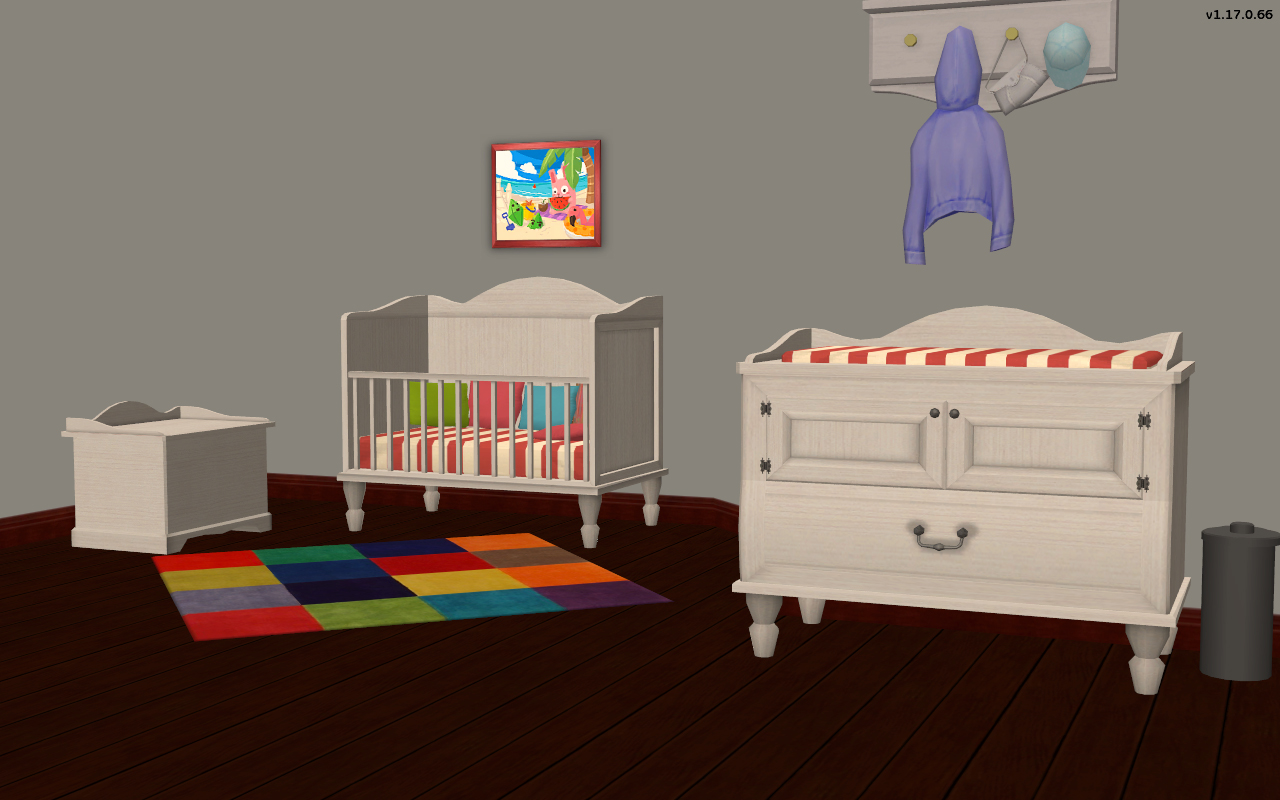
| Name | Location | Price | Polys | Subsets | Notes |
|---|---|---|---|---|---|
| Crib | Misc/Childrens | 325 | 1188 | armoire/bedding | repositoried to armoire and crib bedding |
| Changing Table | Misc/Childrens | 225 | 2073 | armoire/bedding | repositoried to armoire and crib bedding |
| Toybin | Misc/Childrens | 85 | 965 | armoire/toybox | repositoried to armoire and toybox |
| Dresser | Misc/Dressers | 520 | 1100 | desk | repositoried to desk and luxury dresser |
| End Table | Surfaces/End Tables | 100 | 543 | desk | repositoried to desk |
| Bookshelf | Hobbies/Bookshelfs | 250 | 1025 | armoire | repositoried to armoire |
Notes:
These objects contain no textures!! Everything is slaved to the counterpart object from the base game.
Polygon Counts:
See Table
Additional Credits:
komo - This set originated from a request to slave komo item's to the Maxis version. The original objects mapping was so far off from the Maxis versions that I just created my own.
Cushion on toybox
This is a new mesh, and means that it's a brand new self contained object that usually does not require a specific Pack (although this is possible depending on the type). It may have Recolours hosted on MTS - check below for more information.
|
HL_Quaint-Nursery.7z
Download
Uploaded: 18th Nov 2016, 135.6 KB.
9,904 downloads.
|
||||||||
| For a detailed look at individual files, see the Information tab. | ||||||||
Install Instructions
1. Download: Click the download link to save the .rar or .zip file(s) to your computer.
2. Extract the zip, rar, or 7z file.
3. Place in Downloads Folder: Cut and paste the .package file(s) into your Downloads folder:
- Origin (Ultimate Collection): Users\(Current User Account)\Documents\EA Games\The Sims™ 2 Ultimate Collection\Downloads\
- Non-Origin, Windows Vista/7/8/10: Users\(Current User Account)\Documents\EA Games\The Sims 2\Downloads\
- Non-Origin, Windows XP: Documents and Settings\(Current User Account)\My Documents\EA Games\The Sims 2\Downloads\
- Mac: Users\(Current User Account)\Documents\EA Games\The Sims 2\Downloads
- Mac x64: /Library/Containers/com.aspyr.sims2.appstore/Data/Library/Application Support/Aspyr/The Sims 2/Downloads
- For a full, complete guide to downloading complete with pictures and more information, see: Game Help: Downloading for Fracking Idiots.
- Custom content not showing up in the game? See: Game Help: Getting Custom Content to Show Up.
- If you don't have a Downloads folder, just make one. See instructions at: Game Help: No Downloads Folder.
Loading comments, please wait...


Uploaded: 18th Nov 2016 at 5:16 PM
Updated: 19th Aug 2025 at 8:00 PM
-
-
by feeEssen 22nd Oct 2006 at 10:24pm
 17
63k
24
17
63k
24
-
by An_na 28th Aug 2007 at 9:17am
71
89.2k
229
-
by rosaline_10 updated 17th Jan 2008 at 4:33am
+1 packs
21 69.5k 77 Nightlife
-
by petschauerg 25th Nov 2008 at 3:47pm
17
103.1k
37
-
by Nan 4th Feb 2009 at 7:55pm
16
92.6k
74
-
by petschauerg updated 28th Mar 2009 at 5:36pm
20
133.7k
103
-
by petschauerg 2nd Feb 2009 at 7:45pm
28
79.4k
81
-
by Michelle 31st Dec 2011 at 7:27am
22
60.9k
128
-
by Liz 29th Sep 2017 at 7:53am
2
11.2k
21


-
Driveway - Sidewalk Match [Recolor]
by HugeLunatic 25th May 2013 at 4:54am
Driveway recolor to match default sidewalks. more...
+1 packs
27 37.8k 141 Nightlife
-
Backyard Pyramid "Step it Up" - [Recolors]
by HugeLunatic 4th Sep 2013 at 7:23pm
Five Maxis Match wood recolors of the Backyard Pyramid "Step it Up" stair treads, plus one white recolor of the more...
+1 packs
9 29.5k 63 Bon Voyage
-

by HugeLunatic 10th Apr 2011 at 3:40pm
Cleo Hwang spends her days puttering in her garden, growing fresh vegetables and herbs to cook with. more...
-


by HugeLunatic 15th Apr 2014 at 8:02pm
This hides the non-recolorable modular stairs for those of you who use the modular stairs that I have created. more...
8
26.1k
40
-

by HugeLunatic 26th Jun 2020 at 12:33pm
While recoloring this door I found that it contained a single subset, and I like my frames/doors separated. more...
+1 packs
8 5.8k 10 University
-


by HugeLunatic updated 6th Apr 2026 at 12:35pm
+1 packs
2 1.4k 5 Open for Business
-
AL Bohemian Bedskirt & Drape Recolor Override
by HugeLunatic 30th May 2009 at 6:10pm
This is strictly an override for the default colors of the bed drape and skirt only!! more...
+1 packs
8 28k 38 Apartment Life
-
by HugeLunatic 20th Jun 2010 at 11:07pm
The whole swirling, warping, rotating thing with musical notes coming out of the speakers is very annoying and distorts the more...
-
by HugeLunatic 29th Aug 2020 at 8:04pm
This started as simply replacing the produce bin's wood texture to match the freezer bin's, but then I figured why more...
5
14.8k
53
-
by HugeLunatic 14th Mar 2011 at 1:40pm
The "Gone Legit" door from NL is a single tile door and has a different mesh inside/outside, so you cannot more...
12
24.9k
39


About Me
Pet Stories || Dog Agility Items? || Castaway Stories || Holy Simoly Extras
4esf Archive || Holy Simoly Archive || CEP-Extras List || Buyable Game Objects
lunie content from GoS/s2a
 Installation of CEP Extras
-the package with pfiles appended to the name will go into your cep extras folder where your game is installed (typically c drive, you do you)
-the other goes in CEP extra folder in documents.
The following locations are what I am aware of, beyond that you'll have to do some searching.
Downloads Folder:
C:\Users\<user>\Documents\EA Games\The Sims 2 Legacy
C:\Users\<user>\Documents\EA Games\The Sims 2 Ultimate Collection
With multiple launchers, the location for your game install will vary.
C:\Program Files\EA GAMES\The Sims 2 Legacy\TSData\Res\Catalog\zCEP-EXTRA
C:\Program Files\EA GAMES\The Sims 2\TSData\Res\Catalog\zCEP-EXTRA
C:\Program Files (x86)\EA GAMES\The Sims 2\TSData\Res\Catalog\zCEP-EXTRA