
 Sign in to Mod The Sims
 OFB International Window Extras - Part I Single Tile
 OFB International Window Extras - Part I Single Tile


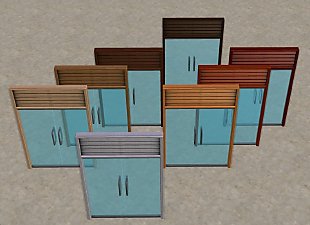
OFBEmbrasure.jpg - width=700 height=435
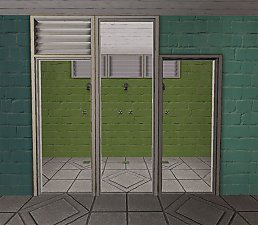
OFBBreech.jpg - width=700 height=437

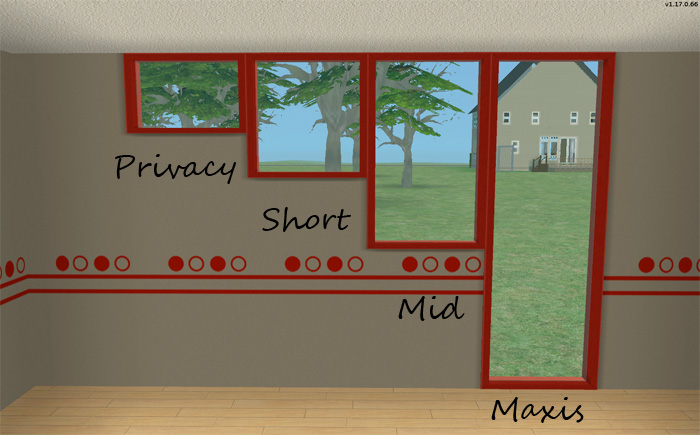
Embrasure - This is the full height all glass version. I added three different heights. The Privacy lines up with the vents on the Breech, the Mid sits just above counters, and the Short falls in between.
- Privacy
- Short
- Mid
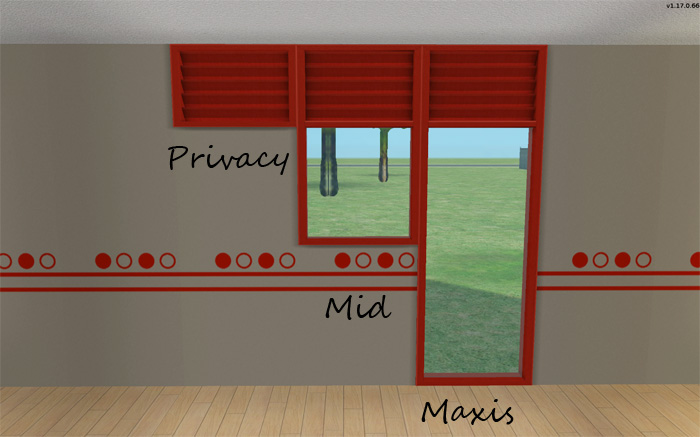
Breech - This is the full height one with the vent on top. I added the full vent privacy, and the Mid height with the vent on top that sits just above the counters.
- Privacy
- Mid
All windows take there textures from the full size counterpart window in OFB.
Polygon Counts:
Breech Privacy/Diag - 252/252
Breech Mid/Diag - 340/340
Embrasure Privacy/Diag - 90/90
Embrasure Mid/Diag - 90/90
Embrasure Short/Diag - 90/90
This is a new mesh, and means that it's a brand new self contained object that usually does not require a specific Pack (although this is possible depending on the type). It may have Recolours hosted on MTS - check below for more information.
|
HL_Privacy Windows Part I.rar
Download
Uploaded: 30th Apr 2009, 91.6 KB.
17,877 downloads.
|
||||||||
| For a detailed look at individual files, see the Information tab. | ||||||||
Install Instructions
1. Download: Click the download link to save the .rar or .zip file(s) to your computer.
2. Extract the zip, rar, or 7z file.
3. Place in Downloads Folder: Cut and paste the .package file(s) into your Downloads folder:
- Origin (Ultimate Collection): Users\(Current User Account)\Documents\EA Games\The Sims™ 2 Ultimate Collection\Downloads\
- Non-Origin, Windows Vista/7/8/10: Users\(Current User Account)\Documents\EA Games\The Sims 2\Downloads\
- Non-Origin, Windows XP: Documents and Settings\(Current User Account)\My Documents\EA Games\The Sims 2\Downloads\
- Mac: Users\(Current User Account)\Documents\EA Games\The Sims 2\Downloads
- Mac x64: /Library/Containers/com.aspyr.sims2.appstore/Data/Library/Application Support/Aspyr/The Sims 2/Downloads
- For a full, complete guide to downloading complete with pictures and more information, see: Game Help: Downloading for Fracking Idiots.
- Custom content not showing up in the game? See: Game Help: Getting Custom Content to Show Up.
- If you don't have a Downloads folder, just make one. See instructions at: Game Help: No Downloads Folder.
Loading comments, please wait...


#maxis match, #maxis, #ofb, #international, #embrasure, #breech, #modern, #windows
-
-
-
-
OFB International Window Extras - Part II - Arches
by HugeLunatic 31st Jul 2009 at 10:50pm
 +1 packs
8 38.8k 69
+1 packs
8 38.8k 69 Open for Business
-
Maxis-match Recolors for OFB International Doors and Windows
by wthrwthoutyu 18th May 2011 at 11:51pm
+1 packs
24 28.5k 61 Open for Business
-
-
-
OFB International Window Build in MLC Palette Colours
by celebkiriedhel 3rd Aug 2014 at 8:12am
+2 packs
7 6.2k 8 Open for Business
 Apartment Life
-
The Modern Farmhouse Windows Set
by TeaAddict 30th Jan 2022 at 11:38am
+17 packs
9 6.3k 23 Happy Holiday
 Family Fun
 University
 Glamour Life
 Nightlife
 Celebration
Open for Business
Celebration
Open for Business
 Pets
Pets
 H&M Fashion
 Teen Style
 Seasons
 Kitchen & Bath
 Bon Voyage
 Free Time
 Ikea Home
Apartment Life
Ikea Home
Apartment Life
 Mansion and Garden
-
EA/Maxis OFB Embrasure by Ergo Window - centered on 2T
by CatherineTCJD updated 6th Apr 2026 at 8:26pm
+1 packs
7 1.1k 5 Open for Business


-
by HugeLunatic 22nd Dec 2009 at 6:56pm
Dining for Four is a small collection of base game 1x2 tile tables made smaller to fit in a 1x1 more...
 31
41.7k
108
31
41.7k
108
-
by HugeLunatic 26th Jun 2020 at 12:33pm
While recoloring this door I found that it contained a single subset, and I like my frames/doors separated. more...
+1 packs
8 5.7k 10 University
-
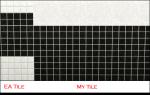
by HugeLunatic 18th Sep 2010 at 11:22pm
EA gave us three sizes of tiles with each one fully tiled, floor to ceiling. more...
17
47k
117
-
Mesa Flats (aka Midnight Masquerade): Neighborhood Recreation - No CC *Update! (V3)* (10/26/2025)
by Hood Building Group updated 26th Oct 2025 at 5:25pm
Mesa Flats (aka Midnight Masquerade), a Sims Pets Stories neighborhood recreated for TS2. more...
73
75k
157
Miscellaneous » Neighborhoods & CAS Screens » Neighbourhoods and Worlds
-
by HugeLunatic 3rd Dec 2012 at 3:32pm
One last upload (I think?!) for some IKEA stuff that will make everything from that SP recolorable. more...
+1 packs
27 45.7k 92 Ikea Home
-
by Hood Building Group updated 7th Nov 2015 at 4:16pm
Quadington University - A creepy zombified university for your 'hoods! more...
77
55.5k
145
Miscellaneous » Neighborhoods & CAS Screens » Neighbourhoods and Worlds
-
by HugeLunatic 18th Aug 2013 at 1:40am
Six new terrain paints for TS2, converted from TS3. more...
24
36.3k
211
-
by HugeLunatic 1st Jul 2015 at 2:10am
The "1 by 1" Designer Wall Sconce is a one shade, wall version of the base game "4 by 4" Designer Chandelier. more...
12
6.6k
22
-
by HugeLunatic 30th Oct 2022 at 8:13pm
+1 packs
3 2k 9 Nightlife
-
Hexa tiles from Future Waffles
by HugeLunatic 20th May 2021 at 1:54pm
The stone hex tiles from Apartment Life in a more reasonable scale. These are simple texture defaults in half the more...
+1 packs
15 4.6k 24 Apartment Life

Packs Needed
| Expansion Pack | |
|---|---|
 | Open for Business |
About Me
 Installation of CEP Extras
-the package with pfiles appended to the name will go into your cep extras folder where your game is installed (typically c drive, you do you)
-the other goes in CEP extra folder in documents.
The following locations are what I am aware of, beyond that you'll have to do some searching.
Downloads Folder:
C:\Users\<user>\Documents\EA Games\The Sims 2 Legacy
C:\Users\<user>\Documents\EA Games\The Sims 2 Ultimate Collection
With multiple launchers, the location for your game install will vary.
C:\Program Files\EA GAMES\The Sims 2 Legacy\TSData\Res\Catalog\zCEP-EXTRA
C:\Program Files\EA GAMES\The Sims 2\TSData\Res\Catalog\zCEP-EXTRA
C:\Program Files (x86)\EA GAMES\The Sims 2\TSData\Res\Catalog\zCEP-EXTRA