Sign in to Mod The Sims
 Wrestling Singlet for YA/A males
 Wrestling Singlet for YA/A males


Thumbnail.jpg - width=638 height=842
Preset1.jpg - width=625 height=800
Preset 1
Preset2.jpg - width=625 height=800
Preset 2
Preset3.jpg - width=625 height=800
Preset 3
Screenshot-6.jpg - width=478 height=433
None CAStable logo
Morphs.jpg - width=1034 height=768
Morph states
Channels.jpg - width=1114 height=723
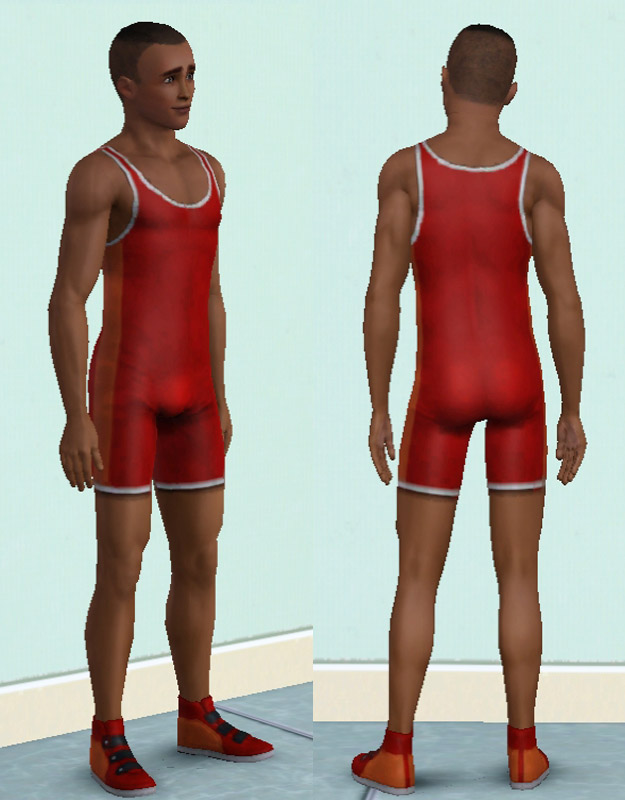
This is a new mesh created by combining a nude top and bottom from the basegame. This is NOT based on the new Store outfit from the Surf's Up Sun and Fun Collection.
Details at a Glance
| CAStable | Designs | Channels | Presets | Morphs | Catagory | Ages |
|---|---|---|---|---|---|---|
| Yes | Two | Three | Three | Yes | Athletic | YA/A |
This outfit is for Young Adult and Adult males and can be found under full body outfits in the Athletic clothing catagory.
The outfit comes in three preset designs, shown in the attached images.
There are two different base designs each with three CAStable areas. These are the main body, secondary colour, and clothing hems.
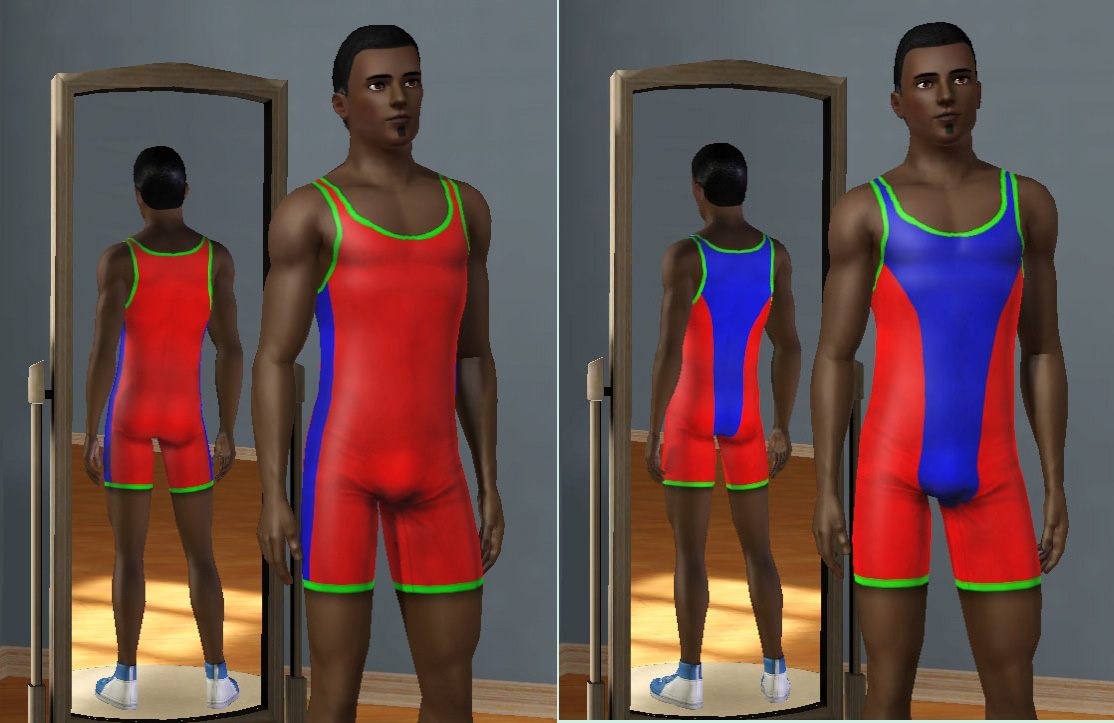
The second preset also features a none-CASTable logo on the back.

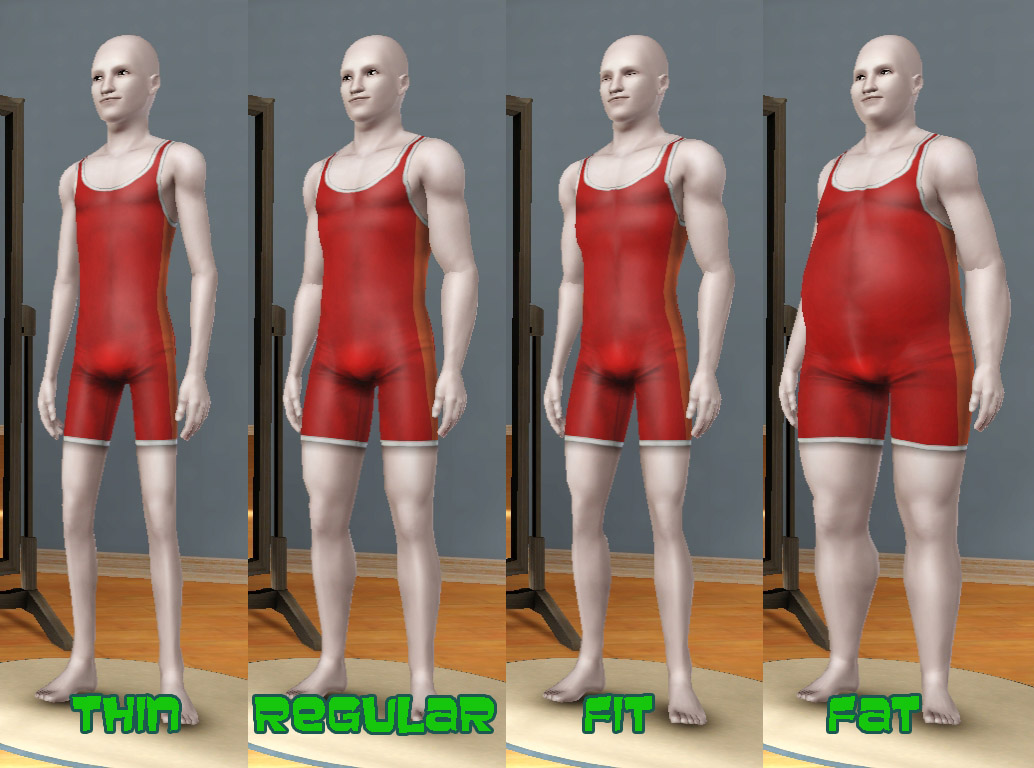
All morphs are included and work correctly so that any Sim of any size may wear it.
Clothing detailing includes slight muscle definition so that the outfit does not look flat, but not too much that it looks odd on larger Sims.
Polygon Counts:
High - 2132
Medium - 1256
Low - 682
Additional Credits:
s3pe,
milkshape,
TSR Workshop,
Photoshop,
robokitty for her "junk" textures
This is a new mesh, and means that it's a brand new self contained object that usually does not require a specific Pack (although this is possible depending on the type). It may have Recolours hosted on MTS - check below for more information.
|
MM_MaleSinglet.zip
Download
Uploaded: 8th Aug 2013, 486.0 KB.
6,205 downloads.
|
||||||||
| For a detailed look at individual files, see the Information tab. | ||||||||
Install Instructions
1. Click the download button, or the filename, to download the file to your computer.
2. Extract the zip, rar, or 7z file. Now you will have either a .package or a .sims3pack file.
For Package files:
1. Cut and paste the file into your Documents\Electronic Arts\The Sims 3\Mods\Packages folder. If you do not already have this folder, you should read the full guide to Package files first: Sims 3:Installing Package Fileswiki, so you can make sure your game is fully patched and you have the correct Resource.cfg file.
2. Run the game, and find your content where the creator said it would be (build mode, buy mode, Create-a-Sim, etc.).
For Sims3Pack files:
1. Cut and paste it into your Documents\Electronic Arts\The Sims 3\Downloads folder. If you do not have this folder yet, it is recommended that you open the game and then close it again so that this folder will be automatically created. Then you can place the .sims3pack into your Downloads folder.
2. Load the game's Launcher, and click on the Downloads tab. Find the item in the list and tick the box beside it. Then press the Install button below the list.
3. Wait for the installer to load, and it will install the content to the game. You will get a message letting you know when it's done.
4. Run the game, and find your content where the creator said it would be (build mode, buy mode, Create-a-Sim, etc.).
Extracting from RAR, ZIP, or 7z: You will need a special program for this. For Windows, we recommend 7-Zip and for Mac OSX, we recommend Keka. Both are free and safe to use.
Need more help?
If you need more info, see:
- For package files: Sims 3:Installing Package Fileswiki
- For Sims3pack files: Game Help:Installing TS3 Packswiki
Loading comments, please wait...



Uploaded: 8th Aug 2013 at 10:04 PM
Updated: 10th Aug 2013 at 5:50 PM
-
-
-
-
-
-
by omegastarr82 6th Sep 2010 at 3:01am
-
by Kiara24 3rd Sep 2010 at 1:28am
 20
30.5k
56
20
30.5k
56
-
by chasmchronicle updated 14th Nov 2012 at 3:51am
20
68.3k
216
Male » Everyday » Young Adult
-
Adult Male Athletic Riding Outfit Fix
by SimsMatthew 10th May 2013 at 10:25pm
-


-

Unlocked and Recoloured "Metaleasy" Garden Arch
by Menaceman44 updated 18th Sep 2019 at 6:04pm
A file that unlocks the decorative garden arch for use on regular Lots and adds extra swatches. more...
 10
15.9k
86
10
15.9k
86
-
TS3 > TS4 The Twinbrook Tandem Pet House
by Menaceman44 updated 27th May 2025 at 3:37pm
The Twinbrook Tandem pet house converted from TS3 for use in TS4. more...
+1 packs
17 78.5k 133 Cats and Dogs
-
Replacement Seasons Butterflies
by Menaceman44 20th Apr 2008 at 4:29pm
After seeing the blue replacement butterflies created by simsample in this thread> Seasons Butterfly Replacement , I decided to create more...
 +1 packs
8 11k 12
+1 packs
8 11k 12 Seasons
-
by Menaceman44 2nd Jun 2014 at 8:44pm
A retexture of the ITF food synthesiser to appear more contemporary. more...
+1 packs
17 22.6k 83 Into the Future
-
Child Muscle Costume Top Hider/Recat
by Menaceman44 updated 1st Aug 2011 at 9:58pm
The male child muscle costume top no longer for the swimwear catagory or hidden completely. more...
+1 packs
37 37.2k 95 Generations
-
Thackeray Chair Name Correction
by Menaceman44 24th Sep 2008 at 7:26pm
I made this package so that the naming of the Thackeray chair from Apartment Life is consistent throughout the catalogue more...
+1 packs
2 11.8k 20 Apartment Life
-
TS2>TS3 Rackmaster 850 Bowling Ball Rack Conversion
by Menaceman44 22nd May 2013 at 3:14pm
A conversion of the deco bowling ball rack from TS2 Night Life. more...
13
25.6k
89
-
Potty Master 3000 *added recolours 03-2009*
by Menaceman44 updated 17th Mar 2009 at 7:18pm
:new: I have now added 6 recolour files to the post. Colours available are; white, black, pink, red, green, yellow. more...
5
16.8k
13
-
Simlish ITF SimCity Poster Texture Replacement
by Menaceman44 2nd Dec 2013 at 8:18pm
A Simlish texture replacment for the ITF SimCity poster more...
-
by Menaceman44 updated 9th Sep 2022 at 7:36pm
A door designed for use on toilet stalls. Comes in 14 colours. more...
87
125.9k
472