
 Sign in to Mod The Sims
 LiftCo Dumbwaiter
 LiftCo Dumbwaiter


Screenshot.jpg - width=506 height=527
Screenshot-2.jpg - width=1008 height=725
Preset Designs
Screenshot-3.jpg - width=563 height=768
CASt Channels
Screenshot-4.jpg - width=544 height=768
Collecting food
Screenshot-5.jpg - width=560 height=768
Ordering food
Screenshot-6.jpg - width=591 height=768
Disposing of trash
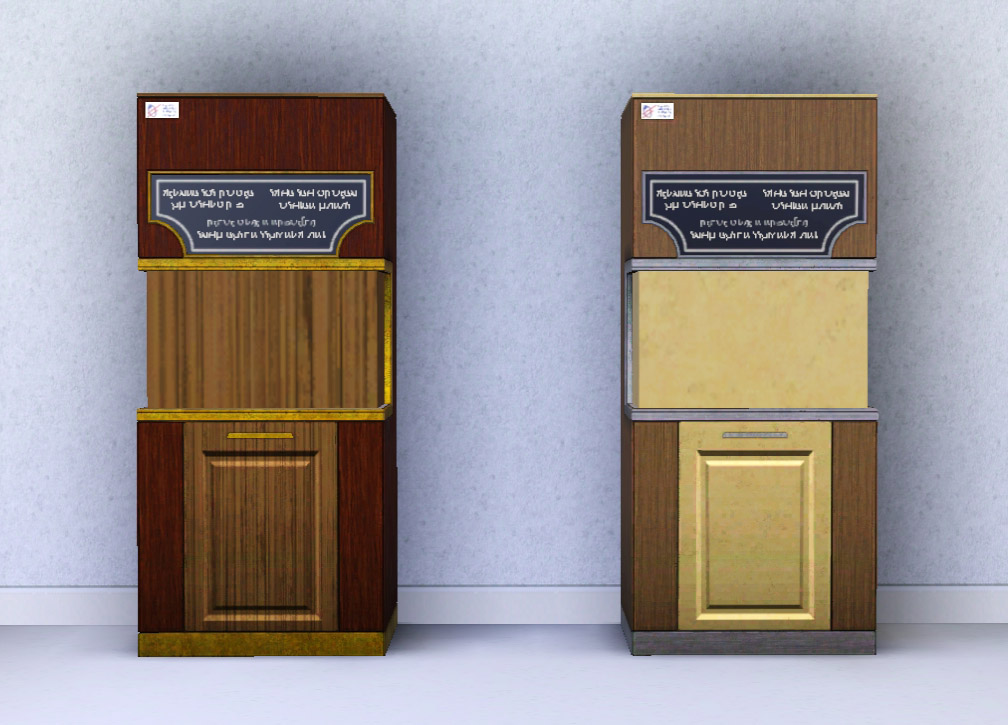
I liked that when placed on a community lot it will spawn a waiter and visiting Sims will make use of it as a functional restaurant.
What I didn't like was that it didn't fit with older themes.
As a result I have retextured it to look like a dumbwaiter instead.
It comes in two preset designs, seen above, with four CAStable channels. It can be found under Kitchen > Refrigerators / Stoves and Appliances > Large Appliances
It retains all of its original functionality, including the Advanced Technology skill gain.
The digital display has been removed and made to look like a chalk board so that it now appears as if Sims are reading from the menu when they make their selection.
Digital sounds can still be heard when new recipes are programmed in but removing this is beyond my skillset.
Many, many thanks to Bloomsbase for helping me beat this object into working submission.
Polygon Counts:
High = 1323
Medium = 326
Additional Credits:
Photoshop,
Milkshape,
TSR Workshop,
s3pe.
This is a new mesh, and means that it's a brand new self contained object that usually does not require a specific Pack (although this is possible depending on the type). It may have Recolours hosted on MTS - check below for more information.
|
MM_Dumbwaiter.zip
Download
Uploaded: 2nd Jun 2014, 244.5 KB.
3,191 downloads.
|
||||||||
| For a detailed look at individual files, see the Information tab. | ||||||||
Install Instructions
1. Click the download button, or the filename, to download the file to your computer.
2. Extract the zip, rar, or 7z file. Now you will have either a .package or a .sims3pack file.
For Package files:
1. Cut and paste the file into your Documents\Electronic Arts\The Sims 3\Mods\Packages folder. If you do not already have this folder, you should read the full guide to Package files first: Sims 3:Installing Package Fileswiki, so you can make sure your game is fully patched and you have the correct Resource.cfg file.
2. Run the game, and find your content where the creator said it would be (build mode, buy mode, Create-a-Sim, etc.).
For Sims3Pack files:
1. Cut and paste it into your Documents\Electronic Arts\The Sims 3\Downloads folder. If you do not have this folder yet, it is recommended that you open the game and then close it again so that this folder will be automatically created. Then you can place the .sims3pack into your Downloads folder.
2. Load the game's Launcher, and click on the Downloads tab. Find the item in the list and tick the box beside it. Then press the Install button below the list.
3. Wait for the installer to load, and it will install the content to the game. You will get a message letting you know when it's done.
4. Run the game, and find your content where the creator said it would be (build mode, buy mode, Create-a-Sim, etc.).
Extracting from RAR, ZIP, or 7z: You will need a special program for this. For Windows, we recommend 7-Zip and for Mac OSX, we recommend Keka. Both are free and safe to use.
Need more help?
If you need more info, see:
- For package files: Sims 3:Installing Package Fileswiki
- For Sims3pack files: Game Help:Installing TS3 Packswiki
Loading comments, please wait...



 View with Names
Uploaded: 2nd Jun 2014 at 8:44 PM
Updated: 23rd Jun 2016 at 11:57 PM
#synthesizer, #synthesiser, #synth, #food, #dumb, #waiter
-

by nanisim 14th Jan 2010 at 6:34pm
 19
38.8k
63
19
38.8k
63
-
-

by Lisen801 updated 12th Oct 2012 at 4:25pm
17
46.6k
142
-
by Nysha 4th Dec 2010 at 11:40pm
43
52.8k
197
-
-
by Lisen801 updated 25th May 2012 at 2:01pm
28
57.7k
128
-
-

by shiromori 18th Oct 2013 at 4:26am
28
22.3k
85
-
-
Magic Cauldron Food Synthesizer
by Lost Pantheon 2nd Feb 2024 at 9:06pm
+1 packs
4 3.6k 16 Into the Future


-

by Menaceman44 3rd Apr 2010 at 5:45pm
A modern looking lamp for your modern homes. more...
8
20.5k
47
-
AL and M&G Duplicate Belt and Cornice Hiders
by Menaceman44 13th Oct 2009 at 2:24am
I was tired of seeing two of each decorative corner piece in the catalogue so created these files which hide more...
 6
23.6k
29
6
23.6k
29
-
TS2>TS3 Aquabox Five-Gallon Aquarium Conversion
by Menaceman44 4th Nov 2012 at 4:29pm
A conversion of the fish tank from The Sims 2. more...
80
111.7k
340
-

by Menaceman44 11th Apr 2008 at 9:37pm
This package is a mesh replacement for the "emtopsweatervestcollarshirt" in its fat state. more...
-
"Bunny in the Rain" CAStable Default
by Menaceman44 13th May 2014 at 6:09pm
A default replacement to enable CASt. more...
-

Dirt Overlay Default Replacement
by Menaceman44 23rd Mar 2015 at 9:07pm
A file to alter the dirt overlay for low hygiene to only show on a Sim's hands and face. more...
-
TS2>TS3 Touch of Teak Plymouth Armoire Conversion
by Menaceman44 27th Mar 2013 at 6:04pm
The Sims 2 Touch of Teak Plymouth Armoire converted for use in The Sims 3. more...
+1 packs
7 13k 33 Supernatural
-


Orange camper outfit for female teens
by Menaceman44 20th Dec 2007 at 9:22pm
This is the result of me creating a fix for a MAXIS error with this outfit's mesh. more...
-


Simlish It's On Us T-shirt Texture Defaults
by Menaceman44 updated 24th Jun 2022 at 10:13pm
Simlish texture replacements for the It's On Us male and female tees. more...
-
TS2>TS3 Tall and Terrible Armoire By Darkness Conversion
by Menaceman44 28th Jun 2013 at 2:53pm
The Tall and Terrible Armoire by Darkness converted from TS2 Teen Stuff to TS3. more...
+1 packs
3 13.3k 47 Supernatural


Packs Needed
| Expansion Pack | |
|---|---|
| Into the Future |