
 Sign in to Mod The Sims
 Toscana Piccolo
 Toscana Piccolo


back.jpg - width=1024 height=640
bath01.jpg - width=1024 height=640
bath02.jpg - width=1024 height=640
bedroom.jpg - width=1024 height=640
floor01.jpg - width=1024 height=640
floor02.jpg - width=1024 height=640
front.jpg - width=1024 height=640
hall.jpg - width=1024 height=640
kitchen.jpg - width=1024 height=640
living.jpg - width=1024 height=640



Google tells me that translates to Small Tuscan, but I know Google can be quite erratic in it's translations. But the words look elegant and exotic so in my twisted reality that name will work! This lot has been months in the making, not this specific style, but the attempt at building a unique and different home on a 10x10 lot. I've had hundreds of failed attempts because they all looked like little cabins or tall modern boxes colored with crayola neon colors.
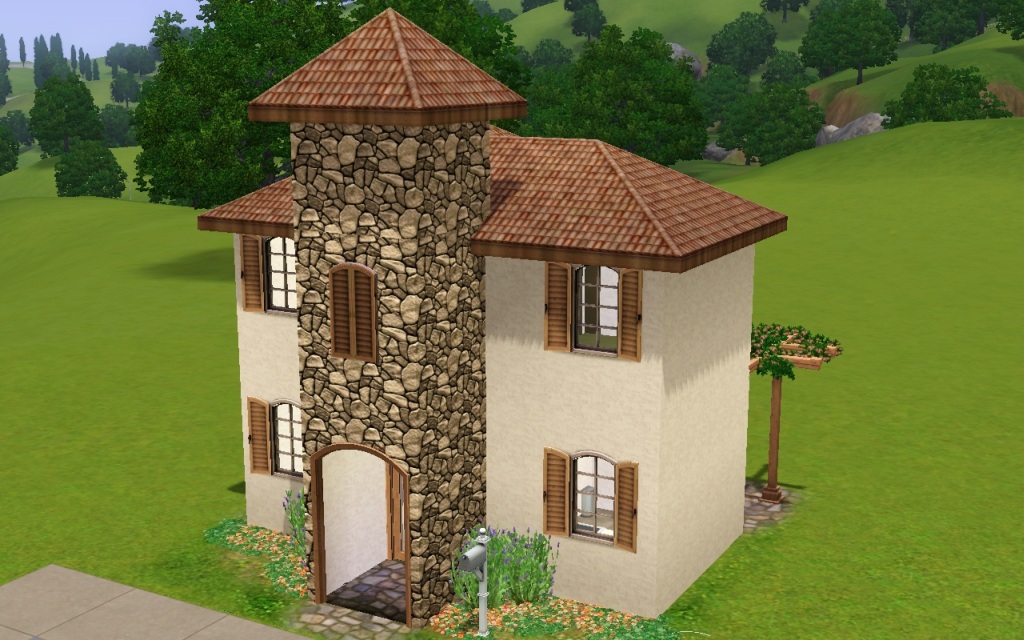
This house pretty much takes up edge to edge, but it is still plenty roomy inside. Designed for a single Sim or a couple it has one bedroom upstairs with an attached bath, a reading nook in the upstairs hall, a large open living and dining area with the kitchen just through the arch. The outside has a small patio that is ready for a lounge chair or maybe a few plants. Colored in warm earth tones that Google assures me is in the Tuscan style, but again...Google sometimes bends the truth.

Compatiblity
I have all EPs/SPs and I've used items from each one. You can install this lot if you don't have the same EPs, the game will just substitute other items for the missing EP items. I recommend you not use this without WA though, as all the windows are from that EP.
Lot Size: 1x1
Lot Price: §29,878 / §20,717
|
HL_Toscana Piccolo.rar
Download
Uploaded: 18th Dec 2010, 641.9 KB.
908 downloads.
|
||||||||
| For a detailed look at individual files, see the Information tab. | ||||||||
Install Instructions
1. Click the filename or the download button to download the file to your computer.
2. Extract the zip, rar, or 7z file.
2. Select the .sims3pack file you got from extracting.
3. Cut and paste it into your Documents\Electronic Arts\The Sims 3\Downloads folder. If you do not have this folder yet, it is recommended that you open the game and then close it again so that this folder will be automatically created. Then you can place the .sims3pack into your Downloads folder.
5. Load the game's Launcher, and click on the Downloads tab. Select the house icon, find the lot in the list, and tick the box next to it. Then press the Install button below the list.
6. Wait for the installer to load, and it will install the lot to the game. You will get a message letting you know when it's done.
7. Run the game, and find your lot in Edit Town, in the premade lots bin.
Extracting from RAR, ZIP, or 7z: You will need a special program for this. For Windows, we recommend 7-Zip and for Mac OSX, we recommend Keka. Both are free and safe to use.
Need more help?
If you need more info, see Game Help:Installing TS3 Packswiki for a full, detailed step-by-step guide!
Loading comments, please wait...


 View with Names
Uploaded: 18th Dec 2010 at 10:42 PM
-
-
-
-
-
eudoxia - 10x10 starter (no cc/store content)
by farfalle 8th Feb 2012 at 6:03am
 +2 packs
16 17.8k 26
+2 packs
16 17.8k 26 World Adventures
 Generations
-
by lavendergrrl83 29th Mar 2012 at 4:10pm
+6 packs
6 14.8k 12 World Adventures
 High-End Loft Stuff
 Ambitions
 Late Night
Generations
Late Night
Generations
 Pets
Pets
-
-
-
-
by plumfrog 27th Sep 2023 at 8:42pm
+19 packs
4 5.4k 17 World Adventures
High-End Loft Stuff
Ambitions
 Fast Lane Stuff
Late Night
Fast Lane Stuff
Late Night
 Outdoor Living Stuff
Generations
Outdoor Living Stuff
Generations
 Town Life Stuff
 Master Suite Stuff
Pets
Master Suite Stuff
Pets
 Katy Perry Stuff
 Showtime
 Diesel Stuff
 Supernatural
 70s, 80s and 90s Stuff
 Seasons
 University Life
 Island Paradise
 Into the Future


-
by HugeLunatic 20th Apr 2013 at 11:01pm
Description This small, compact fridge is good for more than just snacking! more...
 +1 packs
18 29.4k 75
+1 packs
18 29.4k 75 University
-
Base Game Maxis Match Bed Recolors
by HugeLunatic 12th Feb 2009 at 3:29pm
Five Maxis Base game beds recolored with 5 Maxis Match textures plus one of my own. more...
22
43.8k
95
-
C-C-C-Chandelower - Lighting Fix
by HugeLunatic updated 17th Jul 2020 at 3:21pm
This fixes the height of the light cast by the M&G two story chandelier. more...
+1 packs
5 9.4k 41 Mansion and Garden
-
by HugeLunatic 1st Feb 2019 at 1:58pm
When I went to recolor the massage table in Island Colors, I found the cushion was not a separate subset more...
+1 packs
3 13.2k 28 Bon Voyage
-
by HugeLunatic 27th Jan 2016 at 3:59pm
Who knew I could still find something hidden in the game files?! more...
18
14.5k
49
-

by HugeLunatic 6th Nov 2012 at 9:07pm
TSS had these cute butterfly walls in it, and I thought it would be the perfect wall for the child more...
9
13k
21
-
Maxis Shower/Tub Combo Backless
by HugeLunatic updated 7th May 2008 at 3:22am
I love to have a combo tub/shower for my smaller homes, but the surround that Maxis put seems much too more...
194
338.2k
821
-
by HugeLunatic 20th Jun 2010 at 11:07pm
The whole swirling, warping, rotating thing with musical notes coming out of the speakers is very annoying and distorts the more...
-

by HugeLunatic 10th Apr 2011 at 3:40pm
Cleo Hwang spends her days puttering in her garden, growing fresh vegetables and herbs to cook with. more...
-
by HugeLunatic 23rd Jul 2011 at 5:08am
Tired of flushing that expensive recolor down the drain? more...
10
32.1k
38


Packs Needed
| Expansion Pack | |
|---|---|
| World Adventures |
| Ambitions |
| Late Night |
About Me
Pet Stories || Dog Agility Items? || Castaway Stories || Holy Simoly Extras
4esf Archive || Holy Simoly Archive || CEP-Extras List || Buyable Game Objects
lunie content from GoS/s2a
 Installation of CEP Extras
-the package with pfiles appended to the name will go into your cep extras folder where your game is installed (typically c drive, you do you)
-the other goes in CEP extra folder in documents.
The following locations are what I am aware of, beyond that you'll have to do some searching.
Downloads Folder:
C:\Users\<user>\Documents\EA Games\The Sims 2 Legacy
C:\Users\<user>\Documents\EA Games\The Sims 2 Ultimate Collection
With multiple launchers, the location for your game install will vary.
C:\Program Files\EA GAMES\The Sims 2 Legacy\TSData\Res\Catalog\zCEP-EXTRA
C:\Program Files\EA GAMES\The Sims 2\TSData\Res\Catalog\zCEP-EXTRA
C:\Program Files (x86)\EA GAMES\The Sims 2\TSData\Res\Catalog\zCEP-EXTRA