
 Sign in to Mod The Sims
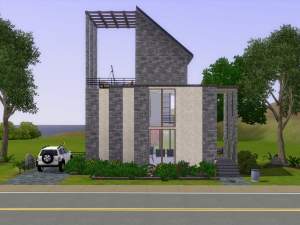
 The Ash Block 1BR+1BA
 The Ash Block 1BR+1BA


1.front.jpg - width=1360 height=768
2.back.jpg - width=1360 height=768
3.bath.jpg - width=1360 height=768
4.bed.jpg - width=1360 height=768
5.dining_kitchen.jpg - width=1360 height=768
6.living.jpg - width=1360 height=768
7.ground_fp.jpg - width=1360 height=768
8.roof_fp.jpg - width=1360 height=768

This single-floor home can suit up to two sims without worrying about their budget as this was built with careful consideration of price. In just less than 16k simoleons, your sim can enjoy a fully furnished home with a modern feel, a thing we thought only rich sims can afford
 .
. This home requires mainly University Life, but stuff from Late Night, Seasons, and 70's, 80's, 90's are sparingly used as well (mostly paintings). You may not have the three latter packs I mentioned, as the game will replace the missing objects with ones from the base game, or nothing at all. I also used the following custom content, and they're not much required:
Simple Shower Tub by HugeLunatic
Bathroom Tiles by HugeLunatic
Lot Size: 15x10
Lot Price (furnished): 15751
Lot Price (unfurnished): 11041
Additional Credits:
Builder's Island - DIY by armiel
|
The Ash Block.rar
Download
Uploaded: 23rd Mar 2017, 3.33 MB.
1,251 downloads.
|
||||||||
| For a detailed look at individual files, see the Information tab. | ||||||||
Install Instructions
1. Click the filename or the download button to download the file to your computer.
2. Extract the zip, rar, or 7z file.
2. Select the .sims3pack file you got from extracting.
3. Cut and paste it into your Documents\Electronic Arts\The Sims 3\Downloads folder. If you do not have this folder yet, it is recommended that you open the game and then close it again so that this folder will be automatically created. Then you can place the .sims3pack into your Downloads folder.
5. Load the game's Launcher, and click on the Downloads tab. Select the house icon, find the lot in the list, and tick the box next to it. Then press the Install button below the list.
6. Wait for the installer to load, and it will install the lot to the game. You will get a message letting you know when it's done.
7. Run the game, and find your lot in Edit Town, in the premade lots bin.
Extracting from RAR, ZIP, or 7z: You will need a special program for this. For Windows, we recommend 7-Zip and for Mac OSX, we recommend Keka. Both are free and safe to use.
Need more help?
If you need more info, see Game Help:Installing TS3 Packswiki for a full, detailed step-by-step guide!
Loading comments, please wait...


 + 1 SPs
Uploaded: 23rd Mar 2017 at 1:46 PM
Updated: 26th Mar 2017 at 12:07 PM
-
by Sakynfoss 3rd Jul 2009 at 5:05pm
 8
21.7k
7
8
21.7k
7
-
by exdemon1120 5th Aug 2009 at 10:04pm
3
7.4k
4
-
-
-
by MotorHalo 19th Sep 2009 at 6:35pm
3
7.8k
-
Wee Barnoid #22 – Budget starter (under 11.000§) – No CC
by plasticbox 8th Nov 2009 at 10:45pm
9
21.2k
23
-
-
-
-


-
.jpg)
1050 East Leisure Lane - TS3 Remake
by aisquared 22nd Apr 2020 at 12:50pm
Another remake from TS2, this time from Desiderata Valley. more...
+3 packs
1 3.6k 4 Ambitions
 Generations
 Pets
Pets
-
-
-

Final Fantasy VIII: Squall Leonhart and Rinoa Heartilly
by aisquared 16th Apr 2020 at 6:42am
4
18.6k
16
-
-
-

Final Fantasy VIII: Seifer Almasy
by aisquared 19th Oct 2020 at 6:23pm
Seifer is another orphan, just like the other five characters, who also is a SeeD candidate. more...
1
3.7k
4
-
-
by aisquared 5th Jul 2024 at 5:46pm
11
2.8k
9
-
by aisquared 25th Jan 2021 at 3:15pm
Do not judge a book by its cover, and so is a house by its exterior? Made from corrugated more...
+11 packs
1 4.1k 18 High-End Loft Stuff
Ambitions
High-End Loft Stuff
Ambitions
 Late Night
 Outdoor Living Stuff
Generations
Outdoor Living Stuff
Generations
 Master Suite Stuff
Pets
Master Suite Stuff
Pets
 Showtime
 Seasons
 University Life
 Into the Future


Packs Needed
| Expansion Pack | |
|---|---|
| Late Night |
| Pets |
| Seasons |
| University Life |
| Stuff Pack | |
|---|---|
| 70s, 80s and 90s Stuff |
About Me
for any questions and feedback feel free to PM me or contact my tumblr.