
 Sign in to Mod The Sims
 Allow Anything With Food - Global Centerpiece Enabler
 Allow Anything With Food - Global Centerpiece Enabler


allowany.png - width=1280 height=957
Screenshot_963-2.png - width=1156 height=650
serve2.png - width=1200 height=675
1-clone.png - width=862 height=332
2-instance.png - width=858 height=422
3-rename-delete.png - width=885 height=392
4-edit.png - width=889 height=313
5-result.png - width=858 height=449
Screenshot_962.png - width=893 height=503
Screenshot_967-2.png - width=1156 height=650


Uumm.. What?
Let's say you have some clutter, you decorate a dining table with it, only to realize that no one can eat normally with it there. Bummer!
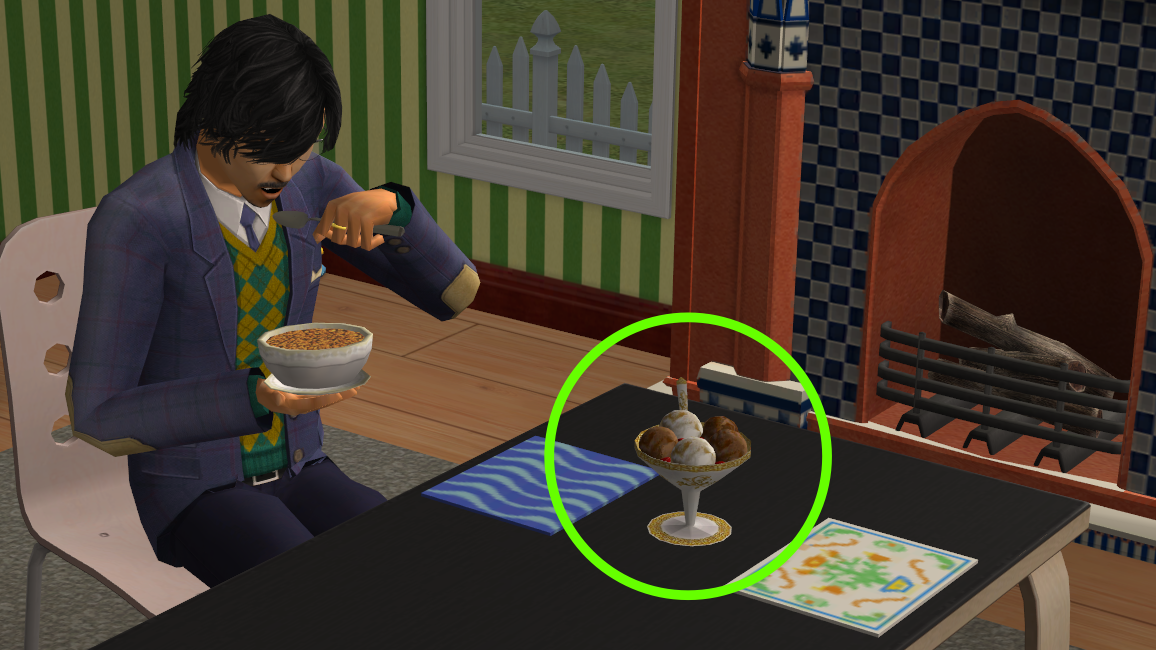
- For Maxis objects, there are mods like Centerpiece Enabler, and a more recent one centerEnable_addons I can't find the link for that adds useful things like homework.
- For custom content clutter, you'd have to edit its package for it to allow table use (or put it on an OMSP). But what if you didn't have to?
So, I present to you a global centerpiece enabler mod, in 2 versions.
AllowAnythingWithFood - All
- Allows all objects indiscriminately, essentially eliminates the "allow with food?" check when serving and eating
- Sims will just be able to put a plate on a table, ignoring whatever is placed in its center slot
- It could be a large pizza box or a bulky computer, though, so be careful what you put on your dining tables with this version
 (not that it breaks anything, only looks weird)
 AllowAnythingWithFood - Select
- Allows objects categorized as potted plant, sculpture, lamp, food, dish and any table deco assigned with my tableware setting mod
- Objects that are already enabled as centerpieces in their own code, will be allowed no matter the category
- Tableware_setter is optional and NOT required for this mod to work
- Read below on what to do with objects that don't fall under these categories
 Requires Any Pack NL+
You need to have any expansion that came out since Night Life (any pack from Night Life to Mansions)
Conflict Resolving- Helpers_AssignTablesChairs - let AllowAnythingWithFood load last, and they may be used together
May conflict with other mods that override the same resources
Ways To Enable Unaffected Objects
If you went with "select" version, you may find that some objects still block eating/serving, even though they look like plants or small sculptures and you totally took them out of that section of the catalog. That's because their internal category is set to something different. There are 2 ways to fix them.
1. Temporary
Pull out the tableware setting mod from Misc/Misc in Buy mode, click "Set Categories for Dining Decor", and give that object any setting (visible or invisible during any time). Edited clutter then gets recognized as an object allowed with food, and people can serve and eat at the table. The caveat is that it'll only affect that specific object instance on that specific lot, not game wide or permanent at all. Also, this method is only suitable for decorative objects.


2. Permanent
If you have some CC that you often use, you may want to consider editing its package file, in short: add a BHAV named "CT - Allow With Food" that would always return true. Extended tutorial below.
- Open CC package in SimPE
- Navigate to Behaviour Functions in Resource Tree
- Right-click on any function in Resource List and click Clone
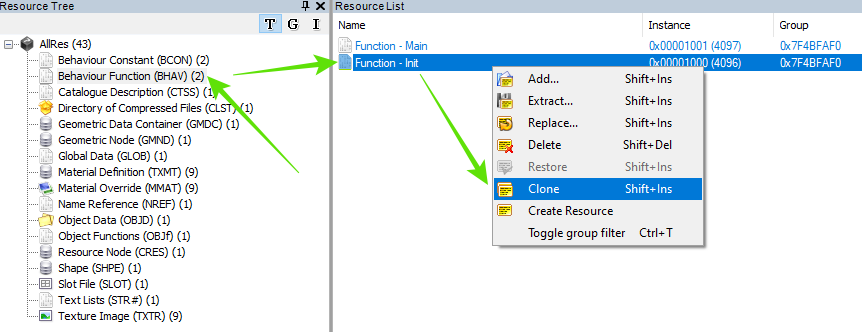
- You'll see a newly created function that's a copy of the one you cloned, now you need to change it
- Click on it and go to Resource Tab
- Note Instance numbers of other functions in the package and give your new function a unique instance that's not been used yet (add +1 to the highest number, for example)
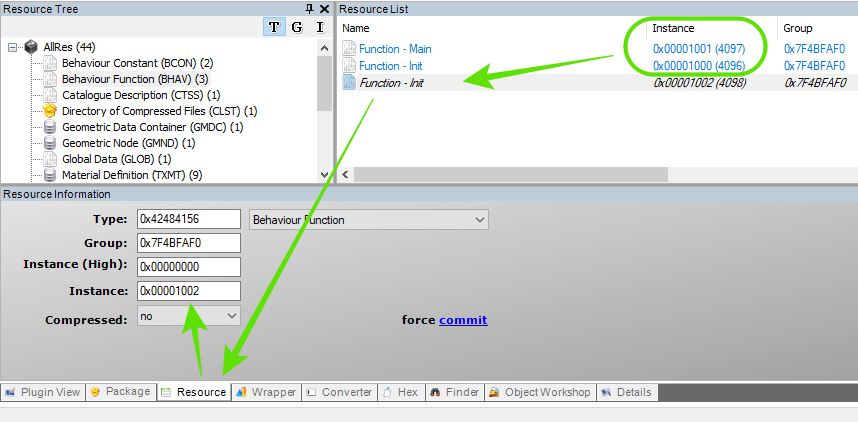
- Make sure that Group number is the same that other functions have (it will usually be 0xFFFFFFFF, but can be another number, like in my example here). If there are BHAVs with more than one Group number, that usually means there are multiple objects in one package, and your life just became harder: you have to figure out which group belongs to the object you want to edit. Look at Object Data resorces, hopefully they have descriptive names and you'll be able to find the one, then copy its Group
- Alright, enough of that, next up - renaming your new function and making it do what it needs to be doing
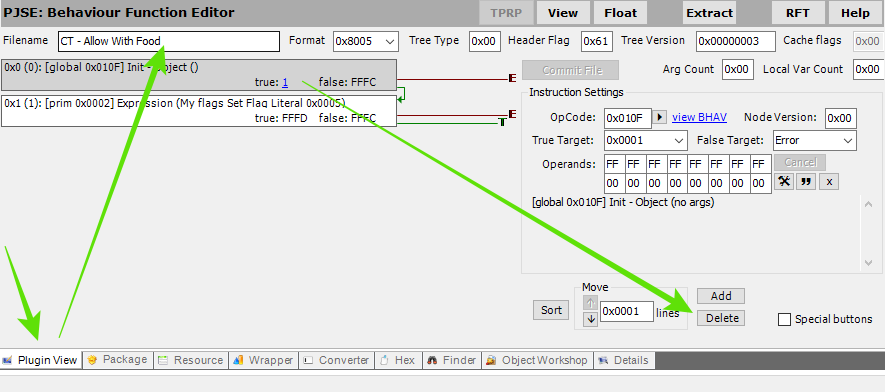
- Click on it if you went away, go to Plugin View and change Filename to "CT - Allow With Food" without quotes
- Then click on the top node (block on the left) and start deleting everything until there's only one node left
- Select the remaining node, change OpCode to 2F3, and change True Target to Return True
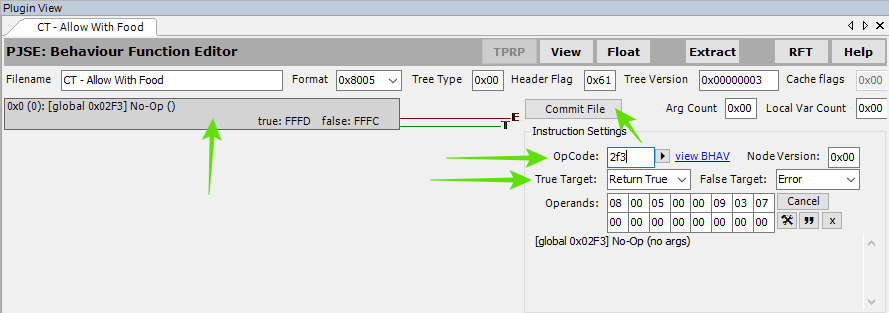
- Commit File and Save the package
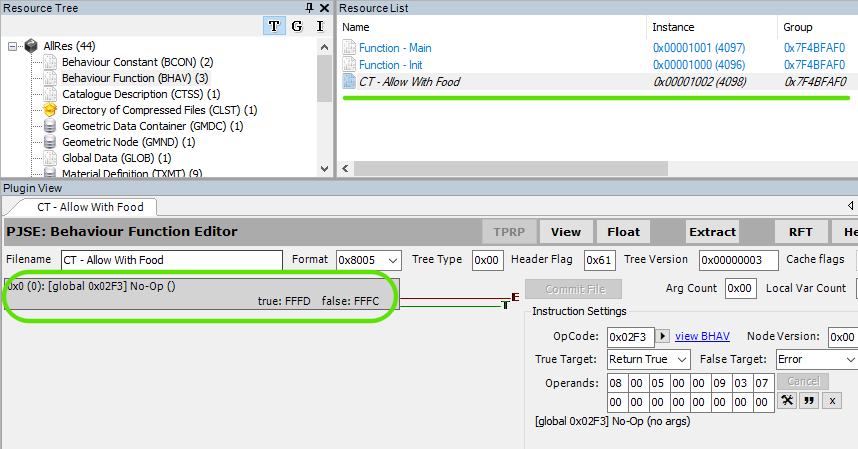
- In the end, you want to see this new function named "CT - Allow With Food", with unique instance and matching group, containing only one node that says "No-Op" and returns true on True Target
Credits & Thanks
Developers of The Sims 2, SimPE, The Compressorizer, PhotoScape X
| Filename | Type | Size |
|---|---|---|
| AllowAnythingWithFood_All.zip | zip | |
| zLamare_AllowAnythingWithFood_All.package | package | 851 |
| Filename | Type | Size |
|---|---|---|
| AllowAnythingWithFood_Select.zip | zip | |
| zLamare_AllowAnythingWithFood_Select.package | package | 1073 |
Note from the Creator:
|
AllowAnythingWithFood_Select.zip
| Allows objects categorized as potted plant, sculpture, lamp, food, dish and any table deco assigned with my tableware setting mod
Download
Uploaded: Yesterday, 928 Bytes.
40 downloads.
|
||||||||
|
AllowAnythingWithFood_All.zip
| Allows all objects indiscriminately
Download
Uploaded: Yesterday, 768 Bytes.
50 downloads.
|
||||||||
| For a detailed look at individual files, see the Information tab. | ||||||||
Install Instructions
1. Download: Click the download link to save the .rar or .zip file(s) to your computer.
2. Extract the zip, rar, or 7z file.
3. Place in Downloads Folder: Cut and paste the .package file(s) into your Downloads folder:
- Origin (Ultimate Collection): Users\(Current User Account)\Documents\EA Games\The Sims™ 2 Ultimate Collection\Downloads\
- Non-Origin, Windows Vista/7/8/10: Users\(Current User Account)\Documents\EA Games\The Sims 2\Downloads\
- Non-Origin, Windows XP: Documents and Settings\(Current User Account)\My Documents\EA Games\The Sims 2\Downloads\
- Mac: Users\(Current User Account)\Documents\EA Games\The Sims 2\Downloads
- Mac x64: /Library/Containers/com.aspyr.sims2.appstore/Data/Library/Application Support/Aspyr/The Sims 2/Downloads
- For a full, complete guide to downloading complete with pictures and more information, see: Game Help: Downloading for Fracking Idiots.
- Custom content not showing up in the game? See: Game Help: Getting Custom Content to Show Up.
- If you don't have a Downloads folder, just make one. See instructions at: Game Help: No Downloads Folder.
Loading comments, please wait...



Uploaded: Yesterday at 10:54 AM
-
-
by Lord Darcy updated 25th Mar 2009 at 7:46am
 +1 packs
93 220.6k 715
+1 packs
93 220.6k 715 Nightlife
-
by simler90 updated 26th Sep 2022 at 9:49pm
19
47.7k
164
-
by EvelynnMama 23rd Jun 2021 at 10:50am
+1 packs
7 16.5k 56 Seasons
-
-
-
-
by HugeLunatic updated 14th Sep 2024 at 4:25pm
+1 packs
8 10.5k 18 Nightlife
-

by jonasn 15th May 2025 at 5:12am
2
3.2k
23


-
-


-
-

by Lamare updated 21st Jun 2026 at 9:18pm
24
4.9k
9
-
-
-
-
-

-

Buyable Sims 3 Game - No Humble Edition
by Lamare 11th Oct 2022 at 5:30pm
This is a video game CD with the Sims 3 on it that your sims can play on any computer. more...
+1 packs
6 8.3k 55 Free Time


