
 Sign in to Mod The Sims
 "Dicke Berta" Stove
 "Dicke Berta" Stove


berta-01.jpg - width=921 height=691
berta_colours01.jpg - width=1020 height=834
berta_colours02.jpg - width=1020 height=834
berta_playtest01.jpg - width=880 height=660
berta_playtest02.jpg - width=880 height=660
berta_presets.jpg - width=1020 height=720
berta_tiling.jpg - width=1020 height=700
brokenchimney.jpg - width=350 height=736
It costs 480§ in game and is in the Build mode catalogue > Fireplaces.
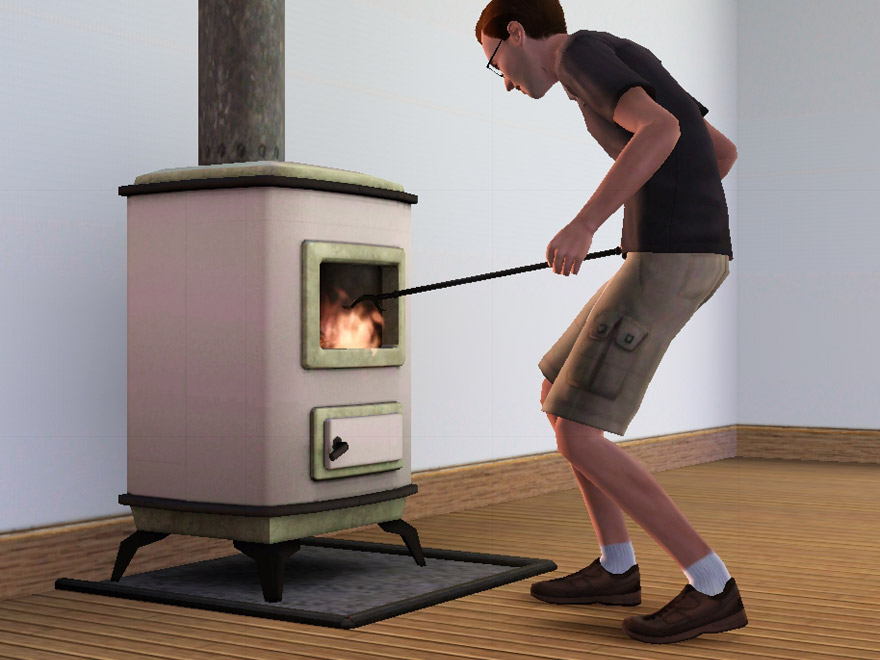
It has three recolourable channels: body, top/bottom/frames, and top and bottom rim plus feet and handle. Berta is cloned from the cheap modern EA fireplace and has the same presets as that – they’re not uber fantastic, but they make sense. See the "presets" screenshot.
Compatibility:
Made from 1.8.25 files. I'm told it works fine in newer games too, see the comments (thanks for letting me know!).
Known issues:
The stove is moved further back to the wall than the original one, so the fire is quite far in front now – flames will often appear to come out of the window, which looks a bit dangerous. (I know that a stove like this would normally have a door .. but sims can't very well poke a fire through a closed door, so I pretend that my sims are all slobs and have lost the door somehow).
There are two seams in the texture on the side and back of the body; this is because the entire witdh of the body wouldn't have fit on the map otherwise (without losing a lot of detail), so I had to cut the mesh somewhere. With more or less monochrome textures, it depends on the angle of light whether you can see it at all; with large floral patterns it's going to be more obvious. See the "tiling" screenshot below.
The UV map of one of the chimney parts is broken – I can't fix this with the tools that I have at the moment. See the "chimneybork" screenshot to see what it looks like. If this turns out to be fixable, I'll fix it; if not, I can live with it (I don't often study the chimneys of my sims' houses in detail).
Known nonissue:
There is a one-pixel line across all of the textures visible in some of the screenshots – I'm pretty sure this is my game, not the texture. If you look very closely on the "Berta-01" and the playtesting screenshots, you can see the same line on the wallpaper as well.
Made in blender with the help of s3pe, s3oc, Aorta, Photoshop, Milkshape, and S3 Object Mesh Tool.
Polygon Counts:
High detail mesh: 963F/1008V; low detail: 329F/423V, plus the chimney bits (those are identical to the EA ones – they're modular, so the total count depends on how many levels your house has).
This is a new mesh, and means that it's a brand new self contained object that usually does not require a specific Pack (although this is possible depending on the type). It may have Recolours hosted on MTS - check below for more information.
|
DickeBerta.zip
Download
Uploaded: 11th Feb 2010, 382.1 KB.
30,384 downloads.
|
||||||||
| For a detailed look at individual files, see the Information tab. | ||||||||
Install Instructions
1. Click the download button, or the filename, to download the file to your computer.
2. Extract the zip, rar, or 7z file. Now you will have either a .package or a .sims3pack file.
For Package files:
1. Cut and paste the file into your Documents\Electronic Arts\The Sims 3\Mods\Packages folder. If you do not already have this folder, you should read the full guide to Package files first: Sims 3:Installing Package Fileswiki, so you can make sure your game is fully patched and you have the correct Resource.cfg file.
2. Run the game, and find your content where the creator said it would be (build mode, buy mode, Create-a-Sim, etc.).
For Sims3Pack files:
1. Cut and paste it into your Documents\Electronic Arts\The Sims 3\Downloads folder. If you do not have this folder yet, it is recommended that you open the game and then close it again so that this folder will be automatically created. Then you can place the .sims3pack into your Downloads folder.
2. Load the game's Launcher, and click on the Downloads tab. Find the item in the list and tick the box beside it. Then press the Install button below the list.
3. Wait for the installer to load, and it will install the content to the game. You will get a message letting you know when it's done.
4. Run the game, and find your content where the creator said it would be (build mode, buy mode, Create-a-Sim, etc.).
Extracting from RAR, ZIP, or 7z: You will need a special program for this. For Windows, we recommend 7-Zip and for Mac OSX, we recommend Keka. Both are free and safe to use.
Need more help?
If you need more info, see:
- For package files: Sims 3:Installing Package Fileswiki
- For Sims3pack files: Game Help:Installing TS3 Packswiki
Loading comments, please wait...


Uploaded: 11th Feb 2010 at 6:34 PM
Updated: 11th Feb 2010 at 9:27 PM
-
by LiamHeartsTheSims 2nd Dec 2009 at 10:58pm
 13
21.7k
6
13
21.7k
6
-
by Lisen801 26th Aug 2010 at 7:04am
36
57.7k
99
-
-
by armiel 31st Jan 2011 at 5:37pm
101
211.1k
381
-
Medieval Fireplaces - Ye Olde Kingdom of Pudding
by The Merrye Makers 14th Jan 2012 at 12:52pm
14
51.4k
128
-
Maisons "Mangalia" and "Mangalia v1"
by catalina_45 18th Apr 2013 at 9:05am
+14 packs
6.8k 7 World Adventures
 High-End Loft Stuff
 Ambitions
 Fast Lane Stuff
 Late Night
 Outdoor Living Stuff
 Generations
 Town Life Stuff
 Master Suite Stuff
 Pets
Pets
 Showtime
 Diesel Stuff
 Supernatural
 Seasons
-
by cottoncandy1 16th Jun 2014 at 10:55am
7
25.5k
37
-
by TheJim07 21st Sep 2015 at 7:53am
4
10.4k
29
-
-
by XnixnBvg 23rd Oct 2025 at 8:19pm
3
4.3k
5


-
by plasticbox 26th Aug 2014 at 11:50pm
One-story house with basement, built on a 20 x 25 lot, furnished for up to five sims. more...
4
9.2k
49
-
Sim-realistic paintings: Watercolours – Landmarks and Ruins
by plasticbox 30th Mar 2009 at 5:13pm
Some more sim-realistic pictures, this time of buildings and landmarks. more...
 13
23.7k
38
13
23.7k
38
-
Château Roquefort – Miniature palace, no CC
by plasticbox 19th Apr 2010 at 11:58pm
(Named after the sim who tested it – not related to the place or the cheese.) A miniature more...
19
38k
56
-
Newbie Road 07b [NL] - Starter House
by plasticbox 2nd Dec 2005 at 5:55pm
Title: Newbie Road 07b [NL] Category: Lots & Housing > Residential > Starter Homes Cost: 19.981 Lot size: 3x2 more...
+1 packs
8 11.9k 4 Nightlife
-
Newbie Road 94 -- Base Game Starter
by plasticbox 9th Oct 2007 at 12:02am
No EPs required. Custom content included, see below. more...
12
24.3k
26
-
Backdoor Lane 57 -- Urban Apartment House (4 units)
by plasticbox 25th Nov 2008 at 11:15pm
Requires NL, OfB and Pets. No custom content. more...
+3 packs
25 52.5k 57 Nightlife
 Open for Business
 Pets
Pets
-
Newbie Road 36a [NL] - Under 30.000
by plasticbox 21st Dec 2005 at 12:06am
Title: Newbie Road 36a [NL] - Under 30.000 Category: Lots & Housing > Residential Cost: 29.988 Lot size: 3x2 more...
+1 packs
8 13.9k 6 Nightlife
-
Modular Tile Panels ? Sparkling/Gristle
by plasticbox 28th Apr 2015 at 8:39am
Tile panels ‒ these are objects, not wallpapers ‒ that use the Maxis “Sparkling Speckled” and “Gristle Glue” textures more...
 17
24.4k
118
17
24.4k
118
-
by plasticbox 6th May 2015 at 10:33pm
What the hell has happened there, has this thing been on fire? :blink: more...
-
Backdoor Lane 16 [NL+OfB] -- Home Business (converted warehouse with small ruin)
by plasticbox updated 1st Apr 2007 at 12:50pm
Cost: 48.057§ Lot: 2x3 Households: 1 Nightlife and OfB required. more...
+2 packs
27 44.7k 48 Nightlife
Open for Business


About Me
– Feel free to recycle, you don’t need to ask.
– For the attribution, please link to the upload you’re using wherever possible (instead of my profile). This is particularly important with edits made for/with different games or game versions.
– If you use my stuff in something you make, please upload the result to a free, accessible, noncommercial site with no more restrictions than these. Code must remain open source; meshes and other material must remain re-usable.
Please do not redistribute any unmodified files – link to the upload post instead.