
 Sign in to Mod The Sims
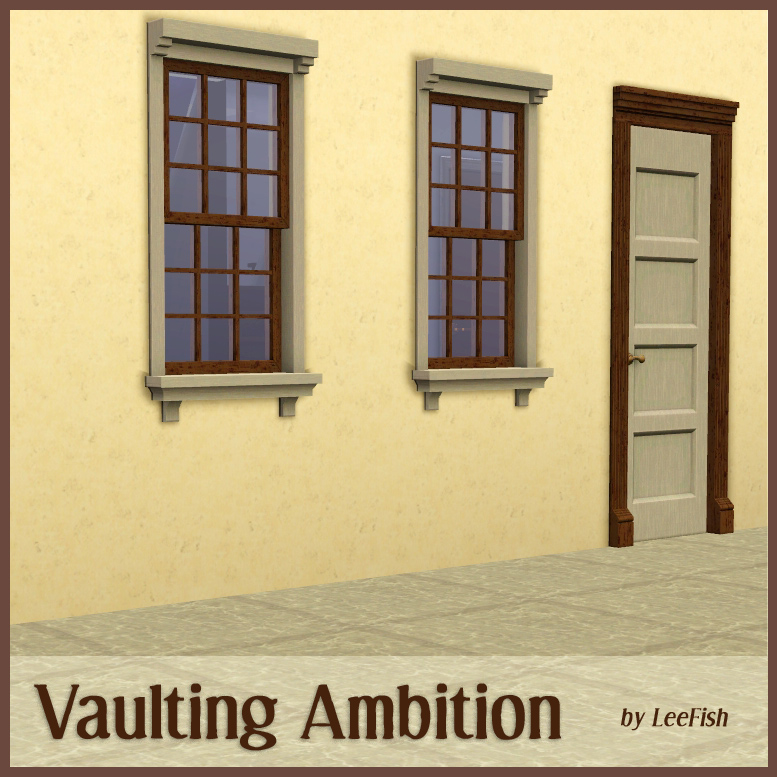
 Vaulting Ambition
 Vaulting Ambition


ambthumb.jpg - width=777 height=777
ambdoorscomparison.jpg - width=1183 height=600
ambdoorssuvmappingall.jpg - width=1183 height=600
ambwindowsuvmappingint.jpg - width=1183 height=600
ambwindowsuvmappingext.jpg - width=1183 height=600
allitems.jpg - width=1183 height=600

| ITEM | PRICE | CATALOG LOCATION | CHANNELS | POLYGONS HIGH/LOW |
|---|---|---|---|---|
| Federal Privacy Window on One Tile | 75 | Build Mode>Windows | 4 | 650/285 |
| Federal Privacy Window Centred | 75 | Build Mode>Windows | 4 | 650/285 |
| Federal Window on One Tile | 100 | Build Mode>Windows | 4 | 1082/397 |
| Federal Window Centred | 100 | Build Mode>Windows | 4 | 1082/397 |
| Caesar's Pathway Repathed | 255 | Build Mode>Doors | 4 | 788/216 |
| Caesar's Two Tile Pathway | 255 | Build Mode>Doors | 4 | 788/216 |
Polygon Counts:
See table in post
Additional Credits:
S3OC, S3PE, Inge Jones, armiel for persuading me these were nice enough to share.
This is a new mesh, and means that it's a brand new self contained object that usually does not require a specific Pack (although this is possible depending on the type). It may have Recolours hosted on MTS - check below for more information.
|
AMBMATCHDoorsbyLeefish.rar
Download
Uploaded: 13th Jan 2012, 41.6 KB.
7,500 downloads.
|
||||||||
|
AMBMatchWindowsbyLeefish.rar
Download
Uploaded: 13th Jan 2012, 106.3 KB.
7,952 downloads.
|
||||||||
| For a detailed look at individual files, see the Information tab. | ||||||||
Install Instructions
1. Click the download button, or the filename, to download the file to your computer.
2. Extract the zip, rar, or 7z file. Now you will have either a .package or a .sims3pack file.
For Package files:
1. Cut and paste the file into your Documents\Electronic Arts\The Sims 3\Mods\Packages folder. If you do not already have this folder, you should read the full guide to Package files first: Sims 3:Installing Package Fileswiki, so you can make sure your game is fully patched and you have the correct Resource.cfg file.
2. Run the game, and find your content where the creator said it would be (build mode, buy mode, Create-a-Sim, etc.).
For Sims3Pack files:
1. Cut and paste it into your Documents\Electronic Arts\The Sims 3\Downloads folder. If you do not have this folder yet, it is recommended that you open the game and then close it again so that this folder will be automatically created. Then you can place the .sims3pack into your Downloads folder.
2. Load the game's Launcher, and click on the Downloads tab. Find the item in the list and tick the box beside it. Then press the Install button below the list.
3. Wait for the installer to load, and it will install the content to the game. You will get a message letting you know when it's done.
4. Run the game, and find your content where the creator said it would be (build mode, buy mode, Create-a-Sim, etc.).
Extracting from RAR, ZIP, or 7z: You will need a special program for this. For Windows, we recommend 7-Zip and for Mac OSX, we recommend Keka. Both are free and safe to use.
Need more help?
If you need more info, see:
- For package files: Sims 3:Installing Package Fileswiki
- For Sims3pack files: Game Help:Installing TS3 Packswiki
Loading comments, please wait...



#ambitions, #EA Match, #Maxis Match, #federal, #leefish, #windows, #doors, #MaxisMatch
-
-
-
by HugeLunatic 15th Jun 2010 at 6:20pm
 61
99.9k
255
61
99.9k
255
-
by HugeLunatic 26th Feb 2011 at 8:12pm
77
109.8k
318
-
by leefish 21st Jan 2012 at 9:45am
21
41.2k
115
-
Medieval Centred Leadlight Door - Ye Olde Kingdom of Pudding
by The Merrye Makers 28th Jan 2012 at 9:31pm
13
45k
119
-
-
-
-
by heaven 24th Oct 2015 at 7:42pm
4
13.7k
43

-

by fanseefish 18th Jul 2011 at 7:30pm
A floor length urinal for the shyer sim... more...
 42
83.4k
124
42
83.4k
124
-
Second Empire Window Expansion Set
by leefish 29th Jun 2009 at 7:53pm
Well, all I can say is FINALLY. more...
+1 packs
30 56.6k 89 Mansion and Garden
-

-


-
-
Medieval Blacksmith - Forge - Ye Olde Kingdom of Pudding
by The Merrye Makers 19th Dec 2011 at 7:49am
From swords to fish hooks for anglers, Ye Olde Kingdom of Pudding blacksmiths used this forge to make anything metal. more...
9
49.9k
103
-

-
Billy Wallshelf - now slotified
by leefish updated 3rd Apr 2011 at 3:52pm
Decorative Billy Wallshelf to match the bookcases more...
+1 packs
24 58k 147 Ikea Home
-
Socialite Expansion Set Part Two
by leefish updated 11th Mar 2011 at 1:25pm
Classical curves window from AL resized for more flexible use more...
+1 packs
24 37.6k 71 Apartment Life
-


Packs Needed
| Expansion Pack | |
|---|---|
 | Ambitions |
About Me
In addition to all the things I have uploaded to MTS I also have a site of my own, leefish.nl. We have free downloads from various creators and accept Sims related uploads from members. Click on the link below to visit the site.
www.leefish.nl
Extra Policy Information
Please feel free to use my meshes in your lots as long as you give me credit for it and please do not share elsewhere as your own work.
The only exception to my policy for uploading with lots is the milk bottle door changer, which should not be uploaded in a lot.
Feel free to include any of my meshes in mesh packs etc in your uploads EXCEPT for on Pay Sites.
If you use my items I would love to know about it, but you don't have to tell me if you don't want to.