Sign in to Mod The Sims
 Island Paradise "Paradise Wave Break Wall" Completer Piece
 Island Paradise "Paradise Wave Break Wall" Completer Piece


WallTiled.jpg - width=1080 height=644
CompleteWave.jpg - width=1024 height=671
TileInPlace.jpg - width=1158 height=565
WallMapping.jpg - width=435 height=590
 I have now added a flipped version of this wall piece for use with sims4.me's flipped wave break wall pieces.
I was confused to discover that the Wave Break Wall from Island Paradise has no piece to show the wave rising out of the water so you must have the wave placed up against a corner of a room or frame it with other wallpapers instead.
The piece I've made here completes the set so that you may have a wave breaking across your wall at whatever point you like, as often as you like.

This wall has one recolourable channel like the original with the same preset. It costs $7 and is also found under misc. walls just like the original.
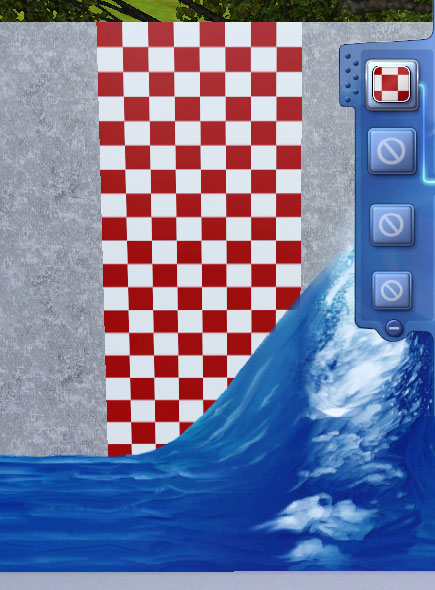
As well as the new wall I have also included a file called MM_wallWaveBreakerDefault to replace the texture of the original "start" of the wave to remove a white line which appears along the left edge. This file is optional but the mural won't look as good without it.
Both files are packaged in the same .zip archive.
The resource replaced by the default file is the wallEP10TIWaveBreak_0x5d4a3e4ebd5ad20d _IMG. Any other package that alters this same resource will conflict.
Additional Credits:
s3pe,
s3oc,
Photoshop,
TSR Workshop.
|
MM_waveBreakRiserFLIPPED.zip
| FLIPPED version for use with sims4.me's flipped wave walls.
Download
Uploaded: 1st Aug 2013, 49.0 KB.
1,405 downloads.
|
||||||||
|
MM_ParadiseWaveBreakRiser.zip
Download
Uploaded: 28th Jul 2013, 130.3 KB.
3,521 downloads.
|
||||||||
| For a detailed look at individual files, see the Information tab. | ||||||||
Install Instructions
1. Click the download button, or the filename, to download the file to your computer.
2. Extract the zip, rar, or 7z file. Now you will have either a .package or a .sims3pack file.
For Package files:
1. Cut and paste the file into your Documents\Electronic Arts\The Sims 3\Mods\Packages folder. If you do not already have this folder, you should read the full guide to Package files first: Sims 3:Installing Package Fileswiki, so you can make sure your game is fully patched and you have the correct Resource.cfg file.
2. Run the game, and find your content where the creator said it would be (build mode, buy mode, Create-a-Sim, etc.).
For Sims3Pack files:
1. Cut and paste it into your Documents\Electronic Arts\The Sims 3\Downloads folder. If you do not have this folder yet, it is recommended that you open the game and then close it again so that this folder will be automatically created. Then you can place the .sims3pack into your Downloads folder.
2. Load the game's Launcher, and click on the Downloads tab. Find the item in the list and tick the box beside it. Then press the Install button below the list.
3. Wait for the installer to load, and it will install the content to the game. You will get a message letting you know when it's done.
4. Run the game, and find your content where the creator said it would be (build mode, buy mode, Create-a-Sim, etc.).
Extracting from RAR, ZIP, or 7z: You will need a special program for this. For Windows, we recommend 7-Zip and for Mac OSX, we recommend Keka. Both are free and safe to use.
Need more help?
If you need more info, see:
- For package files: Sims 3:Installing Package Fileswiki
- For Sims3pack files: Game Help:Installing TS3 Packswiki
Loading comments, please wait...



Uploaded: 28th Jul 2013 at 1:18 PM
Updated: 1st Aug 2013 at 7:42 PM - Addition of new file
-
by daluved1 updated 13th Jan 2011 at 6:20pm
 27
53.2k
107
27
53.2k
107
-
by armiel 27th Jan 2011 at 5:48pm
15
35.9k
96
-
by alexpilgrim 20th Jun 2011 at 7:55pm
61
101.8k
283
-
-
by AdonisPluto 17th Feb 2012 at 7:28pm
12
18.2k
36
-

-
by Jezi Bomb 31st Mar 2014 at 2:42am
19
27k
97
-

by Lo2ta updated 25th Dec 2024 at 8:47am
14
2.4k
16
-
by Lo2ta 3rd Nov 2025 at 6:38pm
605
-

by Lo2ta 26th Feb 2026 at 6:07pm
659
4




-


Pan De Muerto Retail Price Fix
by Menaceman44 updated 4th Aug 2021 at 5:55pm
A fix to ensure the recipe actually costs money to buy and restock in retail stores. more...
 +1 packs
7 13.4k 48
+1 packs
7 13.4k 48 Get to Work
-
Vampires Wall Treatment Recats
by Menaceman44 27th Aug 2021 at 8:25pm
Description I've had these in my own game now for so long that I had actually forgotten about them until the more...
+1 packs
4 9.7k 32 Vampires
-

Get Famous Wall Trim Swatch Fix
by Menaceman44 30th Sep 2024 at 10:26pm
Description While I've been working on wall trims recently, I discovered that there are six additional glass pane swatches for the more...
-
-


Simlish Moschino Stuff CAS Tops
by Menaceman44 30th Dec 2019 at 11:05pm
A file to replace the English text on the Moschino Stuff CAS assets. more...
-
by Menaceman44 14th Sep 2008 at 11:05am
As with my UK Spellbook Fix , this package will correct the wrongly formatted spellbook text in the Dutch version more...
 +1 packs
4 18.8k 7
+1 packs
4 18.8k 7 Apartment Life
-

BlooM's Converted Toddler Pigtail Recolours
by Menaceman44 6th Feb 2008 at 1:16am
I present to you some recolours that I have made of BlooM's Toddler Pigtail Conversion (,72512.msg1118735.html#msg1118735). more...
-
by Menaceman44 28th Sep 2008 at 10:06pm
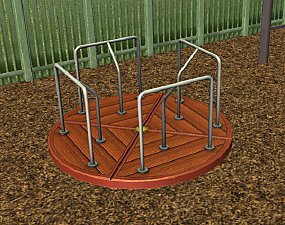
A recolour of the Centrifun roundabout from Apartment Life in wood. more...
+1 packs
12 28.4k 75 Apartment Life
-
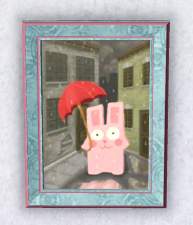
"Bunny in the Rain" CAStable Default
by Menaceman44 13th May 2014 at 6:09pm
A default replacement to enable CASt. more...
-

Multi Language Network Messages Fix
by Menaceman44 9th May 2009 at 4:26pm
Does this seem familiar? With the new AL networking messages the Sim talking to you more...
+1 packs
28 32.1k 42 Apartment Life