
 Sign in to Mod The Sims
 Raised Paneled Walls
 Raised Paneled Walls


panel1-recolors.jpg - width=900 height=447
panel1-setup.jpg - width=900 height=648
panel2-recolors.jpg - width=900 height=307
panel2-setup.jpg - width=900 height=640
panel3-recolors.jpg - width=900 height=362
panel3-setup.jpg - width=900 height=656
raisedpanels-main.jpg - width=900 height=618

These have been fixed! There was a bad bumpmap on the wall that only those of you who's graphics cards actually render bumpmaps could see. If you're like me and your machine doesn't render bumpmaps, you won't be able to see the difference. Anyhoos, the bumpmap is fixed regardless!
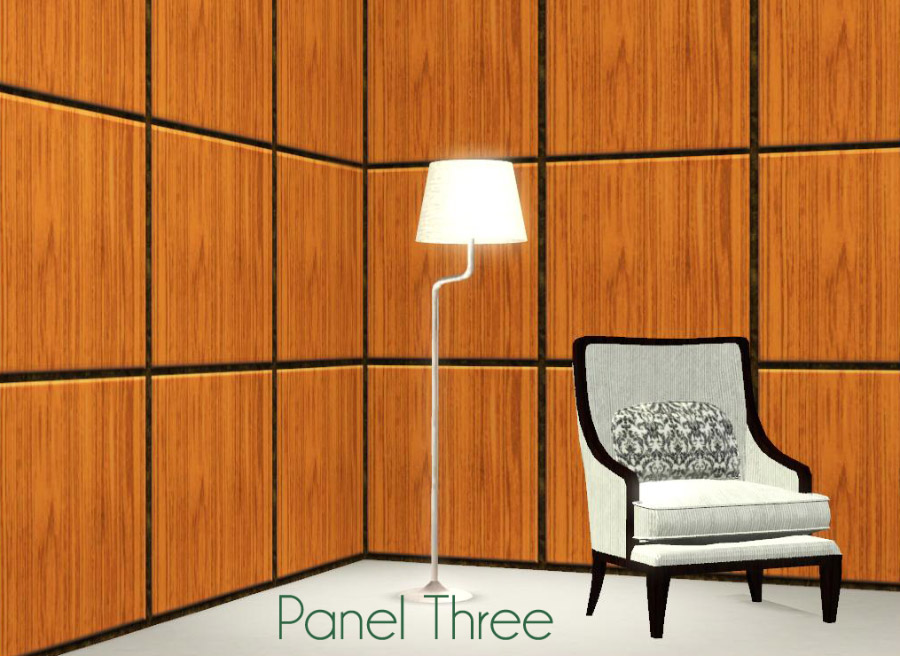
Not much background story on these. I needed raised panel walls for a celebrity house I was decorating and couldn't find any already made, so I made my own.
These are not patterns, they are full walls found under Paneling for 9 simoleons a tile. There are three different versions: Panel One, Panel Two and Panel Three.
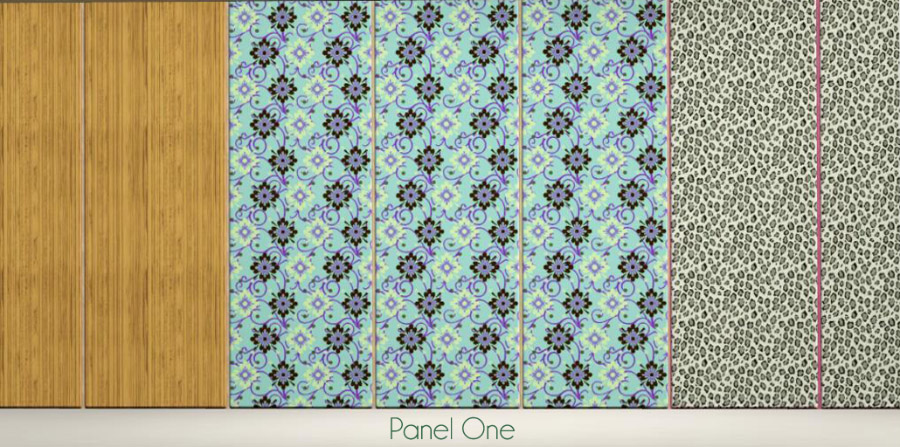
Panel One has two recolorable areas: raised panels and wall.
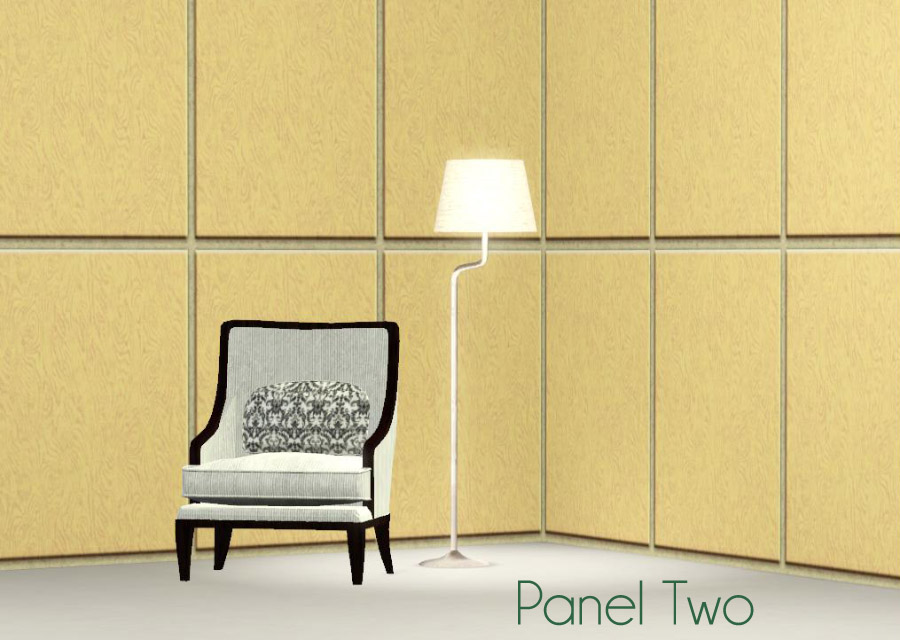
Panel Two has three recolorable areas: top panel, bottom panel and wall.
Panel Three has four recolorable areas: top panel, middle panel, bottom panel and wall.
Additional Credits:
Made with TSRW.
|
Raised Panels Fixed.rar
Download
Uploaded: 13th Jan 2011, 148.7 KB.
18,530 downloads.
|
||||||||
| For a detailed look at individual files, see the Information tab. | ||||||||
Install Instructions
1. Click the download button, or the filename, to download the file to your computer.
2. Extract the zip, rar, or 7z file. Now you will have either a .package or a .sims3pack file.
For Package files:
1. Cut and paste the file into your Documents\Electronic Arts\The Sims 3\Mods\Packages folder. If you do not already have this folder, you should read the full guide to Package files first: Sims 3:Installing Package Fileswiki, so you can make sure your game is fully patched and you have the correct Resource.cfg file.
2. Run the game, and find your content where the creator said it would be (build mode, buy mode, Create-a-Sim, etc.).
For Sims3Pack files:
1. Cut and paste it into your Documents\Electronic Arts\The Sims 3\Downloads folder. If you do not have this folder yet, it is recommended that you open the game and then close it again so that this folder will be automatically created. Then you can place the .sims3pack into your Downloads folder.
2. Load the game's Launcher, and click on the Downloads tab. Find the item in the list and tick the box beside it. Then press the Install button below the list.
3. Wait for the installer to load, and it will install the content to the game. You will get a message letting you know when it's done.
4. Run the game, and find your content where the creator said it would be (build mode, buy mode, Create-a-Sim, etc.).
Extracting from RAR, ZIP, or 7z: You will need a special program for this. For Windows, we recommend 7-Zip and for Mac OSX, we recommend Keka. Both are free and safe to use.
Need more help?
If you need more info, see:
- For package files: Sims 3:Installing Package Fileswiki
- For Sims3pack files: Game Help:Installing TS3 Packswiki
Loading comments, please wait...


Uploaded: 5th Jan 2011 at 10:57 AM
Updated: 13th Jan 2011 at 6:10 PM
-
by HugeLunatic 3rd May 2010 at 6:55pm
 15
38.9k
72
15
38.9k
72
-
by armiel 27th Jan 2011 at 5:48pm
15
36.1k
96
-
by alexpilgrim 20th Jun 2011 at 7:55pm
61
102.2k
286
-
by AdonisPluto 17th Feb 2012 at 7:28pm
12
18.3k
36
-
-
by hazelnutter100 28th Nov 2022 at 11:55pm
9
8.2k
34
-
by Lo2ta updated 25th Dec 2024 at 8:47am
14
2.5k
16
-
by Lo2ta 28th Oct 2025 at 5:33pm
1
1.2k
2
-
by Lo2ta 3rd Nov 2025 at 6:38pm
727
1
-

by Lo2ta 26th Feb 2026 at 6:07pm
1
849
4



-

Pole Position -- A Pole Dancing Pose Set
by Puss 'N Heels 10th Aug 2012 at 9:54pm
Shake your moneymaker ... more...
101
304.2k
438
-
White Formula Default Replacement Bottle
by daluved1 15th Feb 2010 at 10:21pm
Ever since TS1 I've always hated how the baby formula was always green. more...
58
154.3k
372
-
-
The Medieval Kitchen Part 1 - Ye Olde Kingdom of Pudding
by The Merrye Makers 7th Jan 2012 at 2:24am
A sink, stove, refrigerator, and two decorative cooking pots for medieval castle kitchens. Made by Hekate999 for The Merrye Makers. more...
25
91.2k
210
-
-
-
-
-
Medieval Community Lots - Ye Olde Kingdom of Pudding
by The Merrye Makers 16th Dec 2011 at 5:13pm
Ye Olde Kingdom of Pudding Community Lots Greetings, good gentles/ladies. more...
+4 packs
25 46.4k 123 World Adventures
 Ambitions
 Late Night
 Generations
-
by daluved1 15th Jan 2011 at 12:14pm
Do you love retro? This set was originally for a Lucy Desi Ball sim I was working on, but...she's more...
28
95.5k
204
Female » Mixed Sets » Adult



About Me
Because my policy is really inconsistent on my uploads, I've decided to make an official policy! So whatever you see here on my profile is my current policy. You may disregard any ''policy'' information you see on the actual upload itself.
-You may use my creations with sims
-You may use my objects with lots.
-You may retexture my meshes.
-You may include my meshes with retextures.
-You may NOT upload my creations with sims
-You may NOT upload my objects with lots.
-You may NOT upload my creations to paysites.
-You may NOT upload my creations to the exchange.
-Always credit me with a link
-I do NOT take requests!