Sign in to Mod The Sims
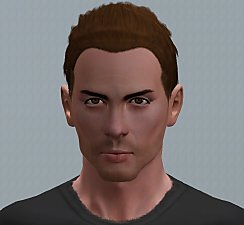
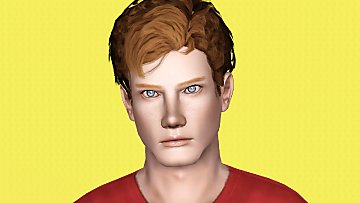
 Josh Sullivan. A guy next door
 Josh Sullivan. A guy next door
SCREENSHOTS


1.jpg - width=998 height=767
2.jpg - width=988 height=767
3.jpg - width=777 height=765
4.jpg - width=728 height=766
5.jpg - width=795 height=765
6.jpg - width=802 height=762
7.jpg - width=702 height=754
Downloaded 3,677 times
130 Thanks
16 Favourited
13,705 Views
Say Thanks!
Thanked!

Josh is typical neardy guy - he is extremely inteligent, socially akward, have most interests in computers, computer games and science fiction.To level up his human paladin until mamimum level in World of Warcraft to Josh is more easy than find the friends or lover.
Despite this, he thinks that one day he finds a proper mate, creates a family and won't be so lonely like he feels now.
Personal Info
Traits: Computer Whiz, Socially Akward (requires University EP), Genius, Neurotic, Hates the Outdoors.
Favorites:
Colour - Green.
Music - Geek Rock (requires University EP).
Food - Hotdogs.
Lifetime Wish: Surrounded by family.
CC Used
Skin "Hot Edition" by navetsea (used as default)
Eyes by watermelon
Eyebrowns(default replacement) at Simple Life
Kisei Nero Hair retexture by Shock & Shame
Sliders Used
Facial Sliders by Bella3lek4
Chin Cleft Slider by TumTum Simiolino
Note
- Sim packaged with default skintone.
- Used Master Controller slider hack x5.
- Clothes, shoes and accessories from Base Game and Late Night EP.
Advertisement:
|
Josh_Sullivan.rar
Download
Uploaded: 29th Mar 2014, 339.4 KB.
3,678 downloads.
|
||||||||
| For a detailed look at individual files, see the Information tab. | ||||||||
Install Instructions
Quick Guide:
1. Click the filename or the download button to download the sim to your computer.
2. Extract the zip, rar, or 7z file.
2. Select the .sim file you got from extracting.
3. Cut and paste it into your Documents\Electronic Arts\The Sims 3\SavedSims folder. If you do not have this folder yet, it is recommended that you open the game, enter Create-a-Sim, and save a sim to the sim bin to create this folder, rather than doing so manually. After that you can close the game and put the .sim file in SavedSims
4. Once the .sim file is in SavedSims, you can load the game, and look for your sim in the premade sims bin in Create-a-Sim.
Extracting from RAR, ZIP, or 7z: You will need a special program for this. For Windows, we recommend 7-Zip and for Mac OSX, we recommend Keka. Both are free and safe to use.
Need more help?
If you need more info, see Game Help:Installing TS3 Simswiki for a full, detailed step-by-step guide! Special Installation Instructions
1. Click the filename or the download button to download the sim to your computer.
2. Extract the zip, rar, or 7z file.
2. Select the .sim file you got from extracting.
3. Cut and paste it into your Documents\Electronic Arts\The Sims 3\SavedSims folder. If you do not have this folder yet, it is recommended that you open the game, enter Create-a-Sim, and save a sim to the sim bin to create this folder, rather than doing so manually. After that you can close the game and put the .sim file in SavedSims
4. Once the .sim file is in SavedSims, you can load the game, and look for your sim in the premade sims bin in Create-a-Sim.
Extracting from RAR, ZIP, or 7z: You will need a special program for this. For Windows, we recommend 7-Zip and for Mac OSX, we recommend Keka. Both are free and safe to use.
Need more help?
If you need more info, see Game Help:Installing TS3 Simswiki for a full, detailed step-by-step guide! Special Installation Instructions
- If you get an error that says "This content requires expansion pack data that is not installed", please use Clean Installer to install this sim.
Advertisement:
Loading comments, please wait...
Author

Download Details
Packs:
None, this is Sims 3 base game compatible!
Uploaded: 29th Mar 2014 at 11:48 PM
Updated: 30th Mar 2014 at 6:50 AM
Uploaded: 29th Mar 2014 at 11:48 PM
Updated: 30th Mar 2014 at 6:50 AM
Tags
Other Download Recommendations:



More downloads by Nemiga:
See more