
 Sign in to Mod The Sims
 "Katie" - 80s/90s Style Large Pearl/Resin Earrings
 "Katie" - 80s/90s Style Large Pearl/Resin Earrings


preview.jpg - width=800 height=800
Screenshot-944.jpg - width=800 height=800
Screenshot-943.jpg - width=800 height=800
Screenshot-941.jpg - width=800 height=800
katie.jpg - width=768 height=768
Screenshot-777.jpg - width=768 height=768

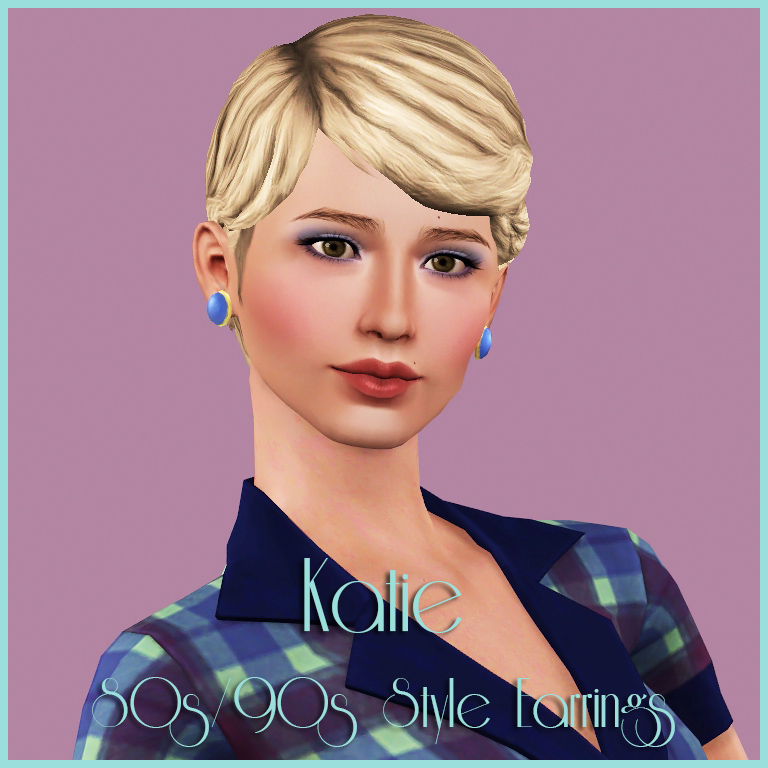
As you typety type away on your keyboard, a harbinger of dated morals, having found yourself in a prime position as a moderator on a well known site for bored and belligerent mothers, you think back to your fashion heyday in the early 90s! Ladies lunching incognito in BHS Cafe, browsing for unique (but really mass produced) nick nacks in Past Times. The eyeshadow was blue, the blush was pink, the 80s-echo feminine power suits were jewel-tone and the oft matching earrings were chunky and often clip-on. You miss those earrings. The youth of today don't know the pain of a clip-on earring you muse, that is why they're so...you can't quite find the right word to use without risking a publicity nightmare for the site, splashed across the pages of some liberal rag and ultimately forced to resign as a moderator on your beloved site. Oh the horror! You straighten out the Cath Kidston table cloth under your laptop and delete your post.
Yeah, that just happened. These are earrings by the way. They're converted from TS4, with a little bit of hand painting, some pulling of textures from TS3 and a wish and a dream.
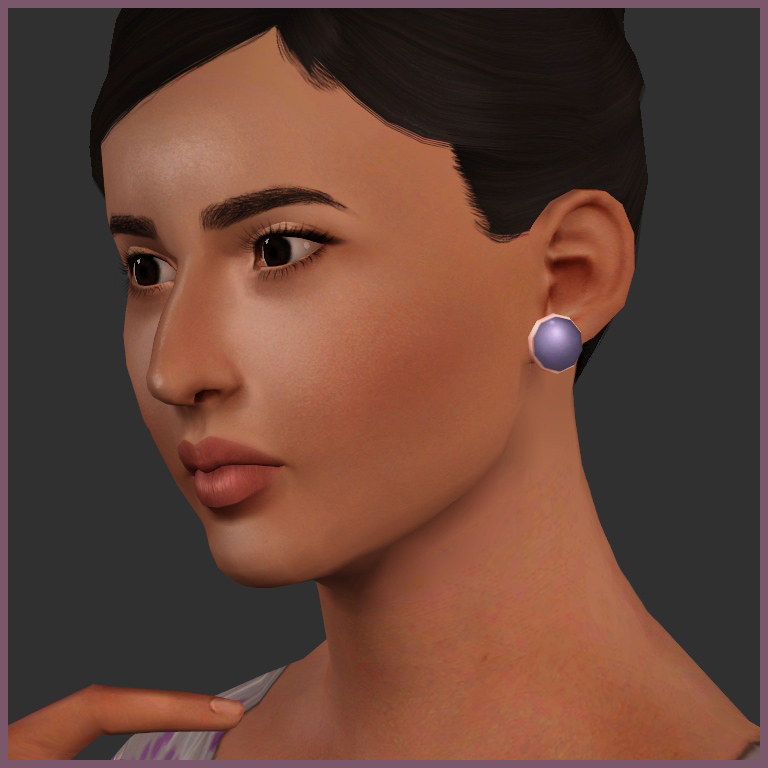
You don't have to go 80s/90s in these, but it does help!
Channels: 2. The metal base and the stone.
Ages: Teen to elder
Accessory type: Earring
Categories: Everyday, Formal, Sleepwear, Swimwear, Athletic, Career, Outwear, Makeover, Maternity, Random...sometimes we get drunk and fall asleep with our earrings in. The horror!
Base Game Compatible
Polygon Counts:
116 polys for all LODs, given they're a low count.
This is a new mesh, and means that it's a brand new self contained object that usually does not require a specific Pack (although this is possible depending on the type). It may have Recolours hosted on MTS - check below for more information.
|
HFO_TS3AFTS4PearlEarrings.zip
Download
Uploaded: 3rd Mar 2019, 831.9 KB.
3,506 downloads.
|
||||||||
| For a detailed look at individual files, see the Information tab. | ||||||||
Install Instructions
1. Click the download button, or the filename, to download the file to your computer.
2. Extract the zip, rar, or 7z file. Now you will have either a .package or a .sims3pack file.
For Package files:
1. Cut and paste the file into your Documents\Electronic Arts\The Sims 3\Mods\Packages folder. If you do not already have this folder, you should read the full guide to Package files first: Sims 3:Installing Package Fileswiki, so you can make sure your game is fully patched and you have the correct Resource.cfg file.
2. Run the game, and find your content where the creator said it would be (build mode, buy mode, Create-a-Sim, etc.).
For Sims3Pack files:
1. Cut and paste it into your Documents\Electronic Arts\The Sims 3\Downloads folder. If you do not have this folder yet, it is recommended that you open the game and then close it again so that this folder will be automatically created. Then you can place the .sims3pack into your Downloads folder.
2. Load the game's Launcher, and click on the Downloads tab. Find the item in the list and tick the box beside it. Then press the Install button below the list.
3. Wait for the installer to load, and it will install the content to the game. You will get a message letting you know when it's done.
4. Run the game, and find your content where the creator said it would be (build mode, buy mode, Create-a-Sim, etc.).
Extracting from RAR, ZIP, or 7z: You will need a special program for this. For Windows, we recommend 7-Zip and for Mac OSX, we recommend Keka. Both are free and safe to use.
Need more help?
If you need more info, see:
- For package files: Sims 3:Installing Package Fileswiki
- For Sims3pack files: Game Help:Installing TS3 Packswiki
Loading comments, please wait...



Uploaded: 3rd Mar 2019 at 12:38 PM
Updated: 3rd Mar 2019 at 12:54 PM
#earrings, #80s, #90s, #accessories, #ts4 to ts3 conversion, #jewellery, #ts3, #the sims 3
-
by magnemoe updated 4th Aug 2009 at 4:44am
 18
39.4k
59
18
39.4k
59
-
Earrings for males, two different sizes and four combinations.
by magnemoe 8th Aug 2009 at 1:19pm
18
30.1k
33
-
by Kiara24 19th Nov 2009 at 1:29pm
10
23.1k
60
-
-
by Kiara24 21st Dec 2010 at 11:30am
15
31.3k
102
-
Grace Earrings: Simple and Elegant for Ladies with Class
by Nysha 3rd May 2012 at 3:29pm
21
44.6k
148
-
-
-
-

-
Hold the Gin, Dahling! - Maternity Wear for the Affluent Lady
by Hellfrozeover 20th Aug 2017 at 10:36pm
Classic Maternity Wear for those ladies that are quite simply allergic to stretch-fabric! more...
14
27.5k
111
Female » Formal » Young Adult
-
Wonderbriefs - Support for the Unencumbered Gentleman
by Hellfrozeover updated 19th Sep 2017 at 6:35pm
19/09/2017 Now also available for more...encumbered mansims Shapewear and its enhancing, yet sweat inducing effects are more...
23
33.8k
96
Male » Sleepwear » Young Adult
-
by Hellfrozeover 26th Mar 2018 at 2:41am
Omar is the kind of guy that you could comfortably introduce your parents to. more...
-
by Hellfrozeover 27th Aug 2017 at 2:39pm
Emmanuel's dream is to be self-sufficient and live off of the land. He is a passionate vegetarian and loves gardening. more...
-
by Hellfrozeover 13th Jun 2017 at 1:10am
Oliver is that rather unfortunate combination of commitment issues and the deep desire to settle down. more...
-

by Hellfrozeover 12th Nov 2017 at 12:57pm
Attempts were made by previous owners to have this cottage match its quaint surroundings, but the mid-century more...
 +13 packs
2 9.4k 21
+13 packs
2 9.4k 21 Get to Work
 Outdoor Retreat
 Get Together
 City Living
 Spa Day
 Dine Out
 Romantic Garden Stuff
 Backyard Stuff
 Vintage Glamour Stuff
 Vampires
 Horse Ranch
 Bowling Night Stuff
 Parenthood
-
Ethan Ferrell - A crazy, immature but lovable guy!
by Hellfrozeover 15th Apr 2012 at 12:15pm
Ethan Ferrell is my current legacy sim. He's creative, funny and a little bit cowardly but lovable with it! more...
-
Rocksteady: Afroknot style by Hellfrozeover
by Hellfrozeover 21st Dec 2006 at 7:30pm
This is my first upload to MTS2 and just a thankyou for all the downloads I've collected from this site more...
-
Diva: Afro Style by Hellfrozeover
by Hellfrozeover 20th Jan 2007 at 4:28pm
Hi again. I've got another afro hairstyle for you to play about with. more...
-
by Hellfrozeover 24th Mar 2017 at 1:02am
To date, Freddy has been dealt a lot of lemons in his life. more...


About Me
Recolours
Retextures
Mesh Conversions (within the Sims series)
Mesh Edits
Reuploads on foreign language sites to make it easier for non English speaking players to access it. A link to my own site is preferable if you could, but this is okay as long as you provide credit and a link back to the original.
Including the mesh in your recolour as long as you credit and link back.
Optional (nice, but not necessary)
Tagging when you use my CC if you want me to see it. I love seeing what you all create and do with it :)
Comments and feedback
No!
Taking credit for my CC or claiming it as your own
Converting my CC outwith the Sims series without my permission
Using my CC or any part of it (including textures) to make money, including Patreon Early Releases
Uploading my CC to Paysites or putting it behind a pay wall (looking at you, Simsdom)
Anything to do with TSR
Reuploading my CC to English language sites. What’s the point? Just link to the original!
If I leave the simming community, my CC may be uploaded to a free, adlink-free graveyard site.
Yes - Sims
Change their names/traits etc
Make them over
Edit them with sliders
Use them in your stories
No - Sims
Reupload them
Claim them as your own
Anything to do with T$R, the Gallery or Sims 3 Studio
Involve them in Simumblr blogs, because no
Don't punch dolphins