
 Sign in to Mod The Sims
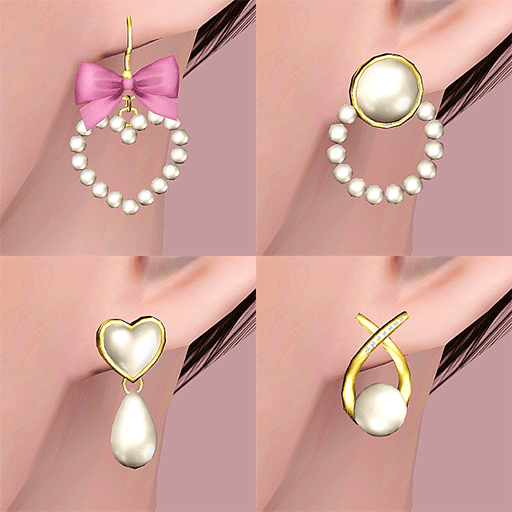
 "Megaera" - Unisex earrings, for Teen and Adults
 "Megaera" - Unisex earrings, for Teen and Adults


01.png - width=1382 height=1080
channels.png - width=904 height=904
presets.png - width=1343 height=974
04.jpg - width=1572 height=629
AF
01.jpg - width=1933 height=704
TM
02.jpg - width=1633 height=654
AM
02.jpg - width=2033 height=740
TM

 Technical Information:
- Unisex, for teen - adult
- 2 recolor channel, with 3 presets
- Available for all clothing categories, not valid for random
- Low-polycount and all LODs.
- With custom thumbnail.
- Three versions available: for both ears, and separate for left and right ears each.
- Linked textures: the "BOTH-TAF" file is the one containing all the textures, and it is required for all the others to show properly in game.
Polycount (for both ears version):
LOD1: 352
LOD2: 176
LOD3: 88
Polycount (for separate ears versions):
LOD1: 176
LOD2: 88
LOD3: 44
Stuff I used to create these earrings:
Blender (my beloved), Photoshop CC 2015, TSRW, Cmar's Mesh Toolkit (with huge thanks to thornowl for fixing the issue where MTK threw an error when trying to deal with very low poly meshes like these, danjaley tutorial on how to link textures with TSRW).
| Filename | Type | Size |
|---|---|---|
| megaera earrings.zip | zip | |
| bellakenobi-megaeraearrings-BOTH-TAF-MASTER.package | package | 374858 |
| bellakenobi-megaeraearrings-BOTH-TAM.package | package | 272976 |
| bellakenobi-megaeraearrings-L-TAF.package | package | 129540 |
| bellakenobi-megaeraearrings-L-TAM.package | package | 258576 |
| bellakenobi-megaeraearrings-R-TAF.package | package | 130247 |
| bellakenobi-megaeraearrings-R-TAM.package | package | 259839 |
| READ ME.txt | txt | 205 |
This is a new mesh, and means that it's a brand new self contained object that usually does not require a specific Pack (although this is possible depending on the type). It may have Recolours hosted on MTS - check below for more information.
|
megaera earrings.zip
Download
Uploaded: 22nd Jul 2024, 1.24 MB.
1,115 downloads.
|
||||||||
| For a detailed look at individual files, see the Information tab. | ||||||||
Install Instructions
1. Click the download button, or the filename, to download the file to your computer.
2. Extract the zip, rar, or 7z file. Now you will have either a .package or a .sims3pack file.
For Package files:
1. Cut and paste the file into your Documents\Electronic Arts\The Sims 3\Mods\Packages folder. If you do not already have this folder, you should read the full guide to Package files first: Sims 3:Installing Package Fileswiki, so you can make sure your game is fully patched and you have the correct Resource.cfg file.
2. Run the game, and find your content where the creator said it would be (build mode, buy mode, Create-a-Sim, etc.).
For Sims3Pack files:
1. Cut and paste it into your Documents\Electronic Arts\The Sims 3\Downloads folder. If you do not have this folder yet, it is recommended that you open the game and then close it again so that this folder will be automatically created. Then you can place the .sims3pack into your Downloads folder.
2. Load the game's Launcher, and click on the Downloads tab. Find the item in the list and tick the box beside it. Then press the Install button below the list.
3. Wait for the installer to load, and it will install the content to the game. You will get a message letting you know when it's done.
4. Run the game, and find your content where the creator said it would be (build mode, buy mode, Create-a-Sim, etc.).
Extracting from RAR, ZIP, or 7z: You will need a special program for this. For Windows, we recommend 7-Zip and for Mac OSX, we recommend Keka. Both are free and safe to use.
Need more help?
If you need more info, see:
- For package files: Sims 3:Installing Package Fileswiki
- For Sims3pack files: Game Help:Installing TS3 Packswiki
Loading comments, please wait...

Uploaded: 22nd Jul 2024 at 10:51 PM
#earrings, #spike earrings, #spike, #spiked earrings, #punk, #goth, #alternative
-
by magnemoe updated 4th Aug 2009 at 4:44am
 18
39.4k
59
18
39.4k
59
-
by magnemoe 18th Aug 2009 at 1:14am
6
25.3k
40
-
by Kiara24 19th Nov 2009 at 1:29pm
10
23.1k
60
-
by Kiara24 21st Dec 2010 at 11:30am
15
31.3k
102
-
-
Grace Earrings: Simple and Elegant for Ladies with Class
by Nysha 3rd May 2012 at 3:29pm
21
44.6k
148
-

by san3sawayaka3kumi 28th Aug 2014 at 3:22pm
5
10.9k
29
-
by Callia-Evergreen 26th Sep 2016 at 5:24am
4
16.2k
69
-
-


-
by bellakenobi 5th May 2023 at 10:16pm
See the girl on the thumb? more...
+1 packs
1 2.5k 10 Seasons
-
-
-
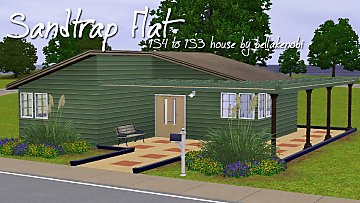
TS4 to TS3 - Sandtrap Flat - Basegame Starter, no CC
by bellakenobi 13th Feb 2015 at 4:26pm
Sims 4 has a lot of beautiful houses on Oasis Springs, and then I decided to build the "Sandtrap Flat" more...
8
16.2k
28
-
-

Ben and Maureen (Full Throttle)
by bellakenobi 30th Apr 2015 at 2:50pm
When I had a very very old PC (and that wasn't long ago), I've spent hours playing Full Throttle. more...
7
17k
15
-


Misato Katsuragi, from Neon Genesis Evangelion
by bellakenobi 27th Feb 2018 at 8:55pm
Yes I never know how to describe my favorite characters by myself, sorry :( Last year I watched Neon more...
3
19.3k
12
-
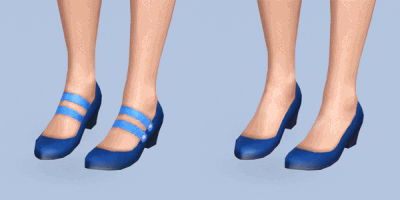
Supernatural Strappy Shoes Edit
by bellakenobi 13th Apr 2017 at 8:47pm
Let's say that I was making a sim, noticed that those strappy shoes from Supernatural was fine for her, but more...
-
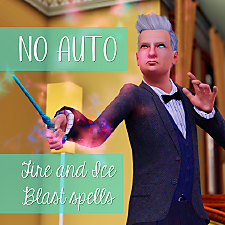
No Autonomous Fire and/or Ice Blast Spells
by bellakenobi 15th Mar 2022 at 2:40pm
Witches are my favorite occult to play in Sims 3, until I started to play with my A-hole grumpy sim more...
+1 packs
2 4.9k 25 Supernatural
-
by bellakenobi 5th Sep 2014 at 6:07pm
I've built this house inspired on the "Imperfect Life" Challenge , which one demands a house costing up to 50.000 more...
+3 packs
2 3.3k 4 Generations
 Master Suite Stuff
Supernatural
Master Suite Stuff
Supernatural


About Me
To find more downloads, visit my tumblr!