
 Sign in to Mod The Sims
 Purrrrfect and Local Black Cat default replacement eyes for kitties + eye fix
 Purrrrfect and Local Black Cat default replacement eyes for kitties + eye fix


screencap.jpg - width=652 height=652
MTSCatfix.jpg - width=1280 height=661
MTSpromo.jpg - width=1280 height=723
MTSPurrrr2.jpg - width=1163 height=768
MTSLBC2.jpg - width=1280 height=723
MTSCasshot.jpg - width=920 height=570

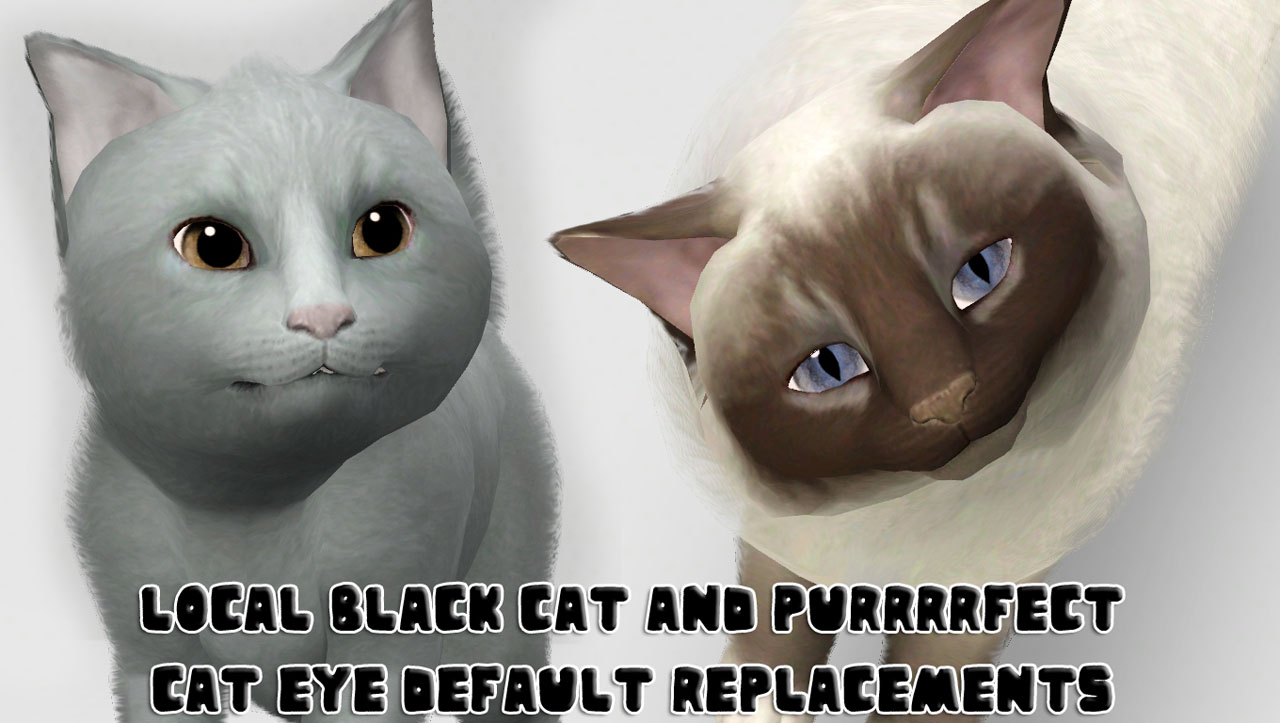
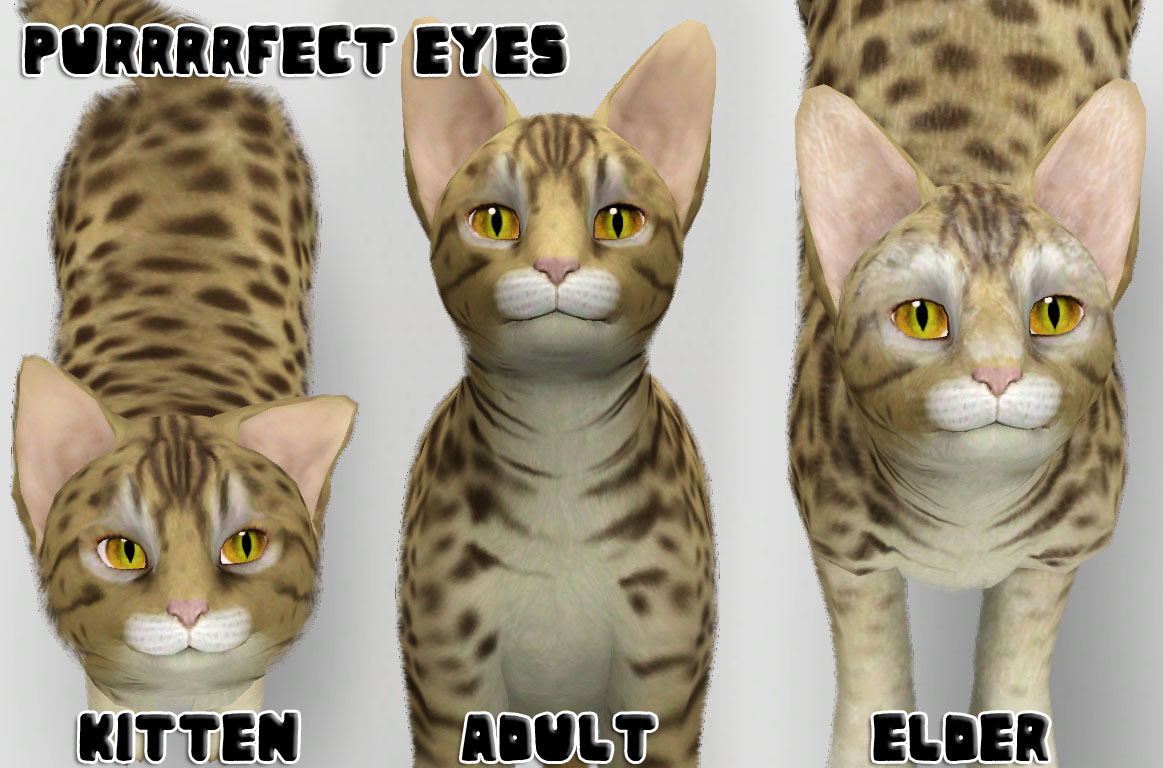
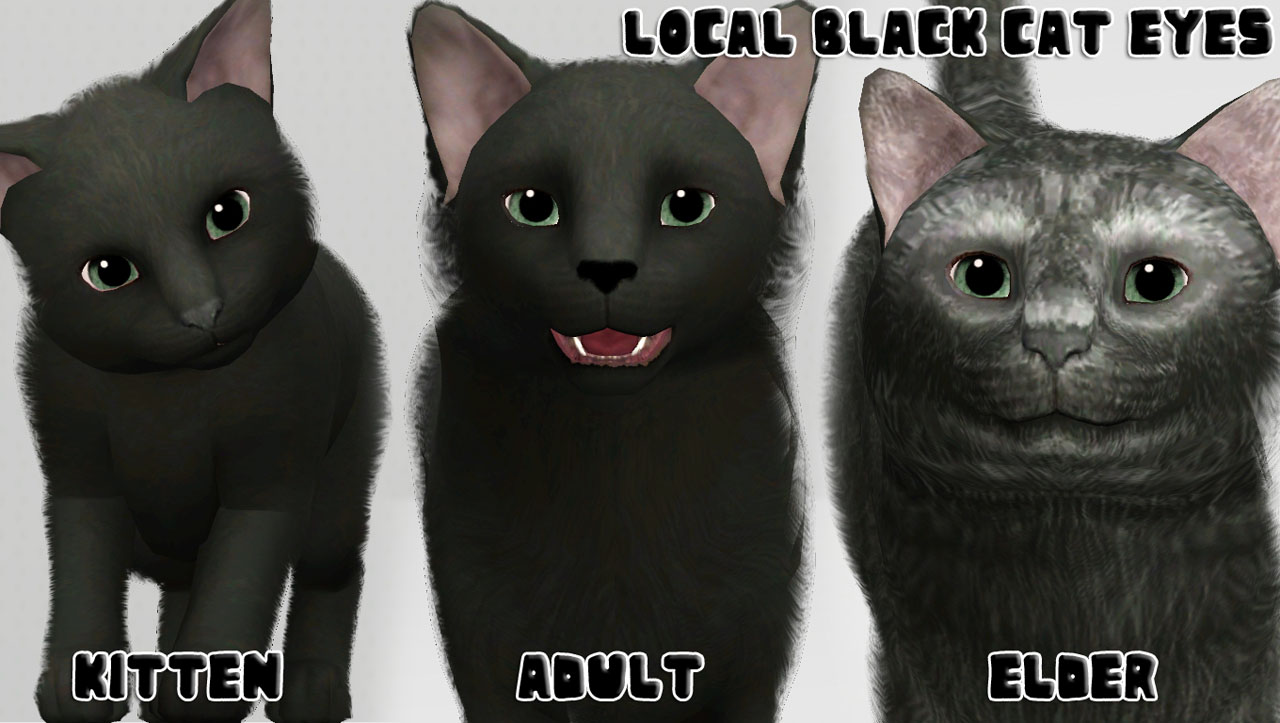
There are two variations of these eyes. One is called Purrrrfect and the other is Local Black Cat.
Purrrrfect has a constricted pupil, LBC has a dilated one for the cuter look that you can’t get with constricted pupils!
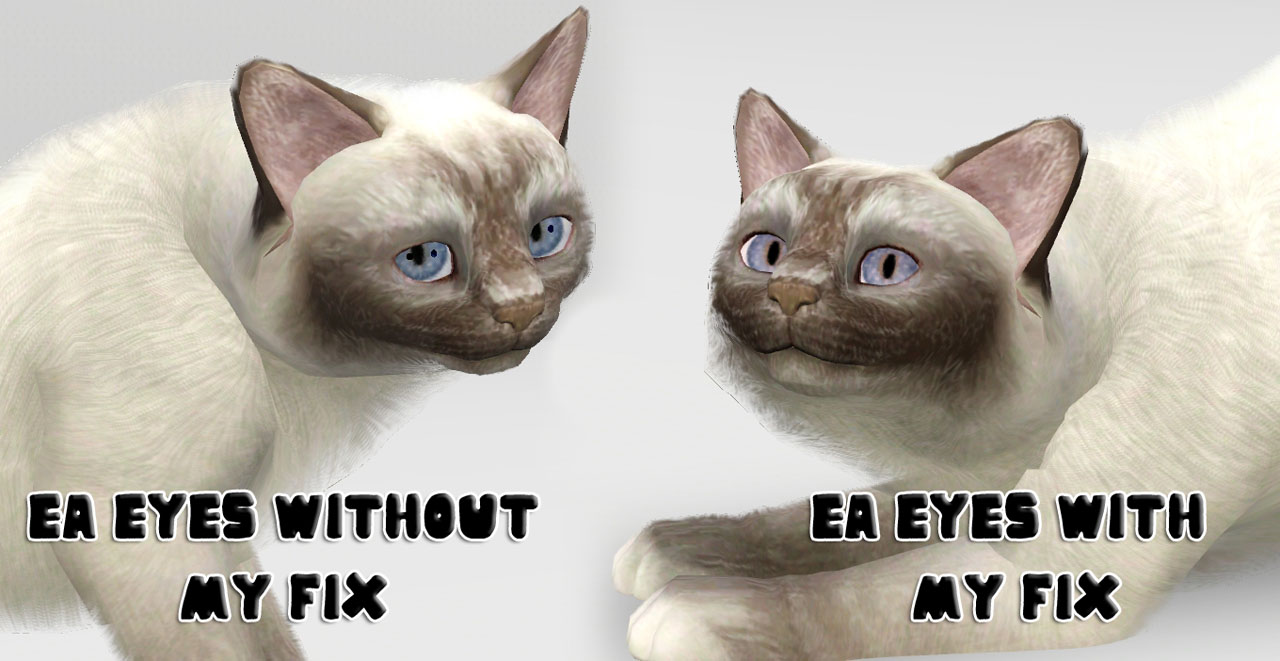
There is a third option, if you just want to fix your cat’s black dots, but want to keep the EA eyes, then you will want the Cat Eye Fix.
YOU MAY ONLY HAVE ONE VARIATION IN YOUR GAME AT A TIME!!!
Just place one of the three choices in your packages folder. I would suggest NOT merging these because there may be updates etc.
All variations work with two tone eyes and the regular 4 channel eyes. They are for kitten-elder cats.
Place any of these three files in your packages folder. These will conflict with other mods that change cat eye meshes, cat eye textures, and cat overlays.
Remember to clear your sim compositor cache to see the changes! Enjoy!!
If you use my eyes as a base, please just give me a quick little credit or link! Thank you!
|
Local Black Cat Eyes Default Replacement by traelia.rar
Download
Uploaded: 16th Aug 2012, 2.46 MB.
18,834 downloads.
|
||||||||
|
Purrrrfect Cat Eye Default Replacements by traelia.rar
Download
Uploaded: 16th Aug 2012, 2.46 MB.
14,849 downloads.
|
||||||||
|
Cat Eye Fix by traelia.rar
Download
Uploaded: 16th Aug 2012, 2.18 MB.
10,739 downloads.
|
||||||||
| For a detailed look at individual files, see the Information tab. | ||||||||
Install Instructions
1. Click the download button, or the filename, to download the file to your computer.
2. Extract the zip, rar, or 7z file. Now you will have either a .package or a .sims3pack file.
For Package files:
1. Cut and paste the file into your Documents\Electronic Arts\The Sims 3\Mods\Packages folder. If you do not already have this folder, you should read the full guide to Package files first: Sims 3:Installing Package Fileswiki, so you can make sure your game is fully patched and you have the correct Resource.cfg file.
2. Run the game, and find your content where the creator said it would be (build mode, buy mode, Create-a-Sim, etc.).
For Sims3Pack files:
1. Cut and paste it into your Documents\Electronic Arts\The Sims 3\Downloads folder. If you do not have this folder yet, it is recommended that you open the game and then close it again so that this folder will be automatically created. Then you can place the .sims3pack into your Downloads folder.
2. Load the game's Launcher, and click on the Downloads tab. Find the item in the list and tick the box beside it. Then press the Install button below the list.
3. Wait for the installer to load, and it will install the content to the game. You will get a message letting you know when it's done.
4. Run the game, and find your content where the creator said it would be (build mode, buy mode, Create-a-Sim, etc.).
Extracting from RAR, ZIP, or 7z: You will need a special program for this. For Windows, we recommend 7-Zip and for Mac OSX, we recommend Keka. Both are free and safe to use.
Need more help?
If you need more info, see:
- For package files: Sims 3:Installing Package Fileswiki
- For Sims3pack files: Game Help:Installing TS3 Packswiki
Loading comments, please wait...


#cat, #kitten, #default replacement, #cat eye replacements, #EA, #meow, #feline, #default eyes, #defaults, #eye fix, #overlay fix, #mesh fix
-
Default Replacement Eyes for TS3
by aikea guinea 18th Jun 2009 at 2:00pm
-
-
Default Eye Replacements: GlistenEyes
by sprinkz 3rd Jul 2009 at 8:04pm
-
Default Eye Replacements-Vibrant Eyes
by JillianWong 15th Jul 2009 at 10:40am
-
: Oasis Eyes : Default Replacements
by EccentricSims 2nd Jan 2011 at 2:05am
-
by tamo 4th Feb 2011 at 8:20pm
 104
240.7k
727
104
240.7k
727
-
Inscrutable Eyes for Cats(Default)
by cmomoney 28th Nov 2011 at 8:18pm
+1 packs
35 70.9k 181 Pets
Pets
Create-A-Pet » Genetics » Cats
-
by tachyglossus 16th Mar 2012 at 11:24am
+1 packs
16 33.5k 88 Pets
Create-A-Pet » Genetics » Cats
-
Fetching Dog Eye Default Replacements + Dog Eye Fix
by traelia 17th Aug 2012 at 6:25pm
+1 packs
39 91.5k 294 Pets
Create-A-Pet » Genetics » Dogs
-
by aspenrose 31st Jul 2023 at 9:06pm
+1 packs
4 3.8k 25 Pets
Create-A-Pet » Genetics » Cats



-
-
Beachy Keen - Starter under $16k
by traelia 18th Aug 2009 at 2:08pm
So there I was, waiting for a game to download, when I decided I wanted to make a beachy starter more...
2
9k
5
-

Smiling Pose Pack - Smiles for closeups! (UPDATED 7/1/2011)
by traelia 20th May 2011 at 1:38pm
Important: You will need cmomoney's Pose Player found here. more...
23
113.2k
140
-
-

-
Boots 3Dsockified for A/YA/T females!
by traelia 7th Mar 2012 at 3:11am
You like boots? You like 3D stuffz? You'll love deeze bootz. more...
-
Realism Skins - NON-DEFAULT and DEFAULT versions!
by traelia 3rd Mar 2010 at 1:24pm
There are a few skintones out there, I think they are all beautiful, but something made me want to give more...
-
-
Chuck Norris Pose Pack - Awesomeness 101!
by traelia 1st Apr 2012 at 1:43am
You need more Chuck in your life. more...
21
37.5k
32
-


Packs Needed
| Expansion Pack | |
|---|---|
 | Pets |