
 Sign in to Mod The Sims
 vRoom! Maxis Matching Beds
 vRoom! Maxis Matching Beds


HL-VroomBlueDbl.jpg - width=800 height=500
HL-VroomPinkDbl.jpg - width=800 height=500
HL-VroomPurpleDbl.jpg - width=800 height=500
HL-VroomRedDbl.jpg - width=800 height=500
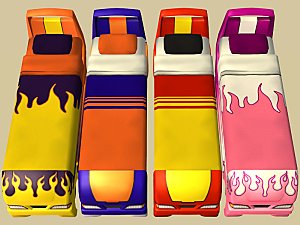
HL-VroomAllSingle.jpg - width=800 height=500

 me to never use the set.
PlasticBox's modern recolors pushed this project off of my wish list and to the top of my to-do list. I am happy it finally worked out.
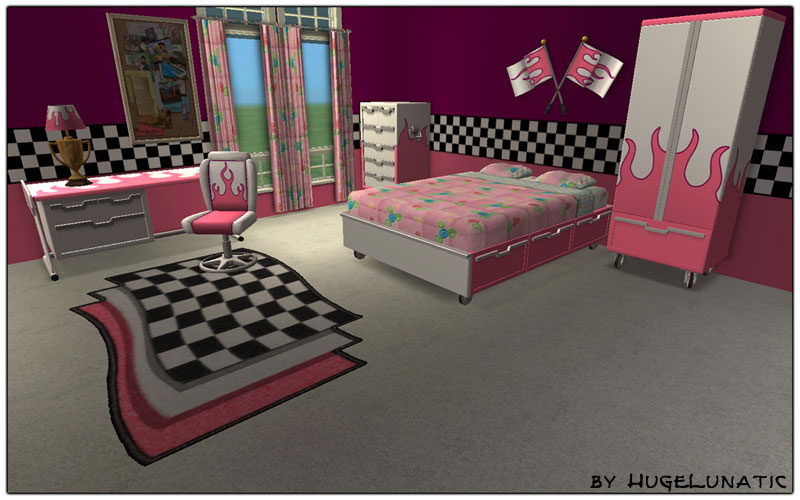
What the files are:
- HL_vRoom...SLAVE
- These require Seasons EP as they take there textures from the original Maxis Armoir.
- You can have either the single or double or both.
- HL_vRoom...BASE
- These require No EP.
- The double bed contains all four recolors that Maxis gave us for the bedroom set, the single bed takes all its colors from the double.
- HL_vRoom...PETS
- These require the Pets EP.
- The double bed contains all four recolors that Maxis gave us for the bedroom set, the single bed takes all its colors from the double.
 PLEASE make sure to download the right one for your game configuration! Each one uses the same GUID's, because seriously you don't need all three at once!
 If you would like to recolor, the mapping is the same as the armoire.
For Base Game Users: Get Numenor's Lost & Found version here
Policy:
- You may recolor and include meshes with credit and link back here.
- You may include these in your lot uploads, but must always remain free. And please be sure to link back here.
Polygon Counts:
Double ~ 1696 for frame, bedding same as Maxis
Single ~ 1644 for frame, bedding same as Maxis
Additional Credits:
Thanks to all who contributed to SimPE otherwise I wouldn't have all these cute little matching items for my sims.
Thanks to Numenor for his tutorial on UVMapping, which finally after 2 years makes sense.
SimAddict99 and MsBarrows for the tutorials on the Repository/Slave technique.
This is a new mesh, and means that it's a brand new self contained object that usually does not require a specific Pack (although this is possible depending on the type). It may have Recolours hosted on MTS - check below for more information.
|
HL_vRoomDBLbedBASE.package.zip
Download
Uploaded: 16th Apr 2010, 297.8 KB.
3,364 downloads.
|
||||||||
|
HL_vRoomSingleBedSLAVE.package.zip
| vRoom! Single Bed Seasons
Download
Uploaded: 20th May 2008, 110.2 KB.
7,218 downloads.
|
||||||||
|
HL_vRoomDBLbedSLAVE.package.zip
| vRoom! Double Bed Seasons
Download
Uploaded: 20th May 2008, 95.6 KB.
7,496 downloads.
|
||||||||
|
HL_vRoomSingleBedPETS.package.zip
| vRoom! Single Bed Pets+
Download
Uploaded: 16th May 2008, 110.2 KB.
6,944 downloads.
|
||||||||
|
HL_vRoomSingleBedBASE.package.zip
| vRoom! Single Bed Base
Download
Uploaded: 16th May 2008, 111.6 KB.
7,105 downloads.
|
||||||||
|
HL_vRoomDBLbedPETS.package.zip
| vRoom! Double Bed Pets+
Download
Uploaded: 16th May 2008, 297.0 KB.
8,277 downloads.
|
||||||||
| For a detailed look at individual files, see the Information tab. | ||||||||
Install Instructions
1. Download: Click the download link to save the .rar or .zip file(s) to your computer.
2. Extract the zip, rar, or 7z file.
3. Place in Downloads Folder: Cut and paste the .package file(s) into your Downloads folder:
- Origin (Ultimate Collection): Users\(Current User Account)\Documents\EA Games\The Sims™ 2 Ultimate Collection\Downloads\
- Non-Origin, Windows Vista/7/8/10: Users\(Current User Account)\Documents\EA Games\The Sims 2\Downloads\
- Non-Origin, Windows XP: Documents and Settings\(Current User Account)\My Documents\EA Games\The Sims 2\Downloads\
- Mac: Users\(Current User Account)\Documents\EA Games\The Sims 2\Downloads
- Mac x64: /Library/Containers/com.aspyr.sims2.appstore/Data/Library/Application Support/Aspyr/The Sims 2/Downloads
- For a full, complete guide to downloading complete with pictures and more information, see: Game Help: Downloading for Fracking Idiots.
- Custom content not showing up in the game? See: Game Help: Getting Custom Content to Show Up.
- If you don't have a Downloads folder, just make one. See instructions at: Game Help: No Downloads Folder.
Loading comments, please wait...


Uploaded: 16th May 2008 at 12:20 AM
Updated: 14th Aug 2020 at 1:05 PM
#maxis match, #bed, #car, #vroom, #modern
-
by Fresh-Prince 3rd Jun 2007 at 10:27pm
 11
12.9k
21
11
12.9k
21
-
-
by HugeLunatic updated 14th Mar 2009 at 12:59am
-
Hemnes Bed & Study Recolor *NOT IKEA SP*
by HugeLunatic 27th Dec 2008 at 8:02pm
-
-
-
Bohemian Single Bed and Daybed
by HugeLunatic 10th May 2009 at 4:39pm
-
by Michelle 29th Jan 2017 at 12:22pm
2
8.3k
29
-
-


-
by HugeLunatic 20th Mar 2013 at 6:18pm
I sleep without pants...so I thought it only fair that my sims do so too. more...
-
"Blazin' Buckaroos!" [Recolors]
by HugeLunatic 25th May 2013 at 4:55am
Basic black and silver recolors of garden light. more...
13
21.2k
70
-
by HugeLunatic 13th Aug 2012 at 11:49pm
While browsing through game images I found (again) this wall image that wasn't in game. more...
6
13.1k
30
-
Zecutine's Step Away With Me Stairs Requires Open
by HugeLunatic 11th Feb 2018 at 11:55pm
Open underneath version of the H&M Zecutine's Step Away With Me Stairs. more...
+1 packs
5 18.9k 38 H&M Fashion
-
by Hood Building Group updated 7th Nov 2015 at 4:16pm
Quadington University - A creepy zombified university for your 'hoods! more...
77
55.7k
145
Miscellaneous » Neighborhoods & CAS Screens » Neighbourhoods and Worlds
-
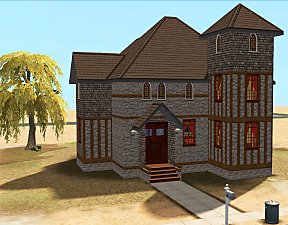
by HugeLunatic 7th Mar 2016 at 5:35pm
Originally built for a hood, this is a really old house that could possibly be haunted. more...
7
15k
41
-
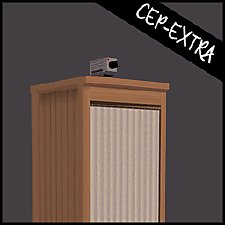
SimSentry Clothing Booth [CEP-Extra]
by HugeLunatic 23rd Feb 2020 at 10:38pm
As requested by shastakiss, the cheap base game clothing booth with two subsets. more...
4
6.6k
9
-
by HugeLunatic 13th Mar 2018 at 8:40pm
The tv center, "Smitty Classy's TV Shrine", as a bookshelf. more...
+1 packs
8 14.5k 41 Apartment Life
-
by HugeLunatic 8th Sep 2012 at 7:44pm
A new lamp add on set to match the base game table lamp "Ilistara Table Lamp". more...
25
26.9k
60
-
"Mail Ho!" from Barnacle Bay Set
by HugeLunatic 1st Apr 2011 at 10:57am
What it does This mod places the Pirate mailbox from the Barnacle Bay store set into the Outdoor/Lawn Ornaments category more...
 11
33.2k
46
11
33.2k
46


About Me
Pet Stories || Dog Agility Items? || Castaway Stories || Holy Simoly Extras
4esf Archive || Holy Simoly Archive || CEP-Extras List || Buyable Game Objects
lunie content from GoS/s2a
 Installation of CEP Extras
-the package with pfiles appended to the name will go into your cep extras folder where your game is installed (typically c drive, you do you)
-the other goes in CEP extra folder in documents.
The following locations are what I am aware of, beyond that you'll have to do some searching.
Downloads Folder:
C:\Users\<user>\Documents\EA Games\The Sims 2 Legacy
C:\Users\<user>\Documents\EA Games\The Sims 2 Ultimate Collection
With multiple launchers, the location for your game install will vary.
C:\Program Files\EA GAMES\The Sims 2 Legacy\TSData\Res\Catalog\zCEP-EXTRA
C:\Program Files\EA GAMES\The Sims 2\TSData\Res\Catalog\zCEP-EXTRA
C:\Program Files (x86)\EA GAMES\The Sims 2\TSData\Res\Catalog\zCEP-EXTRA