
 Sign in to Mod The Sims
 Rolling Hills Dairy Farm
 Rolling Hills Dairy Farm


Front 09.jpg - width=1200 height=700
Front 02C.jpg - width=1200 height=700
First Floor 02.jpg - width=1000 height=800
Second Floor.jpg - width=1000 height=800
Living Room 06.jpg - width=1200 height=700
Dining Room.jpg - width=1000 height=800
Kitchen 01.jpg - width=1000 height=800
Bedroom 0.jpg - width=1000 height=800
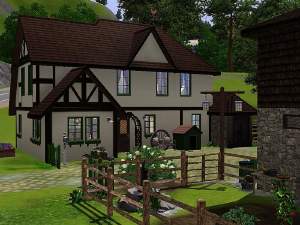
Due to hard times, bits and pieces of the farm had been sold off and all that was left was a small vegetable plot and the barn. Having to choose between the barn and nature's finest for shelter, his grandparents remodeled the said barn into livable space and kept on attempting to bring the soil back to the fertile ground it used to be. Okay, okay, so the hills aren't exactly rolling and the plants are all withered and dead. And yes, sadly, it's true. The cows aren't real either; who wants cows that close to the house anyway?
Store Items Required: (if you want it to look like the pictures)
Riverview (farm content that was included)
Store Items Recommended:
Leaftastic
Lot Specifics:
- Lot Size: 30x30
- Furnished: §50,644
- Unfurnished: §29,136
Official MTS Foundation Contest: Round 2 Entry
|
Rolling Hills Dairy Farm.rar
Download
Uploaded: 12th Aug 2010, 2.12 MB.
2,455 downloads.
|
||||||||
| For a detailed look at individual files, see the Information tab. | ||||||||
Install Instructions
1. Click the filename or the download button to download the file to your computer.
2. Extract the zip, rar, or 7z file.
2. Select the .sims3pack file you got from extracting.
3. Cut and paste it into your Documents\Electronic Arts\The Sims 3\Downloads folder. If you do not have this folder yet, it is recommended that you open the game and then close it again so that this folder will be automatically created. Then you can place the .sims3pack into your Downloads folder.
5. Load the game's Launcher, and click on the Downloads tab. Select the house icon, find the lot in the list, and tick the box next to it. Then press the Install button below the list.
6. Wait for the installer to load, and it will install the lot to the game. You will get a message letting you know when it's done.
7. Run the game, and find your lot in Edit Town, in the premade lots bin.
Extracting from RAR, ZIP, or 7z: You will need a special program for this. For Windows, we recommend 7-Zip and for Mac OSX, we recommend Keka. Both are free and safe to use.
Need more help?
If you need more info, see Game Help:Installing TS3 Packswiki for a full, detailed step-by-step guide!
Loading comments, please wait...



Uploaded: 12th Aug 2010 at 6:15 PM
Updated: 12th Aug 2010 at 7:11 PM by heaven_sent_8_18
-
by jcwolf 6th Jul 2009 at 7:01am
 23
34.6k
17
23
34.6k
17
-
by TheShady updated 23rd Jul 2009 at 3:14pm
7
10.8k
6
-
-
-
-
by ruthless_kk 29th Sep 2009 at 4:10am
48
109.8k
141
-
by -Shady- 30th Nov 2009 at 1:36pm
10
42.1k
53
-
-
-



-

-

-
-

-

-

-

-
Eastlake Manor aka "The Dollhouse"
by heaven 25th Jul 2010 at 1:13am
CC Free, Victorian Style Family Home! more...
5
15.7k
28
-

-
by heaven 16th Nov 2018 at 8:32pm
Built in the style of my WIP world, Greymont Bay, The Wheaton is a small but cozy 2 bedroom house more...
+12 packs
6 23.3k 50 World Adventures
 Ambitions
 Late Night
 Generations
 Master Suite Stuff
 Pets
Pets
 Showtime
 Supernatural
 Seasons
 University Life
 Island Paradise
 Into the Future


About Me
Please Do Not:
- Claim my work as your own.
- Reupload my work anywhere else.
- Include my content with your own upload. Link back to the original download post instead.
- Include my content in a Mods folder upload.
- Use my creations as a base to edit and reupload as your own.
- Convert my content to other games without asking first.
- Edit my creations for your personal use only.
- Use my lots/sims/content in stories (though please don't take credit for them).