
 Sign in to Mod The Sims
 Tom Duhamel's Enhanced Gameplay Cameras: High Altitude Option
 Tom Duhamel's Enhanced Gameplay Cameras: High Altitude Option


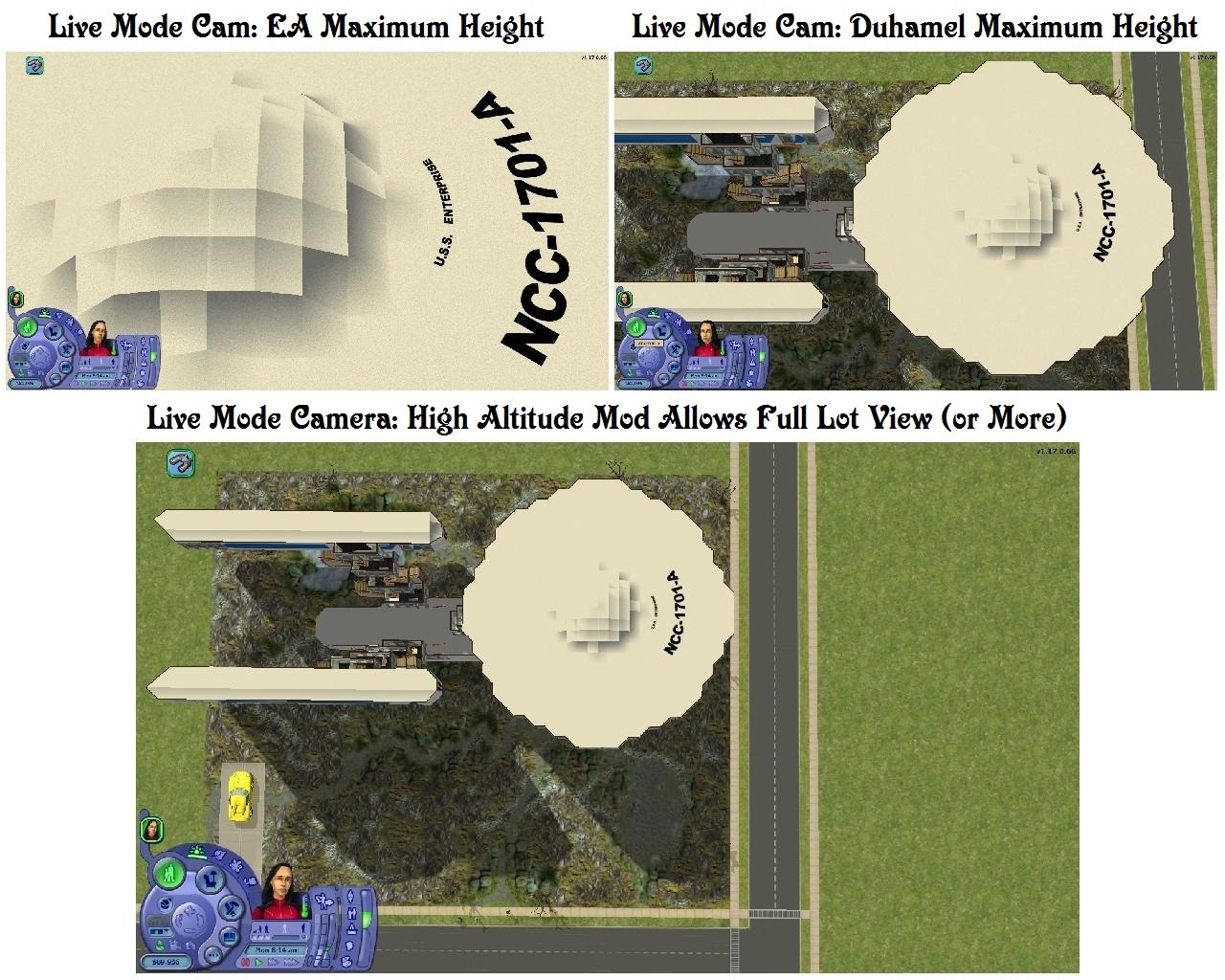
BuildModeSpaceCam.jpg - width=823 height=1023
Build Mode Space Cams
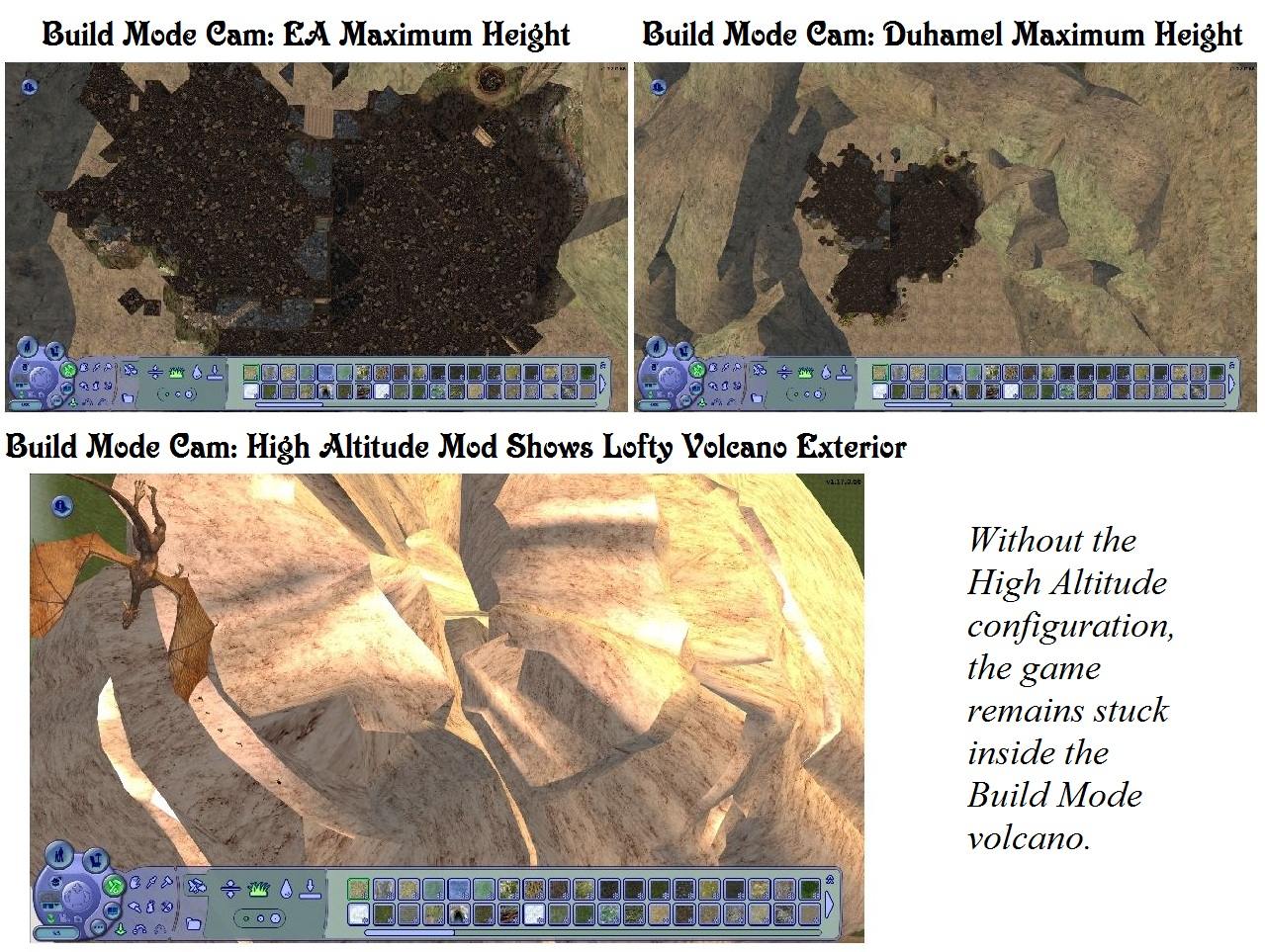
BuildModeVolcanoCam.jpg - width=1279 height=963
Build Mode Volcano Cams
FirstPersonSpaceCam.jpg - width=823 height=1023
First Person Space Cams
LiveModeSpaceCam.jpg - width=1280 height=1024
Live Mode Space Cams
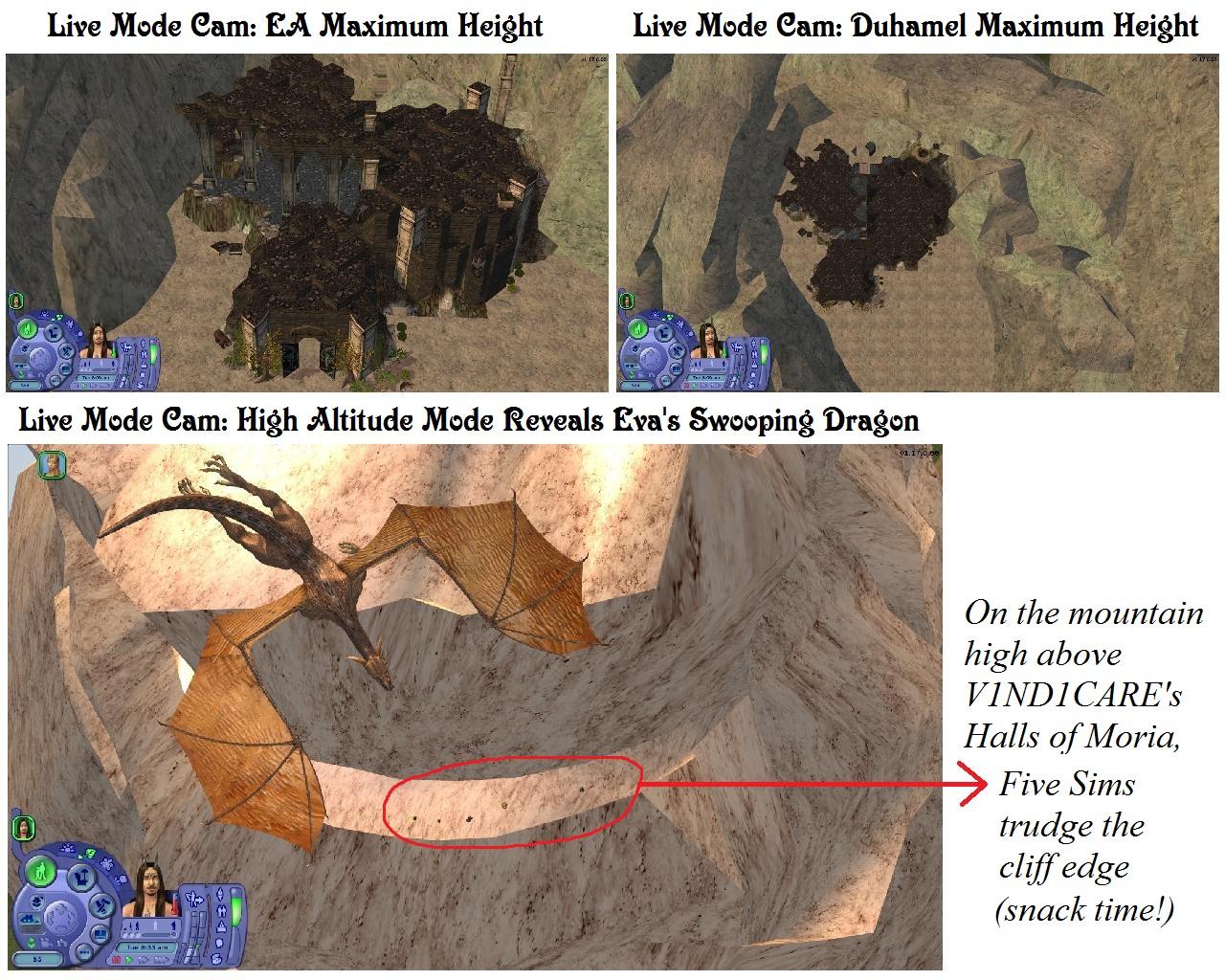
LiveModeVolcanoCam.jpg - width=1280 height=1024
Live Mode Volcano Cams
LiveModeVolcanoCam-Title.jpg - width=1029 height=899
Live Mode High Altitude Cam - Title
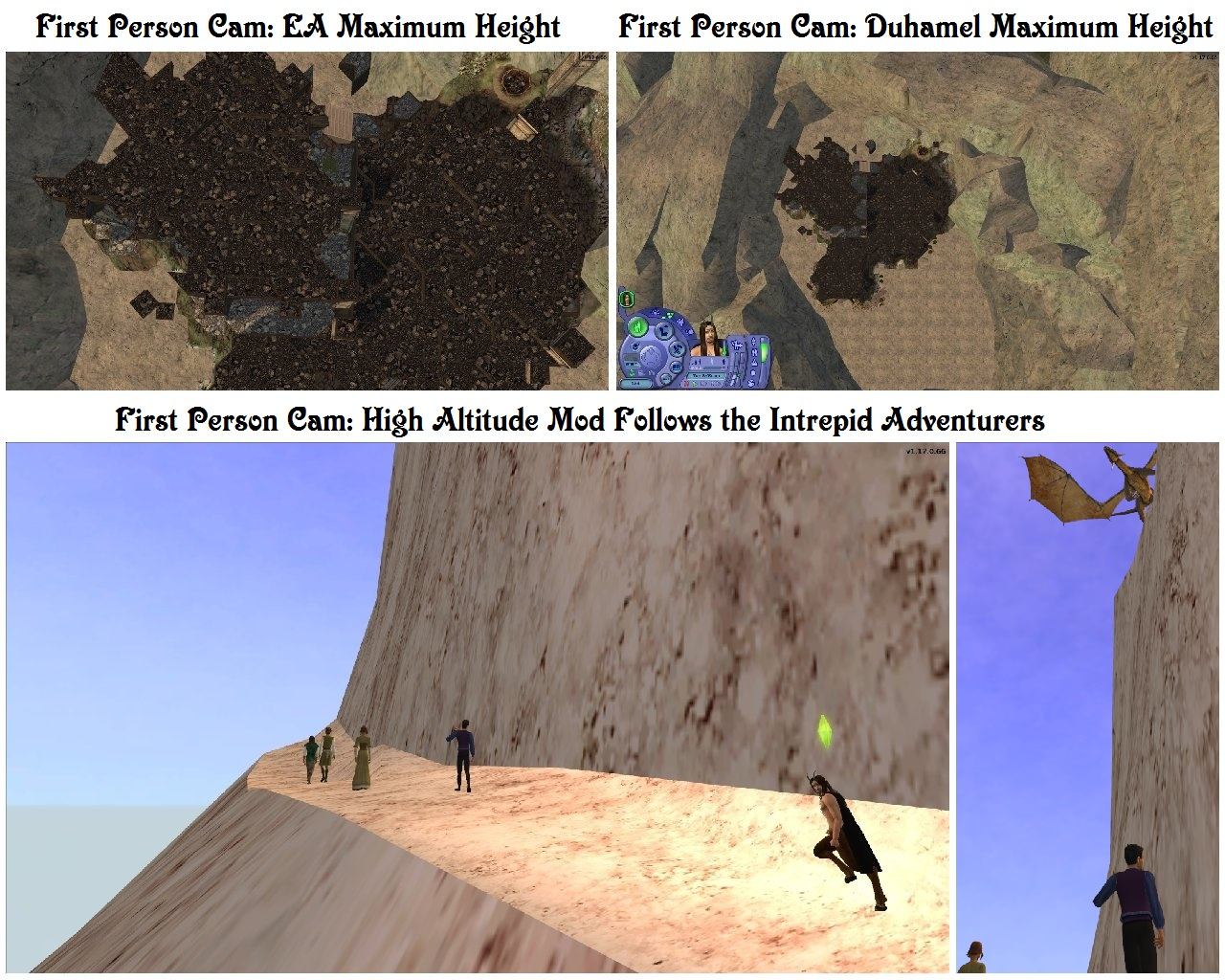
FirstPersonVolcanoCam.jpg - width=1280 height=1024
First Person Volcano Cams
Purpose
While working with my Build Mode Volcanoes, I realized that I needed in-lot cameras that were able to climb to similar heights as the neighbourhood camera. My preference in custom cameras is Tom Duhamel's Enhanced Gameplay set, and with Tom's permission I have adapted his Live, Build and First Person cameras to allow for higher altitudes. I suspect this adjustment would also be useful for those using any really high in-lot buildings or objects, such as space ships, fantasy palaces and floating cities. In any event, once I became accustomed to the change, I have not experienced a disadvantage in having this extra flexibility while playing more typical lots.
Description
This release modifies the following three in-lot camera files:
1) LiveCamera.txt - the default in-lot camera, used in play mode as well as in build and buy. This is typically the most often used camera of all.
2) BuildCamera.txt - used in build or buy mode, but only if you select the Top-Down view button. This camera tends to be rarely used.
3) FirstPersonCameras.txt - the Free Camera selected with the Tab key and applicable to both the in-lot and neighbourhood views. This one removes the user interface and is a favourite for clean picture taking.
Installation
1) Locate the folder My Documents\EA Games\The Sims 2\Cameras using Windows Explorer or an equivalent file manager.
2) Backup all files in this folder. This is essential in case you wish to return to your previous configuration.
3) Extract the files from the downloaded archive to the Cameras folder - they do not go in Downloads like most custom files.
Note: These files each work independently, so it is not necessary to install all three if you would prefer not to.
Usage Note
The First Person or Free Camera has been modified to move slowly to allow for precise positioning during picture taking. As Tom suggests in his original upload, it is easier to use the Live (default) camera to travel to the location you want first, switch to the Free Camera with the Tab key, make some fine adjustments and then take the picture using a clean screen.
If you have a different preference in custom cameras but would like to have high altitude capabilities, if is fairly easy to make your own changes to the camera configuration files. First backup your original files, then using a pure text editor such as Notepad - not a word processor such as Word or Wordpad - make the following edits to create your own high altitude cameras:
a) In LiveCamera.txt, change the camera "Live" Live maximum zoom value (the first number in parenthesis) to 1000.
b) In BuildCamera.txt, change the camera "Build" Build maximum zoom value (the first number in parenthesis) to 1000.
c) In FirstPersonCameras.txt, change both occurences of setparam maxcameraheight to 1000.
Terms of Use
Please do not redistribute these files.
Credits
These config mods. are based on Tom Duhamel's Enhanced Gameplay Cameras
GIMP 2, IrfranView, Microsoft Paint and Photo Editor for graphics texturing, processing, sizing, and labeling
Numenor's AnyGameStarter, for development and testing
Duds' Star Trek: NCC-1701-A Enterprise is used to illustrate high altitude camera usage with a spacecraft
V1ND1CARE's The Halls of Moria forms the foundation for the Build Mode Volcano lot
Eva's Swooping Dragon provides the dramatic tension for this high altitude adventure
|
HighAltitudeCameras.zip
| Tom Duhamel's Enhanced Gameplay Cameras: High Altitude Option
Download
Uploaded: 19th Mar 2013, 2.0 KB.
4,414 downloads.
|
||||||||
| For a detailed look at individual files, see the Information tab. | ||||||||
Install Instructions
1. Download: Click the download link to save the .rar or .zip file(s) to your computer.
2. Extract the zip, rar, or 7z file.
3. Place in Downloads Folder: Cut and paste the .package file(s) into your Downloads folder:
- Origin (Ultimate Collection): Users\(Current User Account)\Documents\EA Games\The Sims™ 2 Ultimate Collection\Downloads\
- Non-Origin, Windows Vista/7/8/10: Users\(Current User Account)\Documents\EA Games\The Sims 2\Downloads\
- Non-Origin, Windows XP: Documents and Settings\(Current User Account)\My Documents\EA Games\The Sims 2\Downloads\
- Mac: Users\(Current User Account)\Documents\EA Games\The Sims 2\Downloads
- Mac x64: /Library/Containers/com.aspyr.sims2.appstore/Data/Library/Application Support/Aspyr/The Sims 2/Downloads
- For a full, complete guide to downloading complete with pictures and more information, see: Game Help: Downloading for Fracking Idiots.
- Custom content not showing up in the game? See: Game Help: Getting Custom Content to Show Up.
- If you don't have a Downloads folder, just make one. See instructions at: Game Help: No Downloads Folder.
Loading comments, please wait...


Uploaded: 19th Mar 2013 at 9:56 PM
-
by Tashiketh updated 30th Mar 2005 at 7:18am
 61
158k
44
61
158k
44
-
-
-
by Masterofallvideogames 14th Jul 2008 at 1:09am
28
41.3k
21
-
Live Camera mod 2 requested by Corsetcrush
by Masterofallvideogames 24th Sep 2008 at 7:23pm
25
45.4k
24
-
by Tom Duhamel updated 5th Jan 2009 at 6:58am
133
268.9k
705
-
by sims2sims2 updated 25th Mar 2012 at 4:07pm
17
43.9k
63
-
by sims2sims2 updated 11th Apr 2012 at 1:10am
45
73.1k
158
-

-
Tiny Filesize Invisible Driveway for Lot Builders
by Sophie-David 18th Apr 2010 at 8:08pm
Tiny Filesize Invisible Driveway, < 2kB more...
+1 packs
45 88.8k 306 Nightlife
-
The Sims 2 Opportunity Pack Reference Section, Books & Notes
by Sophie-David updated 31st Jan 2016 at 4:52am
Five basegame book meshes and basegame ticket (note card) more...
37
26.1k
92
-
Lady Ravendancer's Magical Arcana
by Sophie-David updated 17th Dec 2016 at 5:12am
Supplies two gothic style reading desks, eleven functional texts and supporting recolours suitable for educating a Witch or Warlock, or those interested in the Paranormal career. more...
38
55.5k
84
-
Six Rossetti Prints, Peynter Recolours & Framing Kit
by Sophie-David 21st Aug 2007 at 5:19am
Title Six Rossetti Prints, Peynter Recolours & Framing Kit Description This project started out with quite more...
7.5k
4
-
FreeTime & Later "View Many" Anywhere Patch
by Sophie-David 15th Feb 2011 at 2:57am
Enables "View Many" on all lots, with a minimum of 2, 5, or 10 decorative objects more...
+1 packs
13 24.2k 17 Free Time
-
UPDATE Sept 29, 2019: Recolours of Elaine's Enchanted Picture (Television)
by Sophie-David updated 29th Sep 2019 at 7:18pm
Frame and screen recolours for Elaine's Enchanted Picture: The Lady of Shalott - a painting that functions as a television more...
5
7.4k
11
-
The FreeTime "Broken-In" Desk Recovery Project
by Sophie-David 29th Mar 2015 at 8:01pm
FreeTime "Broken-In" (Bohemian) Desk in Basegame and Natural Wood Recolours, with and without the Cabinet and Palette Accessories more...
+1 packs
14 8.4k 17 Free Time
By Function » Surfaces » Desks
-
21 Animated Lot Based Effects, Down from the 'Hood
by Sophie-David 4th Apr 2013 at 2:32pm
Neighbourhood visual effects made available for in-lot use more...
111
160.2k
373
-
Five "Life Changing" Seasons Wells + Roofless
by Sophie-David updated 19th Jul 2015 at 8:19pm
Ambrosial Well, Cursed Well, Fertility Well, Healing Well, Plague Well, Roofless Well more...
+1 packs
63 75.2k 141 Seasons
-
Eight Maxis Match "Value" Mirrors for FFS Dragon Dressers
by Sophie-David 26th Aug 2007 at 8:46pm
Title Eight Maxis Match "Value" Mirrors for FFS Dragon's Horde Dressers Description These downloads contain recolours more...
15
14.3k
23


