
 Sign in to Mod The Sims
 BlandCo Overhaul
 BlandCo Overhaul


pbox_cabinet-blandco-beforeafter.jpg - width=1040 height=800
pbox_cabinet-blandco-beforeafter-01.jpg - width=1040 height=800
pbox_cabinet-blandco-beforeafter-04.jpg - width=1040 height=800
pbox_cabinet-blandco-beforeafter-02.jpg - width=1040 height=800
pbox_cabinet-blandco-beforeafter-03.jpg - width=1040 height=800
pbox_cabinet-blandco-beforeafter-06.jpg - width=1000 height=800
pbox_cabinet-blandco-beforeafter-05.jpg - width=1000 height=800
pbox_cabinet-blandco-blue.jpg - width=900 height=700
pbox_cabinet-blandco-nodrop_front.jpg - width=1000 height=800
pbox_cabinet-blandco-nodrop_back.jpg - width=1000 height=800
pbox_cabinet-blandco-nodrop_cat.jpg - width=1001 height=800
pbox_cabinet-blandco-tagfix.jpg - width=1000 height=800
pbox_cabinet-blandco-beforeafter-00.jpg - width=1040 height=800


- Light fix for the cabinets (so that they are rendered like the counters)
- Additional No-drop cabinets
- Corrected colour tags for the black version
- Overrides in white and green (optional)
2015-01-28: Matching overrides for the “Sloop” bar are now available here.
Update 2014-12-21: I figured out how to make the no-drop cabinets repeatedly placeable (like the original ones – so that they don't need to be reselected from the catalogue after placing each one) and updated the zips.
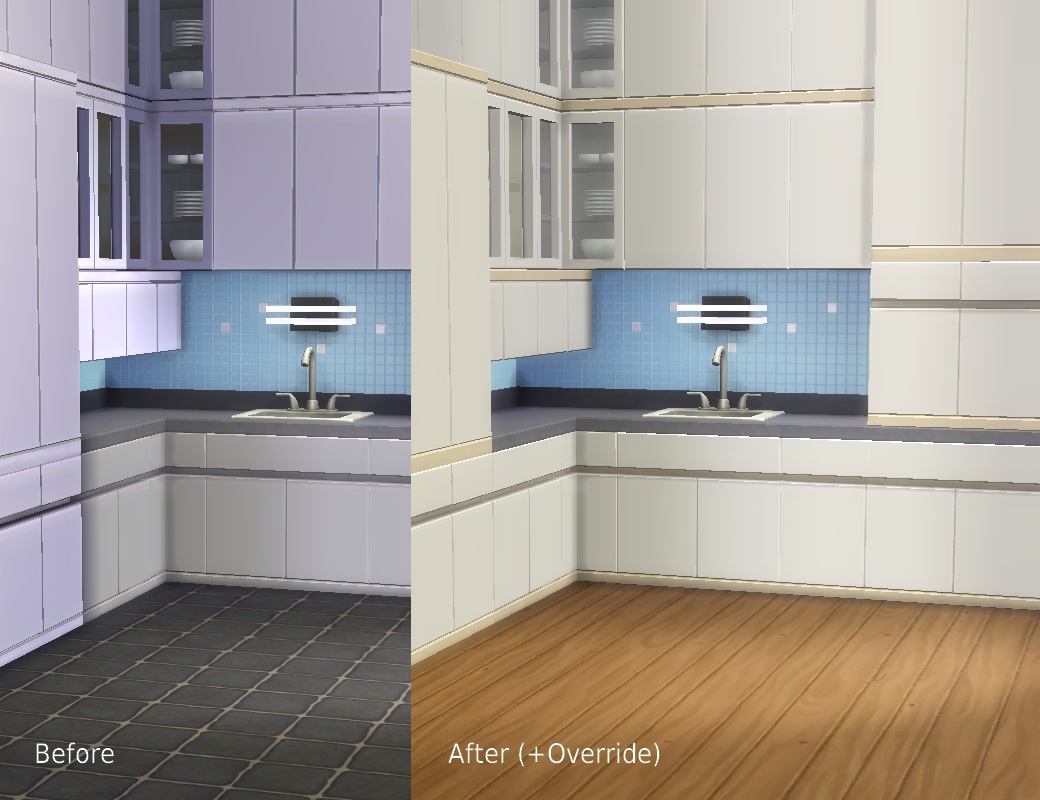
I used to think the busted lighting on the Maxis kitchens was just due to my lame graphics card, but judging from other people's screenshots, it isn't. Attached are two zips that correct various issues: one includes the overrides, the other one doesn't (in case you like that pink kitchen), apart from that they're the same. Only use one or you will likely end up with wrong catalogue swatches. I only tested / used this on Medium and High settings since my hardware won't support anything more, but since the changed shader is already in use in the game and I don't know of any problems with counters, I don't expect any real issues.
A thread on how to change the shaders used for custom objects has been started here.
What each package does:
Light Fix
- Changes the shader on the cabinets to the one that is used on the counters
- Ignores the busted LITE resource on the tall cabinet and uses the one from the regular counter instead
- Corrects the colour tags on the black counters, islands, and cabinets so that one will now find them when filtering for Colour > Black
MODL/MLOD/LITE 0x00000000-0x5C518D95A5000152
MODL/MLOD 0x00000000-0x7D7956DB8DE60189
MODL/MLOD 0x00000000-0x97F26E9E3977994B
MODL/MLOD 0x00000000-0xCB2D54A6F24B8A02
MODL 0x00000000-0xF5A402908C32560C
MODL/MLOD 0x00000000-0xFF1FB5DBD7407FC9
MODL/MLOD 0x00000000-0xFF1FB5DBD7407FDB
COBJ 0x000000000000ECE6 – tag fix
COBJ 0x000000000000ED07 – tag fix
COBJ 0x000000000000ED15 – tag fix
No Drop
- Puts a version of all cabinets in the Counters section that won't drop with walls so they won't leave strange holes when viewed from the backside. This makes them into very versatile, appropriately bland furniture for all kinds of offices, hospitals, space stations etc. They work exactly like the regular cabinets apart from that, with the pop-up model selection and all (they are the same objects, this mod is basically an alias that only changes the placement flag).
- Two flavours: the "defaultcolours" version has the Maxis colour swatches, the "overridecolours" one matches the overrides below
- Since they aren't self-contained objects like they pretend to be, you will get the usual "Script Call Failed" error when attempting to recolour them. I can't turn off the recolour thing unfortunately (that's derived from the fact they have color options (which they must have, otherwise one couldn't select them)).
Overrides
- Texture/catalogue overrides for the light grey version (white) and the pink version (tasteful avocado green). The white has the same light wood as the grey-blue one, the green has the same dark wood as the cream one, so they can easily be combined. Both overrides are for the island counters too, I only forgot to take screenshots of them. You need to delete your localthumbscache.package for the game to generate new thumbnails.
Grey > White:
0x319E4F1D-0x00000000-0x00000000000074D8
0x319E4F1D-0x00000000-0x0000000000007A8F
0x319E4F1D-0x00000000-0x0000000000007ED5
0x00B2D882-0x00000000-0x17A3F006B507FEA9
0x00B2D882-0x00000000-0x1DF3D887AFEA4666
0x00B2D882-0x00000000-0x40091D9D3EBF5C3D
Pink > Green:
0x319E4F1D-0x00000000-0x000000000000ECE0
0x319E4F1D-0x00000000-0x000000000000ED01
0x319E4F1D-0x00000000-0x000000000000ED11
0x00B2D882-0x00000000-0x17A3F006B507FEAE
0x00B2D882-0x00000000-0x1DF3D887AFEA4661
0x00B2D882-0x00000000-0x40091D9D3EBF5C3A
s4pe, HxD.
|
pbox_cabinet-blandco-overhaul_overridecolours.zip
Download
Uploaded: 22nd Dec 2014, 1.16 MB.
17,227 downloads.
|
||||||||
|
pbox_cabinet-blandco-overhaul_defaultcolours.zip
Download
Uploaded: 22nd Dec 2014, 68.8 KB.
11,529 downloads.
|
||||||||
| For a detailed look at individual files, see the Information tab. | ||||||||
Install Instructions
1. Download: Click the File tab to see the download link. Click the link to save the .rar or .zip file(s) to your computer.
Read the upload description for installation instructions. If nothing else is specified, do the following:
2. Extract: Use WinRAR (Windows) to extract the .package file(s) (if included, ts4script as well) from the .rar or .zip file(s).
3. Cut and paste the .package file(s) (if included, ts4script as well) into your Mods folder
- Windows XP: Documents and Settings\(Current User Account)\My Documents\Electronic Arts\The Sims 4\Mods\
- Windows Vista/7/8/8.1: Users\(Current User Account)\Documents\Electronic Arts\The Sims 4\Mods\
Need more information?
- Anyone can use both .rar and .zip files easily! On Windows, use WinRAR.
- If you don't have a Mods folder, just make one.
- Mod still not working? Make sure you have script mods enabled

Loading comments, please wait...


Uploaded: 20th Dec 2014 at 5:15 PM
Updated: 17th Aug 2015 at 1:57 AM
-
by plasticbox updated 7th May 2015 at 11:07am
-
No-Drop cabinets / Light Fix for “Vault” and “SCargeaux” | Update: Unlocked Colour Option Fixes
by plasticbox updated 19th Oct 2015 at 7:54am
-
Store Ice Cream Trays In The Fridge
by crazyspaniard updated 31st Aug 2015 at 5:53pm
-
-

by Lunula Simmer 31st Mar 2022 at 2:25pm
-

Triangular Blue Loading Screen
by Rieszky123 4th May 2022 at 11:17am
-

-
by LunarBritney updated 16th May 2026 at 12:22pm
-

by LunarBritney updated 16th May 2026 at 12:23pm
-
by link_the_bae updated 8th Oct 2025 at 2:27am


-

by plasticbox 7th Dec 2015 at 5:18pm
These are some more Maxis World objects fixed up for Buy/Build. more...
 4
25.9k
85
4
25.9k
85
-

by plasticbox 25th Aug 2014 at 6:52pm
Starter for up to 4 sims, lightly furnished and sparsely landscaped. Base game content only. more...
 3
9.8k
61
3
9.8k
61
-
by plasticbox updated 10th Sep 2014 at 2:01pm
Furnished for 4+1 sims, with basement and attic, on a 15 x 20 lot so it's easy to place just more...
14
25.5k
132
-
Backdoor Lane 34 -- City Starter
by plasticbox 7th Jun 2007 at 2:27am
Nightlife and OfB required. more...
 +2 packs
9 21.7k 17
+2 packs
9 21.7k 17 Nightlife
 Open for Business
-
Backdoor Lane 23 [NL+OfB] -- Mini Townhouse
by plasticbox updated 1st Apr 2007 at 12:20pm
Cost: 56.414§ Lot Size: 1x3 Households: 1 Played: No Furnished: Yes Nightlife and OfB required. more...
+2 packs
12 30.4k 22 Nightlife
Open for Business
-
Mostly obsolete: Flowerbox Fixes / Overrides
by plasticbox updated 10th Mar 2015 at 2:11pm
Fixes / edits / overrides for the Base Game window flowerboxes, making it so that they can be placed more more...
14
24.3k
139
-
Newbie Road 99 -- Under 40.000, Base Game
by plasticbox updated 16th Nov 2007 at 9:08am
No EPs required. more...
6
21.9k
28
-
by plasticbox updated 23rd Aug 2015 at 3:11pm
This is a low side table matching the Maxis “Shugart Bookstation”. more...
9
23.1k
115
-
by plasticbox 13th Jul 2015 at 4:40pm
These are three Maxis girl-only (why?) jeans/shorts from the base game made available for boys. more...
-

Plain PuffySleeve Top Recolours
by plasticbox 25th Jul 2015 at 10:32pm
These are six plain recolours (without the heart stencil) of the Maxis puffy-sleeve top for girls. more...


About Me
– Feel free to recycle, you don’t need to ask.
– For the attribution, please link to the upload you’re using wherever possible (instead of my profile). This is particularly important with edits made for/with different games or game versions.
– If you use my stuff in something you make, please upload the result to a free, accessible, noncommercial site with no more restrictions than these. Code must remain open source; meshes and other material must remain re-usable.
Please do not redistribute any unmodified files – link to the upload post instead.