
 Sign in to Mod The Sims
 Default replacement - GLS AF fur coats
 Default replacement - GLS AF fur coats


Catalog.jpg - width=800 height=600
Black.jpg - width=800 height=600
Brown.jpg - width=800 height=600
White.jpg - width=800 height=600
Originals.jpg - width=800 height=600
Both the replacement textures and the mesh are by AdeLanaSP, and are from her "Frosty Day" set of AF fur coats. When I saw the coats, I thought they were too nice to not be Formal, so I've set the replacements as Outerwear and Formal. Maxis set the originals as Everyday and Formal, but there are category mods (see below) which enable them as Outerwear. Resources are compressed.
If you have AdeLana's set, you already have the mesh. If not, you can download it from this thread as a separate rar file -- though I recommend getting her set. The replacement packages are in three rar files, one for each of the three afbodycoatfurtrim outfits. There are three replacement packages for the brown coat, three for the black coat, and two for the white coat. You can mix and match the replacement packages as you choose, so long as you only use one replacement for each afbodycoatfurtrim outfit. If you use more than one replacement package for an outfit, the game will use the one that loads last, which may not be the one you want. You can use the replacement packages with another default for afbodycoatfurtrim, as long as they load after it.
The filenames for the replacement packages are tagged with the same numbers that AdeLana used to identify her packages, so you can tell which CC packages match the replacement packages you select.
 If you have her set, and want to delete the CC versions of the replacements you select, be sure to do it by deleting the CC packages themselves, rather than by deleting the CC outfits from within Body Shop or CAS.
Note: The GLS packages for both fanseelamb's Maxis Outerwear as.... Outerwear! and Phaenoh's Great Clothing Migration affect the afbodycoatfurtrim outfits. (fanseelamb's mod enables them as Outerwear; Phaenoh's makes them Outerwear-only.) If you use either of those category mods, or any other category mod that affects afbodycoatfurtrim, the replacement packages must load after it, or the replacement outfits will not appear properly. You should not have a problem with that if the category mod is installed in either the \TSData\Res\Catalog\Skins or \TSData\Res\Catalog\Bins folder of your latest expansion pack.
Custom content in images:
Default skins by Leh
(Note: The download links at GoS don't work, the skins can be downloaded here
Default eyes by Lyran (Wayback Machine link)
(Note: The download link is the pic of the eyes. It appears to be working at least some of the time.)
Default replacement eyebrows by rainstorm25
Poly count: 3182 (somewhat higher than Maxis, but townies won't get it as Everyday)
Additional Credits:
AdeLanaSP, for the mesh and textures, and for giving permission to share this.
|
AdeLana_AF_mesh006.rar
Download
Uploaded: 9th Feb 2020, 158.9 KB.
3,385 downloads.
|
||||||||
|
dharden_DEFAULT_afbodycoatfurtrim-white.rar
| Default replacements for the white fur coat from GLS
Download
Uploaded: 9th Feb 2020, 777.2 KB.
3,356 downloads.
|
||||||||
|
dharden_DEFAULT_afbodycoatfurtrim-brown.rar
| Default replacements for the brown fur coat from GLS
Download
Uploaded: 9th Feb 2020, 1.21 MB.
3,362 downloads.
|
||||||||
|
dharden_DEFAULT_afbodycoatfurtrim-black.rar
| Default replacements for the black fur coat from GLS
Download
Uploaded: 9th Feb 2020, 1.31 MB.
3,425 downloads.
|
||||||||
| For a detailed look at individual files, see the Information tab. | ||||||||
Install Instructions
1. Download: Click the download link to save the .rar or .zip file(s) to your computer.
2. Extract the zip, rar, or 7z file.
3. Place in Downloads Folder: Cut and paste the .package file(s) into your Downloads folder:
- Origin (Ultimate Collection): Users\(Current User Account)\Documents\EA Games\The Sims™ 2 Ultimate Collection\Downloads\
- Non-Origin, Windows Vista/7/8/10: Users\(Current User Account)\Documents\EA Games\The Sims 2\Downloads\
- Non-Origin, Windows XP: Documents and Settings\(Current User Account)\My Documents\EA Games\The Sims 2\Downloads\
- Mac: Users\(Current User Account)\Documents\EA Games\The Sims 2\Downloads
- Mac x64: /Library/Containers/com.aspyr.sims2.appstore/Data/Library/Application Support/Aspyr/The Sims 2/Downloads
- For a full, complete guide to downloading complete with pictures and more information, see: Game Help: Downloading for Fracking Idiots.
- Custom content not showing up in the game? See: Game Help: Getting Custom Content to Show Up.
- If you don't have a Downloads folder, just make one. See instructions at: Game Help: No Downloads Folder.
Loading comments, please wait...

Uploaded: 9th Feb 2020 at 5:10 PM
-
-
-
-
-
-
-
-
-
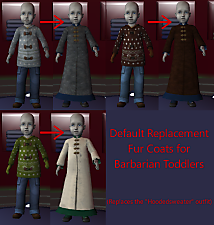
Default Replacement Fur Coats for Barbarian Toddlers
by DinaMarBoobs 2nd Jun 2025 at 6:50pm
 +1 packs
634 2
+1 packs
634 2 Nightlife
-


-
-
Nightlife kasa top, pants, and outfit enabled for young adults
by dharden 21st Sep 2014 at 6:05pm
Mods to enable NL "Kasa" outfits for YAs more...
+1 packs
6.2k 8 Nightlife
-
-
-
-
-
Default replacements for the Yomoshoto Evasion
by dharden 28th Jan 2016 at 4:15am
Default replacements for the Yomoshoto Evasion sedan from Nightlife more...
+1 packs
10 9.5k 29 Nightlife
-
-
Default replacement - "The Four Post Bed" and "The Single Bed a la Mode" w/o posts
by dharden 13th Apr 2017 at 6:34pm
Replaces the four-poster double and single beds from Seasons with Michelle's postless version. more...
+1 packs
3 10.8k 31 Seasons
-
Packs Needed
| Stuff Pack | |
|---|---|
| Glamour Life |