
 Sign in to Mod The Sims
 Beekeeper Hat Updo Variant (F; T, YA, A)
 Beekeeper Hat Updo Variant (F; T, YA, A)


Collage.jpg - width=1080 height=1080
CASTableCollage.jpg - width=2160 height=1080
2025/05/16 – #2
- Changed shaders to match those of the original beekeeper hat from the Supernatural expansion. Lighting seems to be the same when trying to take the same screenshots in the same location, so new screenshots seem unnecessary. This new version does not replace the hair from the previous, as they have different TGIs. Therefore, add the new version, and change the hair of the Sims using the old version to the new version. Players can keep the old version installed alongside the new if desired.
- Added missing bone that was stored in the University Life expansion (hair was cloned from the graduation cap updo hair from that expansion). That should prevent the game from crashing for players without that expansion.
- Set the starting vertex ID for each group to 20000.
- Aligned normals and reordered the hat and hair groups; this seems to have fixed the floating piece of hair seen at certain angles.
- Adjusted the UV map very slightly due to noticing some sharpness at very specific angles.
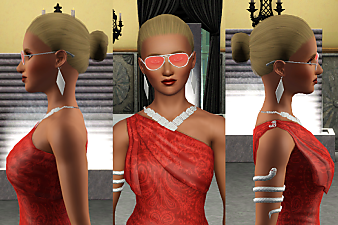
It always irked me that the Sims 3 only included one beekeeper hat hairstyle. I found it immersion-breaking when my long-haired Sims would suddenly sport a shorter hairstyle for when they would use the beekeeping box, which would instantly grow back to their preferred length after they were done with it.
Seeing as nobody else had made a long hair variant of the beekeeper hat hair, I decided to figure out it how to do it myself. I have no prior experience with 3D meshes, but I was able to get the updo hairstyle to work with the beekeeper hat. It's available for female teens, young adults, and adults.
Tools Used
- S3PE (For creating packages and importing resources into them and editing their chunk entries)
- S3OC (Used to clone CAS parts for extracting their resources with its above sister project)
- TSRW 2.0.88 (Used to create CAS parts from existing ones and export them as Sims3Packs)
- Delphy's Sims 3 Pack Multi-Extracter (Used to convert the Sims3Packs exported by TSRW into .package files)
- Blender 2.79 (Used to edit the meshes and realign their UV maps)
- Milkshape 3D (Used to combine groups and add extra data to the meshes so that they didn't show up as pitch black in-game; also used to convert the .simgeom files into .obj files to import into Blender, and to convert the .obj files exported by Blender into .wso files to import into TSRW)
- GIMP (Used to edit DDS textures extracted from the reference CAS parts to align with the UV maps of the new CAS part meshes)
- Meshing Toolkit (Used to assign bones to and create morphs for the new CAS part meshes)
- SimGeom MTNF and TGI Editor (Used to change the shaders of the new CAS part meshes for transparency)
| Filename | Type | Size |
|---|---|---|
| afHairHatBeekeeperUpdo.package (with old shaders).zip | zip | |
| afHairHatBeekeeperUpdo.package | package | 3284308 |
| Filename | Type | Size |
|---|---|---|
| afHairEP7HatBeekeeperUpdo.package.zip | zip | |
| afHairEP7HatBeekeeperUpdo.package | package | 3187236 |
This is a new mesh, and means that it's a brand new self contained object that usually does not require a specific Pack (although this is possible depending on the type). It may have Recolours hosted on MTS - check below for more information.
|
afHairEP7HatBeekeeperUpdo.package.zip
Download
Uploaded: 16th May 2025, 2.25 MB.
114 downloads.
|
||||||||
|
afHairHatBeekeeperUpdo.package (with old shaders).zip
Download
Uploaded: 16th May 2025, 2.24 MB.
121 downloads.
|
||||||||
| For a detailed look at individual files, see the Information tab. | ||||||||
Install Instructions
1. Click the download button, or the filename, to download the file to your computer.
2. Extract the zip, rar, or 7z file. Now you will have either a .package or a .sims3pack file.
For Package files:
1. Cut and paste the file into your Documents\Electronic Arts\The Sims 3\Mods\Packages folder. If you do not already have this folder, you should read the full guide to Package files first: Sims 3:Installing Package Fileswiki, so you can make sure your game is fully patched and you have the correct Resource.cfg file.
2. Run the game, and find your content where the creator said it would be (build mode, buy mode, Create-a-Sim, etc.).
For Sims3Pack files:
1. Cut and paste it into your Documents\Electronic Arts\The Sims 3\Downloads folder. If you do not have this folder yet, it is recommended that you open the game and then close it again so that this folder will be automatically created. Then you can place the .sims3pack into your Downloads folder.
2. Load the game's Launcher, and click on the Downloads tab. Find the item in the list and tick the box beside it. Then press the Install button below the list.
3. Wait for the installer to load, and it will install the content to the game. You will get a message letting you know when it's done.
4. Run the game, and find your content where the creator said it would be (build mode, buy mode, Create-a-Sim, etc.).
Extracting from RAR, ZIP, or 7z: You will need a special program for this. For Windows, we recommend 7-Zip and for Mac OSX, we recommend Keka. Both are free and safe to use.
Need more help?
If you need more info, see:
- For package files: Sims 3:Installing Package Fileswiki
- For Sims3pack files: Game Help:Installing TS3 Packswiki
Loading comments, please wait...

Uploaded: 13th Apr 2025 at 4:57 PM
Updated: 26th Apr 2026 at 7:34 PM
-
TS2 to TS3: The Casual Hair - Now with Moar Edits!
by tyirannoss 12th Jan 2010 at 4:40pm
 97
164k
292
97
164k
292
Hair » Male » Young Adult
-
by Kiara24 20th Aug 2010 at 5:00am
39
79.4k
147
Hair » Female » Young Adult
-
TS2 Cassandra Goth Hair Conversion
by Kiara24 10th Feb 2011 at 10:07am
42
44.9k
73
Hair » Female » Young Adult
-
Brandi Updo Hair - Teen to Elder
by Menaceman44 30th Sep 2011 at 5:54am
-
-
-
-
Base Game - YA Female Default Replacement Hat Hairs
by DRPEPPERGRL 4th Apr 2015 at 6:29pm
6
17.8k
44
Hair » Female » Young Adult
-
by Onebeld 14th Feb 2022 at 11:54am
5
8.3k
21
Hair » Female » Young Adult
-

-


by Destrospean updated 27th Jul 2026 at 12:31am
91
17.5k
25
-


Customizable Uncustomizable Outfits
by Destrospean updated 30th Jul 2026 at 9:33pm
+1 packs
21 11.9k 25 Ambitions
-
by The-Sims-Verse updated 2nd Aug 2026 at 6:28pm
62
14.2k
34
-


by Destrospean updated 22nd Jun 2026 at 9:05pm
148
84.1k
178
-


STBLize+ (supports YAMLs with optional hierarchies, converting back into XMLs and YAMLs, etc.)
by Destrospean updated 7th Oct 2025 at 1:29pm
3.9k
6
-
Dusty Peepers Aviators As Accessory (M & F; T+)
by Destrospean updated 17th Jun 2025 at 4:18pm
1.4k
4
-


More Favorites – Add Custom Favorite Food, Music, and Colors
by Destrospean updated 29th Jul 2026 at 5:28pm
33
8.9k
30
-

Law Enforcement and Medical Career Data Fixer
by Destrospean updated 4th Sep 2025 at 6:12pm
14
11.9k
28
-


Usable Canes for Young Adults and Adults (+ Occult Fixes)
by Destrospean updated 15th Aug 2025 at 8:19pm
I've seen quite a few people on this site and other Sims 3 mod sites complain that EA didn't allow more...
+1 packs
17 9k 28 Generations
-

Outfit Assignment – Assign New Outfits to Any Interactions
by Destrospean updated 14th Jul 2026 at 9:19pm
+1 packs
46 7k 16 Ambitions


About Me
I have a passion for The Sims 3, computer science, and banana smoothies.
I don’t take requests, unless I find them super duper interesting. :P
I am open to collaborations though. :)