
 Sign in to Mod The Sims
 My Foxy Grandpa
 My Foxy Grandpa


MFG_Briefs-Detail.jpg - width=1000 height=756
MFG_Briefs-Presets.jpg - width=1000 height=424
MFG_NecklaceConversion.jpg - width=1000 height=691
MFG_TightTee-Presets.jpg - width=1000 height=648


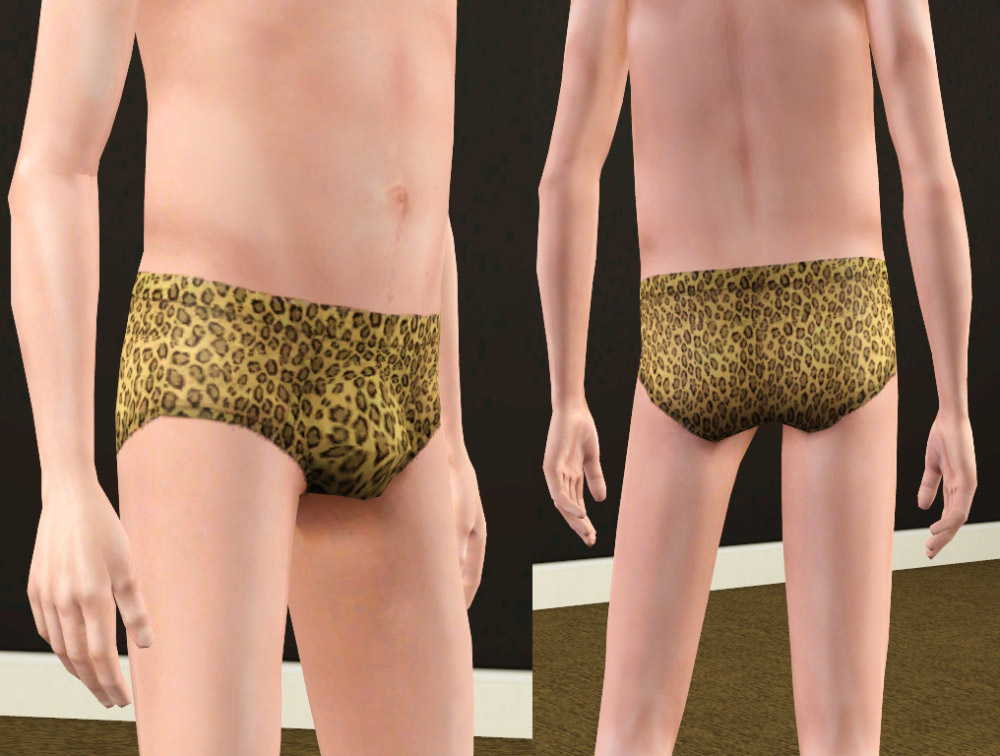
These have one channel and are found in sleepwear only. I made sure to add a leopard print preset for those sims who what to channel their inner Frankie Mashuga look. +1 for knowing who that is!
NOTE: These use the elder underwear mesh, meaning it will pick up any default replacements you have for it. As you can see these are displayed on Robokitty's "JUNK" default replacements. Unfortunately her mesh carries the bumpmap from the swim briefs, which is why you can see it on the underwear. If you do NOT have her defaults installed, you will not see the little "ghost" drawstring.
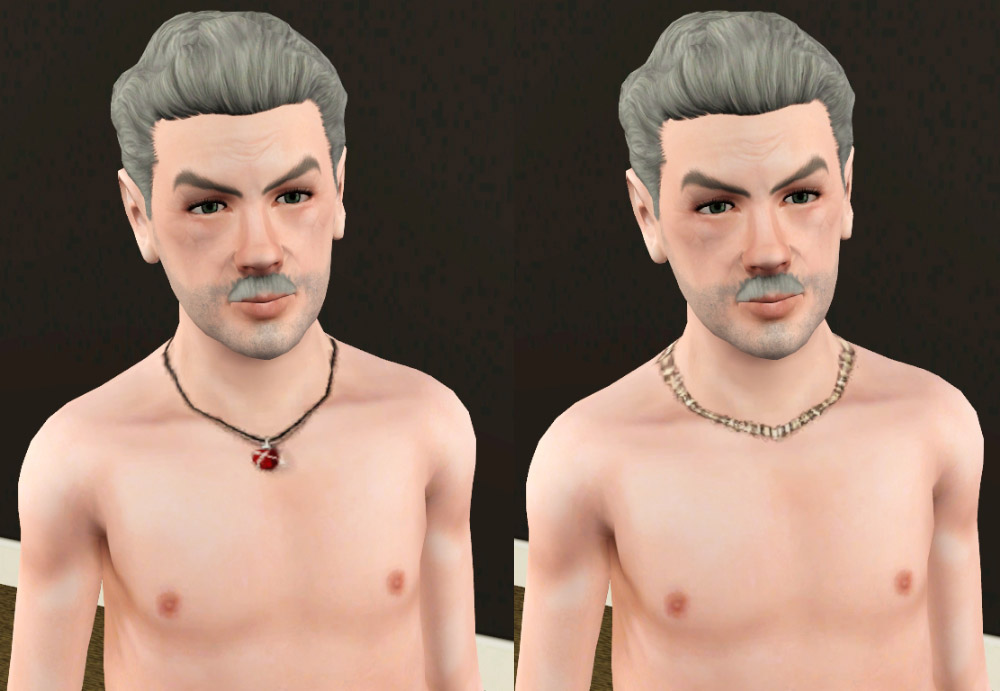
Next up is a simple conversion of those nude tops with necklaces on them. They have one channel (like the original) and are available for naked, sleepwear, athletic and swimwear.
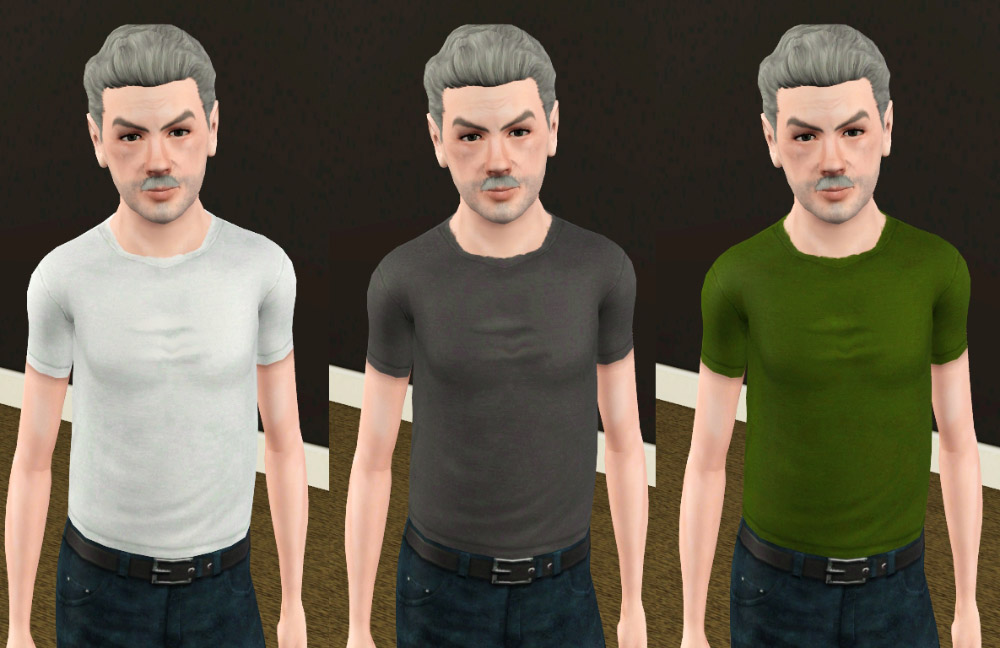
Lastly, I made a fitted t-shirt for your elders using the adult shirt textures. I thought it came out pretty nice. It, too, has one channel and is found in everyday, sleepwear and athletic.
Additional Credits:
Hair by TumTum
|
daluved1_EM_PlainFittedTee.rar
Download
Uploaded: 20th Jul 2011, 1.9 KB.
2,097 downloads.
|
||||||||
|
daluved1_EM_TightyWhiteysConversion.rar
Download
Uploaded: 20th Jul 2011, 2.3 KB.
2,511 downloads.
|
||||||||
|
daluved1_EM_NecklaceTopConversion.rar
Download
Uploaded: 20th Jul 2011, 2.0 KB.
1,771 downloads.
|
||||||||
| For a detailed look at individual files, see the Information tab. | ||||||||
Install Instructions
1. Click the download button, or the filename, to download the file to your computer.
2. Extract the zip, rar, or 7z file. Now you will have either a .package or a .sims3pack file.
For Package files:
1. Cut and paste the file into your Documents\Electronic Arts\The Sims 3\Mods\Packages folder. If you do not already have this folder, you should read the full guide to Package files first: Sims 3:Installing Package Fileswiki, so you can make sure your game is fully patched and you have the correct Resource.cfg file.
2. Run the game, and find your content where the creator said it would be (build mode, buy mode, Create-a-Sim, etc.).
For Sims3Pack files:
1. Cut and paste it into your Documents\Electronic Arts\The Sims 3\Downloads folder. If you do not have this folder yet, it is recommended that you open the game and then close it again so that this folder will be automatically created. Then you can place the .sims3pack into your Downloads folder.
2. Load the game's Launcher, and click on the Downloads tab. Find the item in the list and tick the box beside it. Then press the Install button below the list.
3. Wait for the installer to load, and it will install the content to the game. You will get a message letting you know when it's done.
4. Run the game, and find your content where the creator said it would be (build mode, buy mode, Create-a-Sim, etc.).
Extracting from RAR, ZIP, or 7z: You will need a special program for this. For Windows, we recommend 7-Zip and for Mac OSX, we recommend Keka. Both are free and safe to use.
Need more help?
If you need more info, see:
- For package files: Sims 3:Installing Package Fileswiki
- For Sims3pack files: Game Help:Installing TS3 Packswiki
Loading comments, please wait...


Uploaded: 20th Jul 2011 at 10:02 PM
-
by ~Bec~ 1st Jul 2009 at 12:36pm
 68
272.8k
204
68
272.8k
204
Female » Mixed Sets » Teen
-
Variable Set: Top & Bottom for (Y)AF
by sosliliom 11th Sep 2010 at 9:59pm
39
106.4k
331
Female » Mixed Sets » Adult
-
-
I'm Still Sexy! (Four Clothing Conversions for Elders)
by daluved1 2nd Jun 2011 at 2:39pm
32
53.3k
71
Female » Mixed Sets » Elder
-
Elder pregnant clothes and nude
by melodie9 updated 2nd Mar 2013 at 2:45am
18
68.5k
61
Female » Mixed Sets » Elder
-
-
-
Elders @ The Club Conversion Dump
by VirtualHugs updated 13th Apr 2026 at 5:49pm
+1 packs
6 4.9k 24 Late Night
-
Late 2000s Winter Teen Conversion Mini Dump
by VirtualHugs 4th Feb 2026 at 4:48pm
7
5.7k
12
Female » Mixed Sets » Teen
-

California Grannies Conversion Dump
by VirtualHugs 31st Mar 2026 at 11:19pm
+1 packs
2 1.4k 2 Katy Perry Stuff
Female » Mixed Sets » Elder


-
Medieval Armoury Part 2 - Ye Olde Kingdom of Pudding
by The Merrye Makers 16th Dec 2011 at 9:17am
A selection of decorative weapons in the medieval style more...
15
54.5k
143
-
-
-
Arcane Institute & Mages Guild (Elixir Consignment Store)-Ye Olde Kingdom of Pudding
by The Merrye Makers 19th Jan 2013 at 1:19pm
Arcane Institute and Mages Guild (Elixir Consignment Store) Community Lot made by HiG33k for donation to The Merrye Makers. more...
+8 packs
20 59.8k 166 World Adventures
 Ambitions
Late Night
Ambitions
Late Night
 Generations
 Pets
Pets
 Showtime
 Supernatural
 Seasons
-
-
The Voodoo Queen: Marie Laveau
by daluved1 27th Dec 2010 at 3:00pm
Three x's and a little pound cake can bring you good luck. more...
21
28.4k
25
-
REDUX: Longer Nails for the Ladies
by daluved1 7th Aug 2012 at 3:07pm
Give your ladies' nails a refill. more...
46
111.2k
408
-
-
Medieval Plumbing - Ye Olde Kingdom of Pudding
by The Merrye Makers 18th Dec 2011 at 10:18pm
A chamber pot (toilet), shower, and bathtub for the bladder and hygiene needs of Ye Olde Kingdom of Pudding residents. more...
14
73.7k
181
-
Daluved1's Bright Eye Default/Contacts
by daluved1 updated 20th Sep 2009 at 3:52pm
So, stepping out of my comfort zone, I branched into something a little different. more...


About Me
Because my policy is really inconsistent on my uploads, I've decided to make an official policy! So whatever you see here on my profile is my current policy. You may disregard any ''policy'' information you see on the actual upload itself.
-You may use my creations with sims
-You may use my objects with lots.
-You may retexture my meshes.
-You may include my meshes with retextures.
-You may NOT upload my creations with sims
-You may NOT upload my objects with lots.
-You may NOT upload my creations to paysites.
-You may NOT upload my creations to the exchange.
-Always credit me with a link
-I do NOT take requests!