Sign in to Mod The Sims
 Color of Night -- A ninja pose set
 Color of Night -- A ninja pose set


cover screen.jpg - width=1024 height=768
full set 1.jpg - width=800 height=600
full set 2.jpg - width=800 height=600
full set 3.jpg - width=800 height=600
1.jpg - width=1024 height=768
2.jpg - width=1024 height=768
3.jpg - width=1024 height=768
4.jpg - width=1024 height=768
5.jpg - width=1024 height=768
6,7.jpg - width=1024 height=768
8,9.jpg - width=1024 height=768
10.jpg - width=1024 height=768


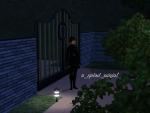


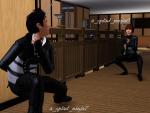
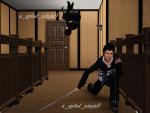

*Compatible with the "Pose List" feature of the newest Pose Player!*
It occurred to me that I've never had a successful criminal in Sims 3. Never gotten to see one of my simmies go to work in the ninja suit. That's a shame. While I pondered my failures, I decided to make a pose set based on a break-in! Fortunately the homeowner was smart enough to hire a bodyguard or things might have gone hard for him. LOL.
Pose tags are as follows:
a_splad_ninja1 -- neutral stance. Weapon can be used.
a_splad_ninja2 -- slouchy stance. Use ALT to line sim up with wall. Weapon can be used.
a_splad_ninja3 -- sneaking. Small weapon recommended if used with this pose.
a_splad_ninja4 -- wall climb. Use ALT to line Sim up with wall. Small weapon recommended if used with this pose.
a_splad_ninja5 -- sneaking up stairs. Weapon can be used.
a_splad_ninja6 -- open hand defensive stance. Weapon not recommended.
a_splad_ninja7 -- attacking position. Weapon can be used.
a_splad_ninja8 -- attacking position. Weapon can be used.
a_splad_ninja9 -- evasion. Weapon not recommended.
a_splad_ninja10 -- escape. Weapon not recommended.
The weapons used in the screenshots are the Katana from RoseSims available on page 4 of the "Magic" sectioni for Sims 3, and the right-handed Kunai Knife by CloudwalkerNZ.
Additional Credits:
Cmomoney for the incredible Pose Player
OrangeMittens for the excellent "Creating Your Own Custom Poses" tutorial
WesHowe for the AnimTool
Mesher for the AM/AF rigs
Inge Jones for S3PE and the rest of the Sims community at large for assistance and encouragement.
|
Ninja Assassin!.rar
Download
Uploaded: 26th Jan 2012, 70.9 KB.
8,917 downloads.
|
||||||||
| For a detailed look at individual files, see the Information tab. | ||||||||
Install Instructions
1. Click the download button, or the filename, to download the file to your computer.
2. Extract the zip, rar, or 7z file. Now you will have either a .package or a .sims3pack file.
For Package files:
1. Cut and paste the file into your Documents\Electronic Arts\The Sims 3\Mods\Packages folder. If you do not already have this folder, you should read the full guide to Package files first: Sims 3:Installing Package Fileswiki, so you can make sure your game is fully patched and you have the correct Resource.cfg file.
2. Run the game, and find your content where the creator said it would be (build mode, buy mode, Create-a-Sim, etc.).
For Sims3Pack files:
1. Cut and paste it into your Documents\Electronic Arts\The Sims 3\Downloads folder. If you do not have this folder yet, it is recommended that you open the game and then close it again so that this folder will be automatically created. Then you can place the .sims3pack into your Downloads folder.
2. Load the game's Launcher, and click on the Downloads tab. Find the item in the list and tick the box beside it. Then press the Install button below the list.
3. Wait for the installer to load, and it will install the content to the game. You will get a message letting you know when it's done.
4. Run the game, and find your content where the creator said it would be (build mode, buy mode, Create-a-Sim, etc.).
Extracting from RAR, ZIP, or 7z: You will need a special program for this. For Windows, we recommend 7-Zip and for Mac OSX, we recommend Keka. Both are free and safe to use.
Need more help?
If you need more info, see:
- For package files: Sims 3:Installing Package Fileswiki
- For Sims3pack files: Game Help:Installing TS3 Packswiki
Loading comments, please wait...


-
-
by spladoum 11th Mar 2013 at 7:27am
 22
83.9k
142
22
83.9k
142
-
by Milenchica 17th May 2013 at 9:01am
5
23.9k
31
-
-
by cottoncandy1 22nd Jan 2014 at 11:53am
10
35.1k
56
-
-
-
-
by k2m1too 28th Sep 2021 at 8:38pm
3.3k
4
-
by jessesue 15th Aug 2025 at 1:27pm
2
2.7k
3

-
Patio Maternity Dress--BG-compatible!
by spladoum 20th Dec 2016 at 3:05am
Here we are with more maternity wear--this one was a happy accident. more...
11
22.1k
70
-
A Dude's Jacket--Now with Two Versions! Base Game Compatible!
by spladoum 22nd Jun 2014 at 4:01am
Another nice top for your guys--because we need 'em! Two versions! more...
14
12.8k
45
Male » Everyday » Young Adult
-

-
Pole Position -- A Pole Dancing Pose Set
by Puss 'N Heels 10th Aug 2012 at 9:54pm
Shake your moneymaker ... more...
101
304.1k
438
-


-
Toddler Dress Up -- Two Generations Outfit Conversions! Base Game Compatible!
by spladoum 18th Aug 2014 at 12:39pm
Outfits for your little ones to play dress up :) more...
8
26.3k
85
-
Dad Shorts -- 4 embarrassing outfits! BG-compatible!
by spladoum 11th Apr 2016 at 6:40am
I haven't the first idea what inspired me to work on this bane of suburbia, the Dad Who Doesn't Know more...
9
25.4k
69
Male » Everyday » Young Adult
-
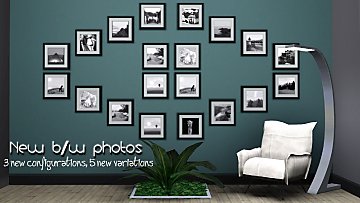
Quad B/W photos--new pictures, new frame configuration.
by spladoum 27th Oct 2014 at 10:12pm
So I’ve always loved the quad set of b/w photos that came with the base game, but I’ve always been more...
10
28.3k
144
-
-
Bossy -- 6 male modeling poses
by spladoum updated 8th Dec 2014 at 10:58pm
*Compatible with the "Pose List" feature of the newest Pose Player!* I was so excited by the prospect of more...
9
28.7k
59