Sign in to Mod The Sims
 Toddler's Play Poses
 Toddler's Play Poses
SCREENSHOTS


TP_Icon.gif - width=300 height=300
Screenshot-327.jpg - width=1140 height=721
Screenshot-330.jpg - width=1188 height=768
Downloaded 10,763 times
284 Thanks
70 Favourited
40,865 Views
Say Thanks!
Thanked!
I made a slight prequel to the Child's Play poses with four toddler poses that could be used for crushes, or in this case, with my models, they are twins. It's just four simple poses, two holding hands looking at each other, and then the third is a cute standing position while the fourth is kissing the third. Check the attached images, please. :]
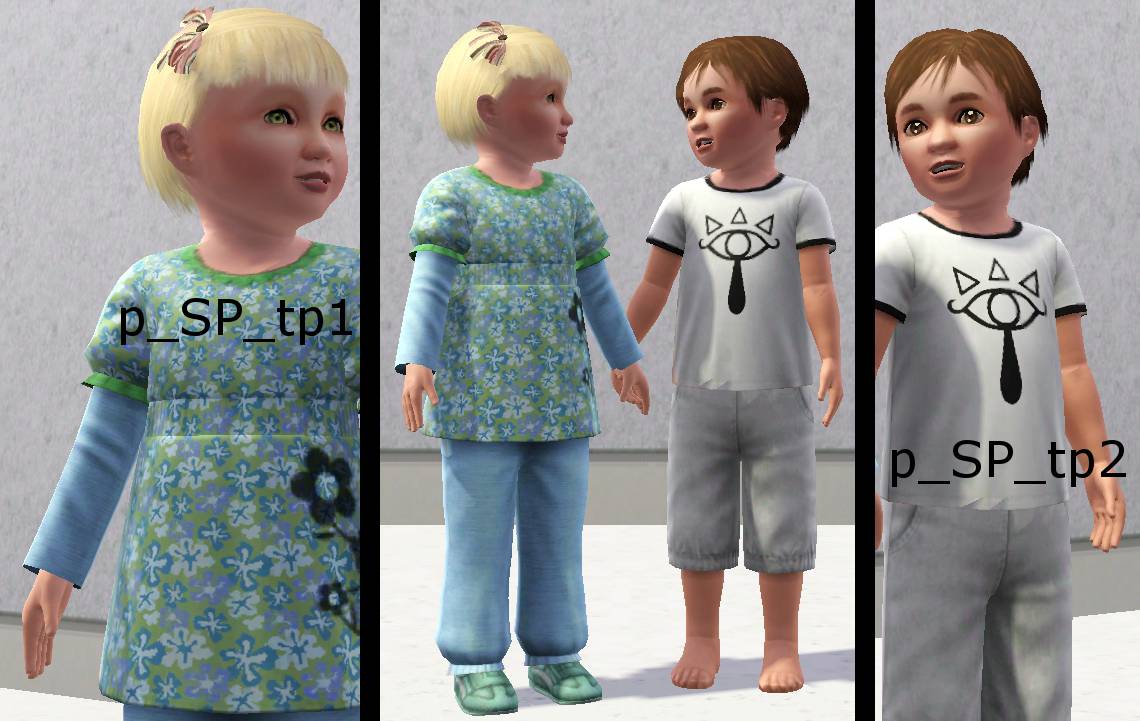
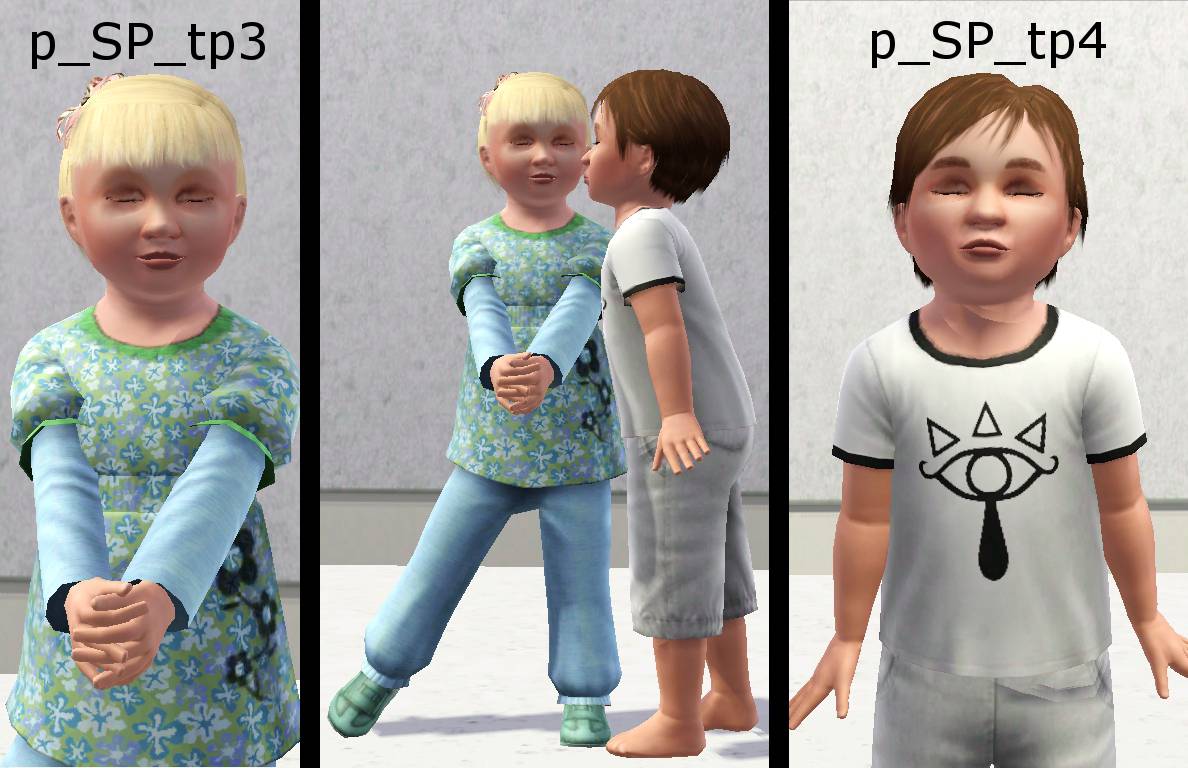
All of the CC can be found in the base game, or generations, I think Elijah's shorts are generations, not too sure. The Eye of Truth shirt is made by me, unreleased as of yet.
You must have the Pose Player installed to use these poses.
This pose pack includes:
p_SP_tp1
p_SP_tp2
p_SP_tp3
p_SP_tp4
All of the CC can be found in the base game, or generations, I think Elijah's shorts are generations, not too sure. The Eye of Truth shirt is made by me, unreleased as of yet.
You must have the Pose Player installed to use these poses.
This pose pack includes:
p_SP_tp1
p_SP_tp2
p_SP_tp3
p_SP_tp4
This mod is a custom pose or animation. This means that you will need the Pose Player or Animation Player mod by cmomoney installed in order to use the download in your game.
|
ToddlersPlay_SennyPaine.zip
Download
Uploaded: 9th Sep 2012, 1.19 MB.
10,762 downloads.
|
||||||||
| For a detailed look at individual files, see the Information tab. | ||||||||
Install Instructions
Quick Guide:
1. Click the download button, or the filename, to download the file to your computer.
2. Extract the zip, rar, or 7z file. Now you will have either a .package or a .sims3pack file.
For Package files:
1. Cut and paste the file into your Documents\Electronic Arts\The Sims 3\Mods\Packages folder. If you do not already have this folder, you should read the full guide to Package files first: Sims 3:Installing Package Fileswiki, so you can make sure your game is fully patched and you have the correct Resource.cfg file.
2. Run the game, and find your content where the creator said it would be (build mode, buy mode, Create-a-Sim, etc.).
For Sims3Pack files:
1. Cut and paste it into your Documents\Electronic Arts\The Sims 3\Downloads folder. If you do not have this folder yet, it is recommended that you open the game and then close it again so that this folder will be automatically created. Then you can place the .sims3pack into your Downloads folder.
2. Load the game's Launcher, and click on the Downloads tab. Find the item in the list and tick the box beside it. Then press the Install button below the list.
3. Wait for the installer to load, and it will install the content to the game. You will get a message letting you know when it's done.
4. Run the game, and find your content where the creator said it would be (build mode, buy mode, Create-a-Sim, etc.).
Extracting from RAR, ZIP, or 7z: You will need a special program for this. For Windows, we recommend 7-Zip and for Mac OSX, we recommend Keka. Both are free and safe to use.
Need more help?
If you need more info, see:
1. Click the download button, or the filename, to download the file to your computer.
2. Extract the zip, rar, or 7z file. Now you will have either a .package or a .sims3pack file.
For Package files:
1. Cut and paste the file into your Documents\Electronic Arts\The Sims 3\Mods\Packages folder. If you do not already have this folder, you should read the full guide to Package files first: Sims 3:Installing Package Fileswiki, so you can make sure your game is fully patched and you have the correct Resource.cfg file.
2. Run the game, and find your content where the creator said it would be (build mode, buy mode, Create-a-Sim, etc.).
For Sims3Pack files:
1. Cut and paste it into your Documents\Electronic Arts\The Sims 3\Downloads folder. If you do not have this folder yet, it is recommended that you open the game and then close it again so that this folder will be automatically created. Then you can place the .sims3pack into your Downloads folder.
2. Load the game's Launcher, and click on the Downloads tab. Find the item in the list and tick the box beside it. Then press the Install button below the list.
3. Wait for the installer to load, and it will install the content to the game. You will get a message letting you know when it's done.
4. Run the game, and find your content where the creator said it would be (build mode, buy mode, Create-a-Sim, etc.).
Extracting from RAR, ZIP, or 7z: You will need a special program for this. For Windows, we recommend 7-Zip and for Mac OSX, we recommend Keka. Both are free and safe to use.
Need more help?
If you need more info, see:
- For package files: Sims 3:Installing Package Fileswiki
- For Sims3pack files: Game Help:Installing TS3 Packswiki
Loading comments, please wait...
Author
Download Details
Packs:
None, this is Sims 3 base game compatible!
Uploaded: 9th Sep 2012 at 3:40 PM
Updated: 9th Sep 2012 at 3:41 PM by Buzzler - fixed thumbnail
Uploaded: 9th Sep 2012 at 3:40 PM
Updated: 9th Sep 2012 at 3:41 PM by Buzzler - fixed thumbnail
Tags
#toddler, #poses, #toddler poses, #crush
Creator Recommendations:
Other Download Recommendations:
-

Baby Love Pose Pack - Some cute toddler poses!
by traelia updated 25th Apr 2012 at 11:20am
 48
92.5k
242
48
92.5k
242
-
by deivvus 18th May 2013 at 1:34am
54
93.3k
262
-
-
by equiem 8th May 2014 at 7:04pm
12
31.4k
73
-
by equiem 21st May 2014 at 8:09am
13
21.3k
56
-
-
-
-
-
by TheSweetSimmer 29th Dec 2017 at 9:54pm
2
13k
14


More downloads by SenPain:
See more