
 Sign in to Mod The Sims
 HQ Texture Converter - version 2.7.0.0 - updated 2/14/2023
 HQ Texture Converter - version 2.7.0.0 - updated 2/14/2023


iconHQ.png - width=256 height=256
SharpenCompare.jpg - width=1363 height=647
CASCompare.jpg - width=1191 height=873
HQTCwindow2.3.jpg - width=703 height=502

What it does:
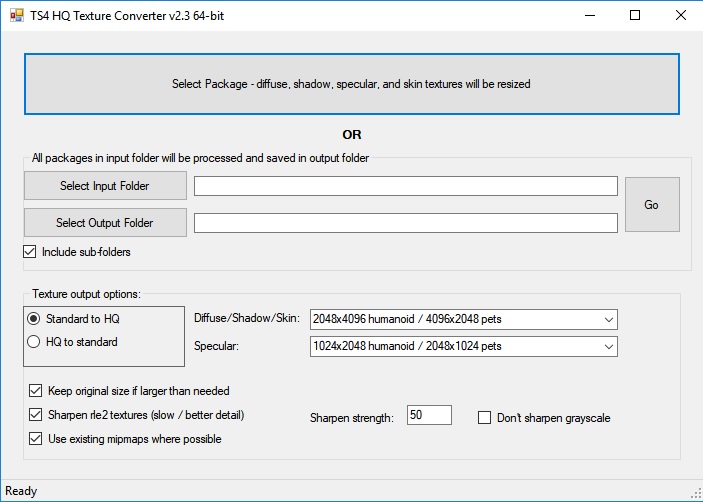
You can select either one package or input and output folders. If you select one package, it will be converted and you'll be prompted to save it with a new name. If you select folders, all packages in the input folder will be converted and saved in the output folder with new names. A status line at the bottom of the window will let you know what it's doing.
Conversion:
- RLE2 textures (diffuse, shadow, skin color, and skin definition) are resized to 2048x4096
- LRLE textures (diffuse and skin color) are resized to 2048x4096
- RLE2 textures disguised as LRLE are converted and resized to true LRLE 2048x4096
- RLES textures (specular) are resized to 1024x2048
- DDS CAS skin color files are resized to 2048x4096
However, these are just the defaults and you can select the output dimensions for yourself. Will also convert from HQ dimensions to standard if needed.
Pet textures are automatically resized correctly.
Requires Windows and .NET 4.7. If you're on Windows 10 you probably already have it; if you're using Windows 7 or 8.1 you can install it if necessary. Requires 64-bit. (If anyone needs a 32-bit version I'll provide it, but it's likely you'll get memory errors when processing large packages.)
How to use:
Use the top button to select a package to process one at a time. Select input and output folders to process every package in the folder. As of version 2.3 it will also optionally convert subfolders in the input folder, creating corresponding subfolders in the output folder if necessary.
Texture output options:
- Choice of which conversion to do and the target texture dimensions should be self-explanatory.
- Keep original size - when converting to HQ, you can choose to keep any textures that are larger than needed as is.
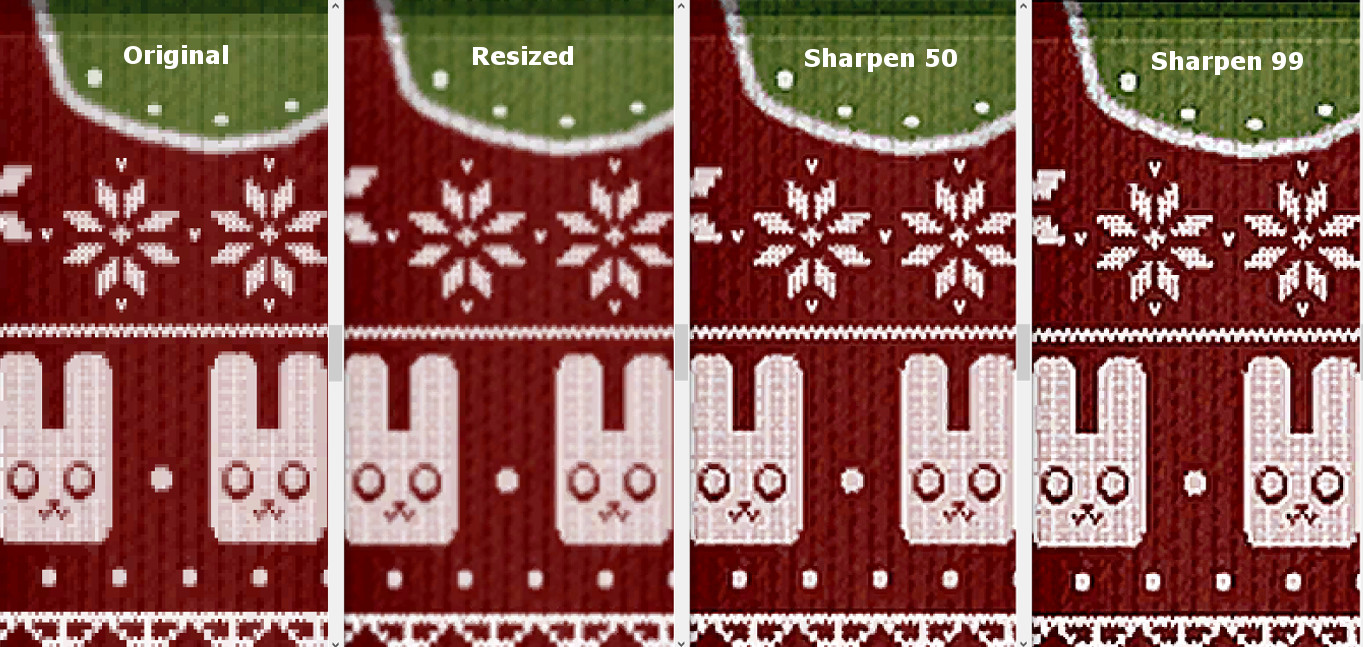
- Sharpen rle2 and lrle textures - using this option will sharpen the main (diffuse) textures of clothing, hair, accessories, skins, etc. You can choose the sharpening strength. Sharpening will slow down processing significantly. Strength of sharpening makes no difference in speed. Sharpening may or may not be useful when working with LRLE textures, you'll have to experiment.
- Don't sharpen grayscale - starting in version 2.2 the tool uses the CASP in CC packages to identify the shadow textures, so this option should normally be left unchecked. It may be useful if converting packages that contain clothing/hair/accessory textures but no CASPs as when converting EA game packages. It may not. If checked, the tool will attempt to identify shadow textures and not sharpen them. The benefit is that sharpening may cause banding in some shadows which might be visible. The drawback is that any black and white or gray clothing and skin details may not be sharpened.
- Use existing mipmaps - starting in version 2.2, if this option is checked the tool will keep existing mipmaps if possible. Leaving this option checked will be slightly faster and retain the quality of original textures in the mipmaps. In cases where sharpening has made a big improvement in a texture you may want to try unchecking it and generating new mipmaps.
With sharpening enabled, conversion will be slow. A package of 1000 rle2 and/or lrle textures could take around 2 hours or more. Without sharpening it's significantly faster. The program will prevent your computer from sleeping during conversion, but your monitor will still time out and sleep and you may see the monitor blacking out for a couple of seconds at a time even while you're using it.
Sharpening comparison:
Notes/Warnings:
The tool should only be run on packages that include only CAS parts (clothing, hair, accessories, makeup, skins, etc.). Running it on packages containing other CC such as objects may result in textures of the wrong size and/or wrong format and could cause your game to crash or not start.
This should go without saying, but you should keep your original packages in case something goes wrong.
Please report problems, questions, and reasonable requests in the comments.
Windows only, sorry. If anyone wants to convert it for Mac, you have my permission.
Version 2.7
Belatedly updated to use the new compression format for LRLE.
Version 2.6.1
Fix for errors thrown by empty CASPs in EA packages.
Version 2.6
Update for yet another new version of CASP.
Will no longer sharpen when sizing from HQ to non-HQ.
Version 2.5:
Update for another new version of CASP.
Added support for LRLE textures. This needs more testing; please report problems.
Version 2.4:
Update for the new version of the CASP.
I'm doing only a 64-bit version this time. If anyone needs a 32-bit version I'll provide it, but I doubt there's much if any need.
Version 2.3:
Fixes: Corrects an error affecting memory that was causing random crashes with no error message or an access violation.
New features:
- During batch conversion, optionally convert subfolders of packages under the input folder. Subfolders with the same names will be created in the output folder if they don't already exist.
- If any packages fail to convert during batch conversion due to unreadable textures or whatever, the tool will continue to run and display a list of packages that could not be converted when it's finished.
Many thanks to claudiasharon for working with me about the crashing problem.
Version 2.2:
Fixes: Fixes shadow lines again appearing when converting CC on some systems.
New features: Optionally use existing mipmaps.
Many thanks to LunaLechuza for helpful suggestions and testing.
Version 2.0:
Fixes: Corrected the lines on shadow textures and the dark lines around the edges of some diffuse textures.
New features: 64-bit version, sharpening, keeping larger-than-needed textures is now optional.
Additional Credits:
With thanks to Iconic for requesting this tool!
The HQ Mod is here: http://alf-si.tumblr.com/HQ_ts4_English
Image and package handling done with the s4pi library: https://github.com/s4ptacle/Sims4Tools/tree/develop
Folder selection uses Ookii.Dialogs: http://www.ookii.org/software/dialogs/
| Filename | Type | Size |
|---|---|---|
| TS4HQConverter_2_7_0_0.zip | zip | |
| DDSPanel.dll | dll | 77824 |
| iconHQ.ico | ico | 128178 |
| Ookii.Dialogs.dll | dll | 133296 |
| s4pi.ImageResource.dll | dll | 58368 |
| s4pi.Interfaces.dll | dll | 78848 |
| s4pi.Package.dll | dll | 65536 |
| s4pi.Settings.dll | dll | 5120 |
| squishinterface_Win32.dll | dll | 33792 |
| squishinterface_x64.dll | dll | 38400 |
| System.Custom.dll | dll | 24576 |
| TS4HQConverter.application | application | 1865 |
| TS4HQConverter.exe | exe | 192512 |
| TS4HQConverter.exe.config | config | 144 |
| TS4HQConverter.exe.manifest | manifest | 9393 |
| Filename | Type | Size |
|---|---|---|
| TS4HQConverterSourceV2.7.0.0.zip | zip | |
| app.config | config | 144 |
| CASP.cs | cs | 26971 |
| DupFileDialog.cs | cs | 1344 |
| DupFileDialog.Designer.cs | cs | 5715 |
| DupFileDialog.resx | resx | 5817 |
| Form1.cs | cs | 54020 |
| Form1.Designer.cs | cs | 21955 |
| Form1.resx | resx | 6387 |
| GPL-3.0.txt | txt | 35819 |
| iconHQ.ico | ico | 128178 |
| OokiiDialogsLicense.txt | txt | 1569 |
| Program.cs | cs | 506 |
| AssemblyInfo.cs | cs | 1460 |
| Resources.Designer.cs | cs | 2857 |
| Resources.resx | resx | 5612 |
| Settings.Designer.cs | cs | 1097 |
| Settings.settings | settings | 249 |
| squishinterface_Win32.dll | dll | 33792 |
| squishinterface_x64.dll | dll | 38400 |
| TGI.cs | cs | 6094 |
| TS4HQConverter.csproj | csproj | 10783 |
| TS4HQConverter.csproj.user | user | 579 |
| TS4HQConverter_TemporaryKey.pfx | pfx | 1676 |
| LRLE.cs | cs | 50046 |
|
TS4HQConverterSourceV2.7.0.0.zip
| Source files, not needed to use the tool
Download
Uploaded: 14th Feb 2023, 147.9 KB.
14,849 downloads.
|
||||||||
|
TS4HQConverter_2_7_0_0.zip
| Extract folder and run TS4HQConverter.exe
Download
Uploaded: 14th Feb 2023, 362.2 KB.
40,669 downloads.
|
||||||||
| For a detailed look at individual files, see the Information tab. | ||||||||
Install Instructions
1. Download: Click the File tab to see the download link. Click the link to save the .rar or .zip file(s) to your computer.
2. Extract: Use 7zip (Windows) to extract the file(s) from the .rar or .zip file(s).
3. Cut and paste the file(s) into your Mods folder
Need more information?
- My Documents\Electronic Arts\The Sims 4\Mods\
- Anyone can use both .rar and .zip files easily! On Windows, use 7zip!
- If you don't have a Mods folder, just make one.
Loading comments, please wait...



Uploaded: 23rd Nov 2018 at 8:35 PM
Updated: 14th Feb 2023 at 5:12 PM - New version upload
-

-
Tool to work with UI textures - new version 8/17/16
by CmarNYC updated 18th Aug 2016 at 12:08am
 50
35.7k
34
50
35.7k
34
-
S4 CAS Tools - updated to V3.8.2.0 on 3/18/2023
by CmarNYC updated 18th Mar 2023 at 8:21pm
559
334.9k
510
-
TS4 MorphMaker - updated to V4.5.2 on 4/19/2023
by CmarNYC updated 19th Apr 2023 at 4:23pm
647
376.1k
307
-
TS4 Skin Converter, version 1.2, 7/8/2019 - NOW OBSOLETE
by CmarNYC updated 8th Jul 2019 at 9:38pm
116
46.5k
101
-
TS4 Skin Converter V2.3, enable CC skintones in CAS
by CmarNYC updated 11th Dec 2020 at 12:25am
152
95.9k
158
-
by denton47 updated 15th Feb 2026 at 7:33am
217
84k
207
-
XonoNight's Custom Loading Screen Tips
by XonoNight 2nd Jul 2025 at 11:25am
-

-
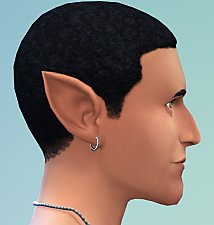
Pointed Ears as CAS Sliders - updated 6/15/2022
by CmarNYC updated 15th Jun 2022 at 3:56pm
Pointed ears added to the CAS ear sliders more...
-
-
-
TS4 MorphMaker - updated to V4.5.2 on 4/19/2023
by CmarNYC updated 19th Apr 2023 at 4:23pm
A tool for making custom CAS sliders and presets more...
647
376.8k
307
-
Enhanced Leg Sliders - V2 6/15/2022
by CmarNYC updated 15th Jun 2022 at 3:31pm
Added morphs for thighs and lower legs more...
-

S4 CAS Tools - updated to V3.8.2.0 on 3/18/2023
by CmarNYC updated 18th Mar 2023 at 8:21pm
A program for the cloning of game CAS parts, working with CAS custom content packages, and converting meshes more...
559
335.4k
510
-
Pregnancy morphs added to six game clothes - updated 8/9/10
by CmarNYC updated 9th Aug 2010 at 12:42pm
Added pregnancy morphs for game clothing. more...
 47
176.3k
292
47
176.3k
292
Female » Mixed Sets » Adult
-
-

-

Male pregnancy morphs - V3, 12/21/2012 - Seasons compatible
by CmarNYC updated 21st Dec 2012 at 4:48pm
Pregnancy clothing for adult and YA sim males. more...
225
338.3k
540
Male » Mixed Sets » Adult

About Me
My policy on use of my work:
Feel free to use any of my meshes, morphs, skins, or whatever as a base. If you change, convert, or enhance my stuff you may post it without asking, but please give credit. If you use them without changes, please post a link to my downloads rather than reposting. However, you may include them with Sims or lots without asking, but with credit.
Please do not post anything using my creative work on any pay site or the Exchange, unless it's in a free section of a pay site. If you want to post your own original creation made using my tools to a pay site or the Exchange, you may do so, but give credit for the tool.
Obviously my tools are for free use by anyone, but I'd appreciate a credit if you post something created with them.
So basically: no pay site, no Exchange, give credit. Other than that, meh.
If at some time I lose interest in Sims 3, or am too busy, or die, anyone who wants to may update/modify/add to any of my work as long as they follow the MTS policy on updating broken or outdated custom content.
I don't take requests. Suggestions for enhancing work I'm doing or have done are welcome, whether or not I act on them, but please no requests for totally unrelated stuff that I probably have no idea how to do.