
 Sign in to Mod The Sims
 Edited Wainscot panels textures
 Edited Wainscot panels textures


IndexPicture2.jpg - width=1200 height=768
Edited panels.jpg - width=1039 height=658
UpdatedPanels.jpg - width=1100 height=1021
Texure and channels.jpg - width=800 height=773
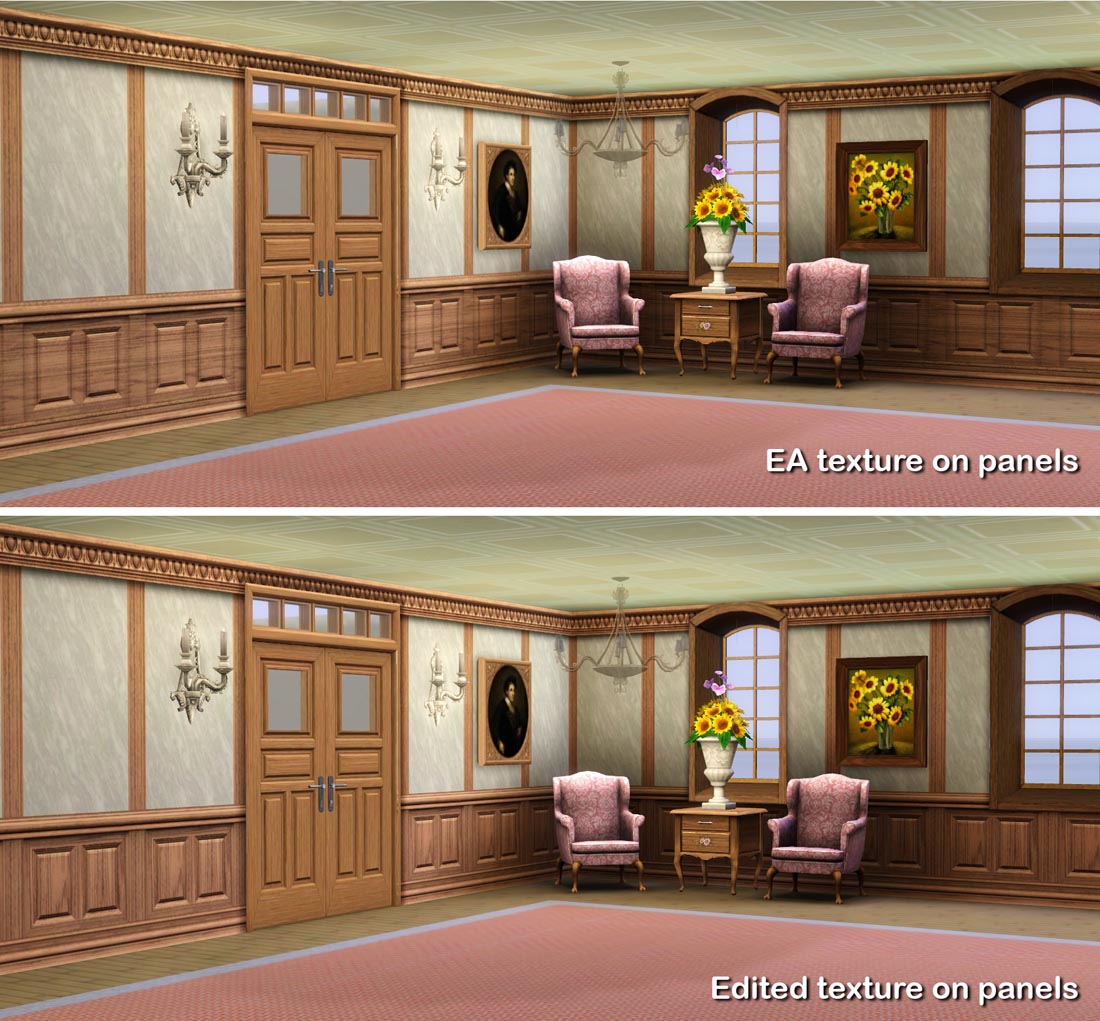
I changed the two panels,
Wall_Wainscot_2 square and Wall_Wainscot_2Square_2Panel.
In the game there are many variants of these but I only have two in my packages. It is therefore intended that you change the panels with CAST and create the ones you like.
Were you find the panels and the costs
After installation you will find of course the panels with the others in the panel directory.
The names and costs are:
Lisen_Wall_Wainscot_2 square $ 10
Lisen_Wall_Wainscot_2Square_2Panel $ 11
Color channels and texturing
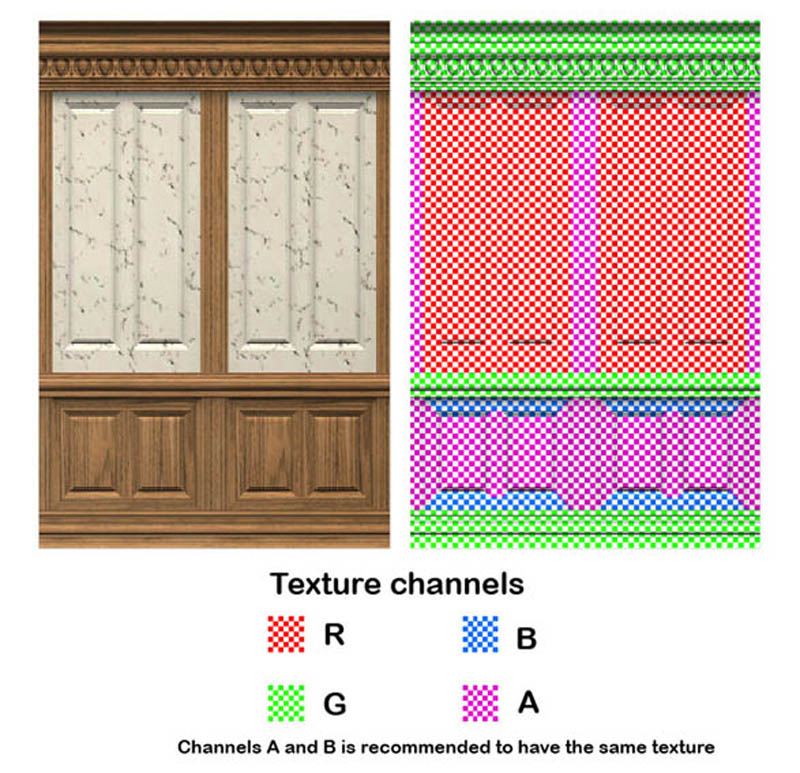
The panels have four channels, se picture. Use the same texture for channels A and B
for the panels to look real.
Additional Credits:
As always I want to thank all the developers of the tools I use and all the helpful people here and there.
|
Lisen_Wall_Wainscot.7z
Download
Uploaded: 5th Jun 2012, 105.2 KB.
4,591 downloads.
|
||||||||
| For a detailed look at individual files, see the Information tab. | ||||||||
Install Instructions
1. Click the download button, or the filename, to download the file to your computer.
2. Extract the zip, rar, or 7z file. Now you will have either a .package or a .sims3pack file.
For Package files:
1. Cut and paste the file into your Documents\Electronic Arts\The Sims 3\Mods\Packages folder. If you do not already have this folder, you should read the full guide to Package files first: Sims 3:Installing Package Fileswiki, so you can make sure your game is fully patched and you have the correct Resource.cfg file.
2. Run the game, and find your content where the creator said it would be (build mode, buy mode, Create-a-Sim, etc.).
For Sims3Pack files:
1. Cut and paste it into your Documents\Electronic Arts\The Sims 3\Downloads folder. If you do not have this folder yet, it is recommended that you open the game and then close it again so that this folder will be automatically created. Then you can place the .sims3pack into your Downloads folder.
2. Load the game's Launcher, and click on the Downloads tab. Find the item in the list and tick the box beside it. Then press the Install button below the list.
3. Wait for the installer to load, and it will install the content to the game. You will get a message letting you know when it's done.
4. Run the game, and find your content where the creator said it would be (build mode, buy mode, Create-a-Sim, etc.).
Extracting from RAR, ZIP, or 7z: You will need a special program for this. For Windows, we recommend 7-Zip and for Mac OSX, we recommend Keka. Both are free and safe to use.
Need more help?
If you need more info, see:
- For package files: Sims 3:Installing Package Fileswiki
- For Sims3pack files: Game Help:Installing TS3 Packswiki
Loading comments, please wait...



Uploaded: 5th Jun 2012 at 4:30 PM
-
by daluved1 updated 13th Jan 2011 at 6:20pm
 27
53.3k
107
27
53.3k
107
-
by armiel 27th Jan 2011 at 5:48pm
15
36k
96
-
by alexpilgrim 20th Jun 2011 at 7:55pm
61
102k
285
-
-
-
by AdonisPluto 17th Feb 2012 at 7:28pm
12
18.2k
36
-
by aisquared 5th Jul 2024 at 5:46pm
11
2.9k
10
-
by Lo2ta updated 25th Dec 2024 at 8:47am
14
2.4k
16
-
by Lo2ta 3rd Nov 2025 at 6:38pm
666
1
-

by Lo2ta 26th Feb 2026 at 6:07pm
1
766
4


-
-
-

-
-
-
-
The Social Child and Adoption Center
by Lisen801 17th Jun 2005 at 7:44pm
Here's the Social Child and adoption Center in my Sim Community ! more...
 20
26.4k
13
20
26.4k
13
-
A Open Stove and some accessories
by Lisen801 15th Sep 2010 at 8:53pm
Another old fashion stove for your Sims more...
30
85.6k
199
-
-


About Me
Credit is nice but not mandatory.