
 Sign in to Mod The Sims
 Peony Heights
 Peony Heights


peonyFront.jpg - width=1024 height=573
Front View
peonyBack.jpg - width=1024 height=573
Back View
peonyThird.jpg - width=1024 height=639
Third Floor
peonyFirst.jpg - width=1024 height=639
First Floor
peonyApt.jpg - width=1024 height=639
Apartment Closeup
peonyInt.jpg - width=1024 height=574
Interior
peonyInt01.jpg - width=1024 height=860
Living and Mailbox/Trash Location

Requires Late Night!!
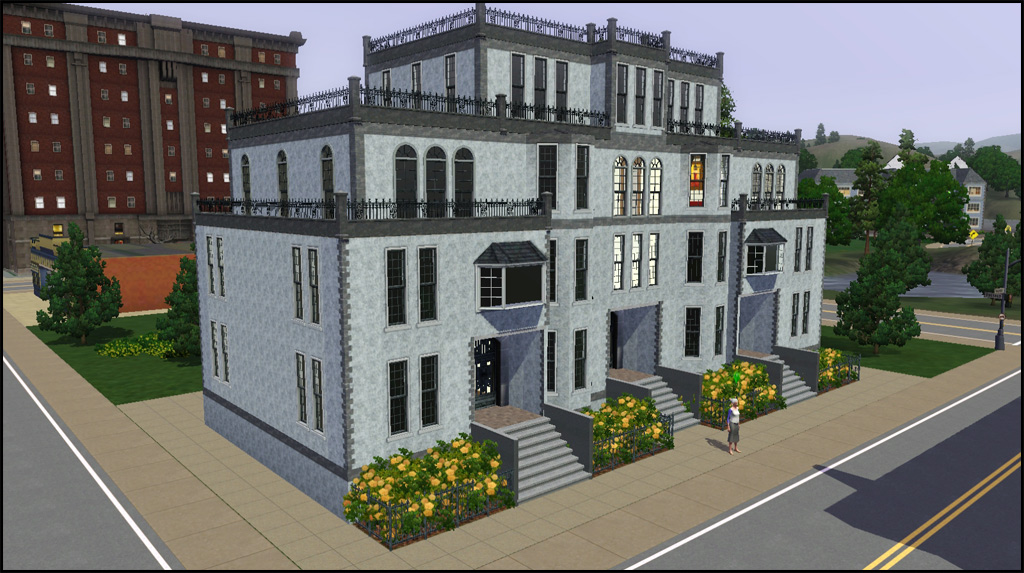
Peony Heights is a four story apartment building. The third floor is where the 2 bedroom, 1 bath apartment is located. The second floor is skipped, but if you want to watch your sim trek up all those flights of stairs then you will want to replace the "level skip" sphere with "public room" sphere. The first floor has the main lobby with wall mailbox and callbox, while the other two first floor lobbies are empty but set to public. The third floor also has one door across the hall for NPC's. There is a single trash chute on the third floor, just down from the apartment door.
This was built prior to Late Night being released so the building is a bit more finished on the inside than an apartment needs to be. I chose to leave all this in case you would like to convert and use this for something other than apartments. There is a door mod here at MTS that you could use to house multiple playable families if you choose. You will just need to remove the markers and add doors.
This lot was built based on a historical building in Michigan (i think) that is currently renovated to be apartments, which is the reason it is gray stone. I lost the reference pic and website after installing my OS, clearly that pic was not in my pictures folder. I blame Qbuilderz. Yea. Pretty sure he linked me to the historical website. So totally his fault I lost the link.

To Edit:
- CTRL+SHIFT+C to bring up cheat console
- testingCheatsEnabled true
- BuyDebug on
- RestrictBuildBuyInBuildings off
For more information on building custom apartment buildings please see Game_Help:Sims_3_Apartmentswiki
Note
The residential trash can is still on the lot. Typically it spawns right at the front of the lot when newly placed in town. Using MoveObects on you can move it where ever, but if you delete in live mode it always returns right back to the front of the lot. So it's better to just stick it out back. I've found lots pre-built in game in Bridgeport that also do this.
Compatibility
This was built with all EP/SPs. If your game is patched you should be able to still install this, but you will get a message stating some objects are missing and will be replaced. If you don't have Late Night I think the mailbox and trash chute will just disappear and the standard mailbox will return.
CC Shown but Not Included
Painting - In the Dawn of Sims
Lot Size: 3x2
Lot Price: §28738
|
HL_PeonyHeights.rar
Download
Uploaded: 3rd Nov 2010, 711.8 KB.
2,670 downloads.
|
||||||||
| For a detailed look at individual files, see the Information tab. | ||||||||
Install Instructions
1. Click the filename or the download button to download the file to your computer.
2. Extract the zip, rar, or 7z file.
2. Select the .sims3pack file you got from extracting.
3. Cut and paste it into your Documents\Electronic Arts\The Sims 3\Downloads folder. If you do not have this folder yet, it is recommended that you open the game and then close it again so that this folder will be automatically created. Then you can place the .sims3pack into your Downloads folder.
5. Load the game's Launcher, and click on the Downloads tab. Select the house icon, find the lot in the list, and tick the box next to it. Then press the Install button below the list.
6. Wait for the installer to load, and it will install the lot to the game. You will get a message letting you know when it's done.
7. Run the game, and find your lot in Edit Town, in the premade lots bin.
Extracting from RAR, ZIP, or 7z: You will need a special program for this. For Windows, we recommend 7-Zip and for Mac OSX, we recommend Keka. Both are free and safe to use.
Need more help?
If you need more info, see Game Help:Installing TS3 Packswiki for a full, detailed step-by-step guide!
Loading comments, please wait...


 + 2 SPs

Uploaded: 3rd Nov 2010 at 7:15 PM
Updated: 8th Nov 2010 at 7:27 PM
-
-

-
-
-
-
-
-
-
by catalina_45 8th Apr 2011 at 3:11am
 +5 packs
4 26.4k 12
+5 packs
4 26.4k 12 High-End Loft Stuff
 Ambitions
 Fast Lane Stuff
 Late Night
 Outdoor Living Stuff
-


-
by HugeLunatic 10th Dec 2010 at 2:31am
This is a very old set of mine, my very first mesh set that I shared. more...
 20
57.5k
119
20
57.5k
119
-
by HugeLunatic updated 5th Jun 2012 at 6:12am
What this mod does This fix will allow you to shift all wall cabinets by EA (EP/SP only) up/down the more...
-
by HugeLunatic updated 16th Apr 2010 at 3:12pm
I really like the modern design of the vRoom! more...
-
"Mail Ho!" from Barnacle Bay Set
by HugeLunatic 1st Apr 2011 at 10:57am
What it does This mod places the Pirate mailbox from the Barnacle Bay store set into the Outdoor/Lawn Ornaments category more...
11
33.3k
46
-
by HugeLunatic 18th Dec 2010 at 10:42pm
Toscana Piccolo Google tells me that translates to Small Tuscan, but I know Google can be quite erratic in it's more...
+3 packs
13 13.8k 27 World Adventures
Ambitions
Late Night
World Adventures
Ambitions
Late Night
-
Maxis "Lost & Found" Plumbob Arch
by HugeLunatic 21st Mar 2011 at 12:16am
A little fun and whimsy for your game! A Plumbob arch! more...
37
72.1k
175
-
by HugeLunatic 31st Oct 2009 at 5:43pm
A small add on set of Medieval furniture to match the UNI set. more...
+1 packs
54 91.1k 133 University
-
Green Dragon Brocade Classic Living
by HugeLunatic 21st Aug 2007 at 12:43am
I absolutely adore Crocobaura's new Classic Living meshes and have been waiting to use this texture for what seems forever. more...
-
Modular Stairs, Fence, Gate & Column Add- Ons
by HugeLunatic updated 7th Jun 2010 at 5:34pm
New Mesh! more...
32
108.3k
216
-
"Ye Olde Window" aka Colonial Windows II
by HugeLunatic 23rd Sep 2009 at 6:18pm
An extension of the first set of Colonial Windows, sorta. more...
59
163.3k
305


Packs Needed
| Expansion Pack | |
|---|---|
| World Adventures |
| Ambitions |
| Late Night |
| Stuff Pack | |
|---|---|
| High-End Loft Stuff |
| Fast Lane Stuff |
About Me
Pet Stories || Dog Agility Items? || Castaway Stories || Holy Simoly Extras
4esf Archive || Holy Simoly Archive || CEP-Extras List || Buyable Game Objects
lunie content from GoS/s2a
 Installation of CEP Extras
-the package with pfiles appended to the name will go into your cep extras folder where your game is installed (typically c drive, you do you)
-the other goes in CEP extra folder in documents.
The following locations are what I am aware of, beyond that you'll have to do some searching.
Downloads Folder:
C:\Users\<user>\Documents\EA Games\The Sims 2 Legacy
C:\Users\<user>\Documents\EA Games\The Sims 2 Ultimate Collection
With multiple launchers, the location for your game install will vary.
C:\Program Files\EA GAMES\The Sims 2 Legacy\TSData\Res\Catalog\zCEP-EXTRA
C:\Program Files\EA GAMES\The Sims 2\TSData\Res\Catalog\zCEP-EXTRA
C:\Program Files (x86)\EA GAMES\The Sims 2\TSData\Res\Catalog\zCEP-EXTRA